Customizing a Web Service
The ARM enables operators to customize a web service.
|
➢
|
To customize a web service: |
|
1.
|
Open the Web Services page (Settings > Call Flow Configurations > Web Services). |
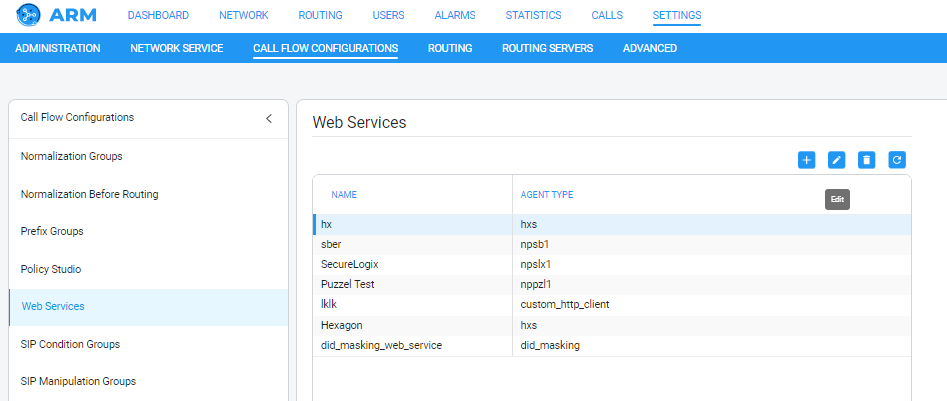
With the help of a SIP Manipulation Group, you can use a ‘custom’ web service and send a GET/POST/PUT/PATCH REST API request.
|
2.
|
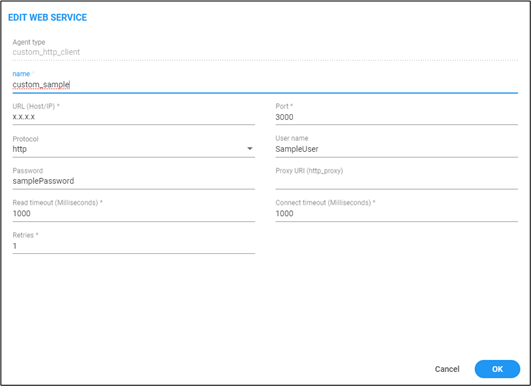
Click + to add a new web service -OR- select an already configured service and then click the 'edit' icon. |
|
3.
|
Use the preceding screen to add | edit a ‘custom’ web service. |
|
4.
|
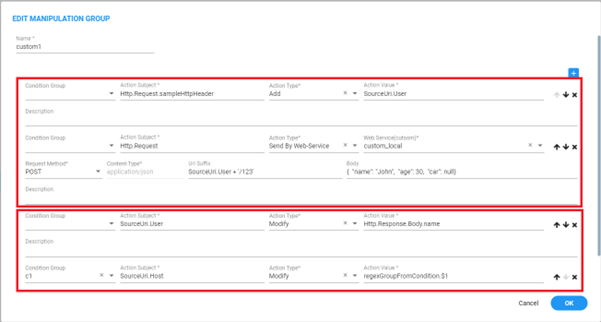
Customize the web service in the ‘SIP Manipulation Groups’ page:
|
|
●
|
The uppermost screen section indicated in the figure below enables operators to prepare the request and its sending. |
|
●
|
The lowermost screen section indicated in the figure below enables operators to use the response.
|
|
5.
|
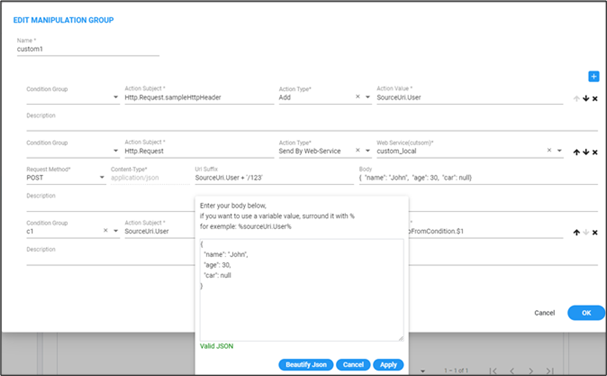
Prepare and send the request: |
|
●
|
In the first rule, an HTTP header is added to the request |
|
✔
|
Its key will be ‘sampleHttpHeader’ |
|
✔
|
It will receive its value from ‘SourceUri.User’ |
|
●
|
In the second rule, a POST request will be sent by ‘custom_local’ web-service. |
|
✔
|
The URL suffix can be built in a similar way to ‘action value’ field. |
|
✔
|
The body of the request is built by writing full and valid JSON. Inside the JSON it is possible to combine values from the system/headers by wrapping them with the '%' character, as shown in the figure. |
|
6.
|
Add rules after the request (in the same Manipulation Group) and in these rules, use the response values, for example: |

|
●
|
[Refer to the preceding figure] In the first rule, in the ‘sourceUri.User’ field, the ‘name’ field will be applied if it exists in the body of the received response (currently, first-level JSON search is supported). |
|
●
|
In the second rule, note that first a condition-group (built separately) is called. Two new related options are available: |
|
✔
|
If inside condition-group regex matched, you can use its groups in the same condition-group or in linked manipulation-group window (in the preceding figure, see ‘regexGroupFromCondition.$1’) |
|
✔
|
If a condition group is linked to a manipulation group like here, the operator is able to use the ‘Http.Response…’ values also in the linked condition-group. |
|
7.
|
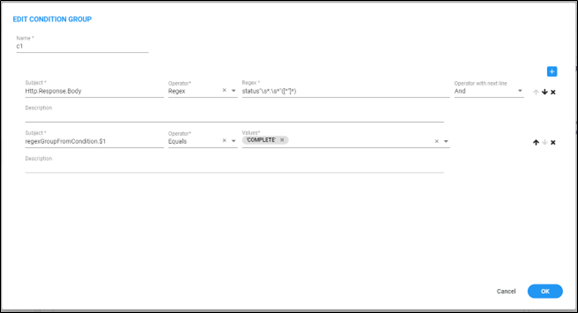
View the linked condition-group as exemplified in the following figure. |
|
●
|
[Refer to the preceding figure] In the first rule, a regex is performed on the body of the HTTP Response (possible if this Condition-Group is called from a Manipulation-Group). |
|
●
|
In the second rule, a test is made on the first group found in the last regex (if found). |