Enable a Phone to be used as an Audio Device
USB host mode is supported, i.e., the phone can be connected to a PC via a USB-A Male – USB-A Male cable, allowing it to be used as the PC’s audio device such as an external speaker. Click to view a video clip demonstrating how to use the phone in Audio Device Mode. The principle is the same across all AudioCodes Teams phone models.
|
1.
|
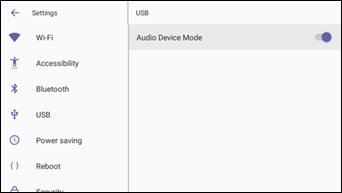
In the phone’s Device Settings > USB, enable Audio Device Mode. |
|
2.
|
Connect the the USB-A - USB-A cable from the phone to the PC.
|
|
●
|
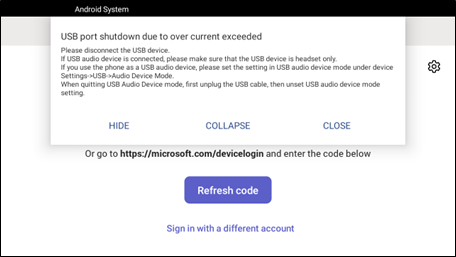
It is important to set the feature up in this order (i.e., first enable USB mode and then connect the USB cable). |
|
●
|
If the cable is connected before enabling the mode, you'll get this message: |
|
3.
|
On a PC running Windows OS, navigate to Settings > Devices > Audio and make sure the phone is set to be the PC’s default audio device.
|
|
4.
|
Play media such as YouTube and Windows Media Player via the phone speaker. |