Manage Phones with the Device Manager
AudioCodes' Device Manager manages Android-based Teams phones in a similar way to UC-type phones. Teams phones' configuration parameters are in the same format as UC phones. A .cfg configuration file is defined for each device. Device Manager version 7.8.2000 and later supports Android-based Teams devices.
Zero Touch Provisioning is supported in a non-tenant aware manner; each local DHCP Option 160 must be configured with a fully-specified URL pointing to dhcpoption160.cfg as shown here:
DHCP Option 160 URL
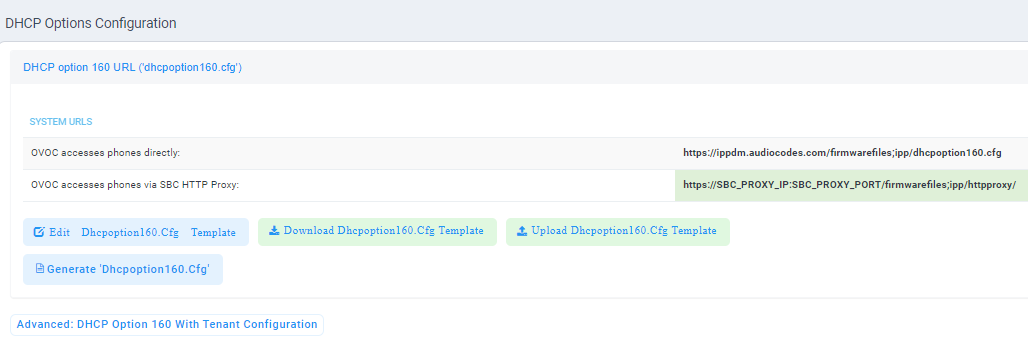
This URL is displayed in the Device Manager page under Setup > DHCP Options Configuration. After devices are added to the Device Manager (which allocates them to the default tenant), they can be re-allocated by selecting Change Tenant in the ‘Actions’ menu. The above URL can also be configured in AudioCodes' Redirect Server. Android-based Teams devices currently support:
|
■
|
Provisioning of configuration |
|
■
|
Provisioning of firmware |
|
■
|
Switching to UC / Teams |
|
■
|
Monitoring (based on periodic Keep-Alive messages sent from devices) |
The Device Manager's ‘internal’ functions (which don't involve devices) are:
|
●
|
To change a device's configuration, see the Device Manager Administrator's Manual. Changing a device's configuration using the Device Manager is the same for Android-based Teams devices as for UC devices. |
|
●
|
To commit a change made at the template/tenant/site/group/user level, perform Generate Configuration. The change can be validated in the device’s .cfg file. The Android-based endpoint pulls the updated configuration when the next periodic provisioning cycle occurs. |