PSTN Gateways
A PSTN gateway (Online PSTN Gateway) in Microsoft Teams Direct Routing is a configuration entity that acts as a pointer to an SBC device. It interfaces Microsoft Teams to a telephone carrier SIP trunk or IP-PBX, allowing external PSTN calling functionality. Key functions include mediating call signaling and enabling voice routing policies.
| ➢ | To add a PSTN gateway: |
| 1. | Click the PSTN Gateways tab and then click Add New PSTN Gateway. |

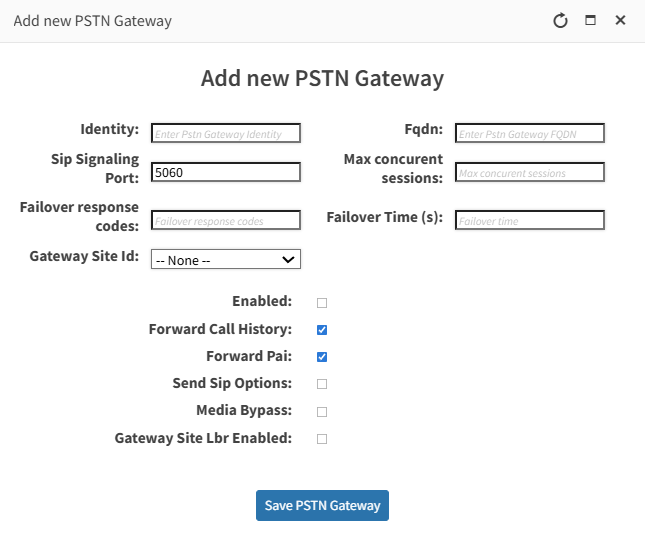
| 2. | Configure parameters according to the table below and then click Save PSTN Gateway. |
|
Parameter |
Description |
||||||
|---|---|---|---|---|---|---|---|
|
Identity |
The name of the entity. |
||||||
|
SIP Signaling Port |
The communication port used for signaling. |
||||||
|
Failover Response Codes |
The response codes used in the event of communication failure. |
||||||
|
Gateway Site Id |
The logical identifier used to group or associate a gateway with a specific SIP Connection. |
||||||
|
FQDN |
The FQDN of the SBC device used for call routing. |
||||||
|
Max Concurrent Sessions |
The maximum number of concurrent call sessions available for the SBC device configured as the Online PSTN gateway. |
||||||
|
Failover Time |
Defines the time (seconds) that the Direct Routing service waits before routing calls to an alternate SBC when the primary SBC becomes unavailable. |
||||||
|
Enabled |
|
||||||
|
Forward Call History |
Determines whether Microsoft Teams includes call history information when forwarding calls from Teams to the SBC. |
||||||
|
Forward PAI |
Determines whether Microsoft Teams includes a P‑Asserted‑Identity (PAI) header when forwarding calls to the SBC (your PSTN gateway). |
||||||
|
Send SIP Options |
Determines whether the SBC sends SIP OPTIONS messages to Microsoft Teams for keep‑alive and health‑checking purposes. |
||||||
|
Media Bypass |
Determines whether media (RTP audio) flows directly between the Teams client and the SBC, instead of being proxied through Microsoft’s cloud media relays. |
||||||
|
Gateway Site Lbr Enabled |
Determines whether Location‑Based Routing (LBR) is enforced at the network site level for calls passing through that specific gateway. |
An example of a configured PSTN gateway is shown in the figure below.
