Upgrade a DM License to AI Summary
If your Provider or Reseller updates an existing Live Platform Device Manager service license to include AI Summary (i.e., from Essential to Essential + AI Summary (or from Pro to Pro + AI Summary), you will receive an email containing a secured link to the Terms and Conditions of the agreement for activating AI Summary.
You can upgrade an existing Live Platform Device Manager service license from Essential to Essential + AI Summary (or from Pro to Pro + AI Summary) to support the AI Summary feature. This process requires the customer to approve the Terms and Conditions in order to activate the AI Summary feature for the Trial period. A secure link to this agreement is sent to the customer tenant admin email account.
For Device Manager, there is currently no difference between Essential and Pro licensing.
|
➢
|
To accept the Terms and Conditions: |
|
1.
|
From the Device Manager drop-down, choose Edit Service. |
|
2.
|
From the License Type drop-down, choose Essential + AI Summary or Pro + AI Summary. |
|
3.
|
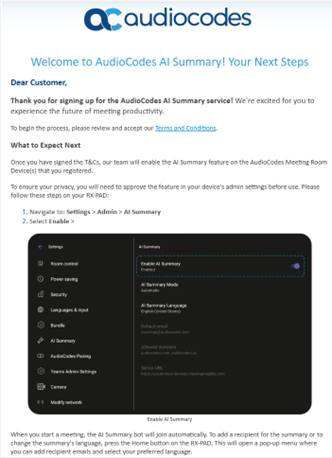
You receive a Welcome email , which contains a link to review and accept the Terms and Conditions. |
|
4.
|
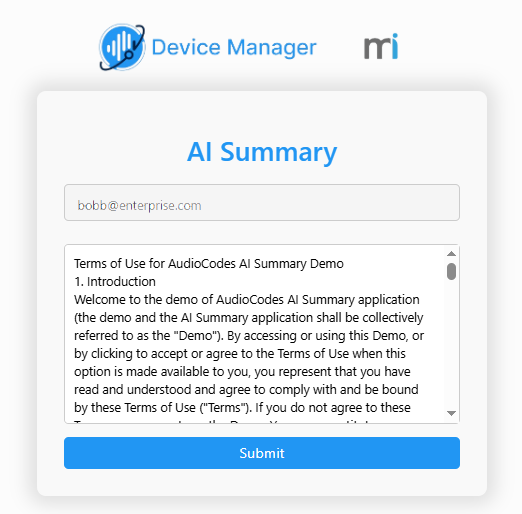
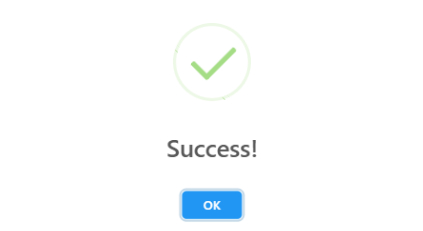
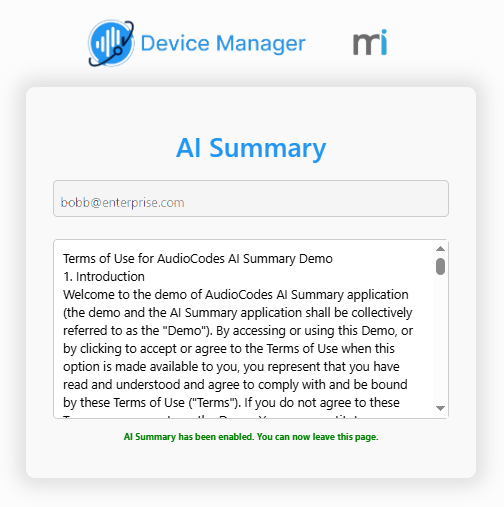
Click Terms and Conditions. The agreement for the Trial version is displayed. Read the content and then click Submit. |
|
5.
|
Close the above confirmation dialogs. |
|
6.
|
The license upgrade does not remove any devices previously added to the service (although you will need to set them up for AI Summary – (refer to the AI Summary Configuration Guide). Optionally add additional devices (see the relevant steps in Onboarding using Redirect Server with 'Essential + AI Summary' or 'Pro + AI Summary' License). |