Configure UCaaS service for SIPREC
To enable Interaction Insights to record calls from the customer’s devices, assign a UCaaS service to the tenant and configure the relevant phone numbers that should be recorded. Refer to the table below for configuration of UCaaS services in this procedure.
|
Service |
Onboard Service |
Add SIP Connection |
Upload Numbers |
Configure Numbers for SIPREC |
|---|---|---|---|---|
|
WebEx Cloud Connect |
||||
|
Zoom Provider Exchange |
Upload Zoom Provider Exchange numbers directly from Live Platform |
|||
|
Live UC |
||||
|
Live CX |
The example in this procedure describes the setup for the Live CX service.
| ➢ | To configure UCaaS service for SIPREC: |
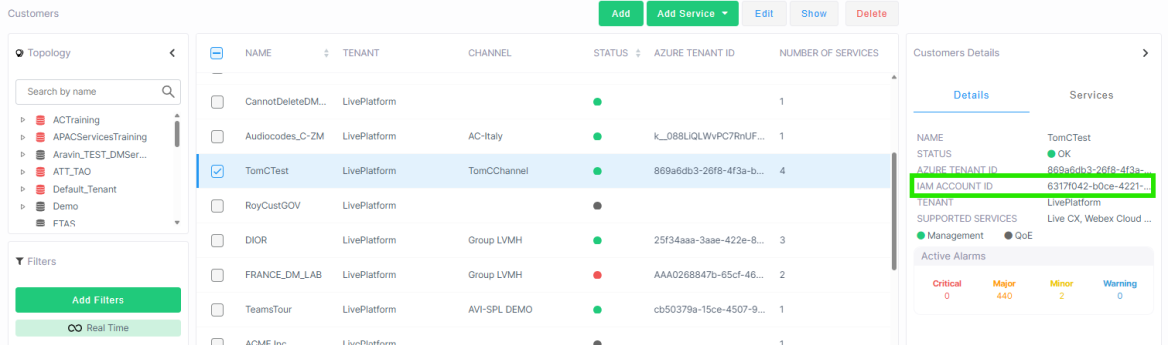
| 1. | Retrieve the customer's IAM Account ID: Navigate to Topology > Customers and select the customer from the list. Copy the value in the IAM Account ID field, which can be found in the Customer Details panel. |
| 2. | If not already done, add an Interaction Insights service tenant to the customer (see Onboard Interaction Insights Services). |
| 3. | Onboard the relevant UCaaS service (refer to the table above). |
| 4. | Add the relevant SIP Connection for the service (refer to the table above). |
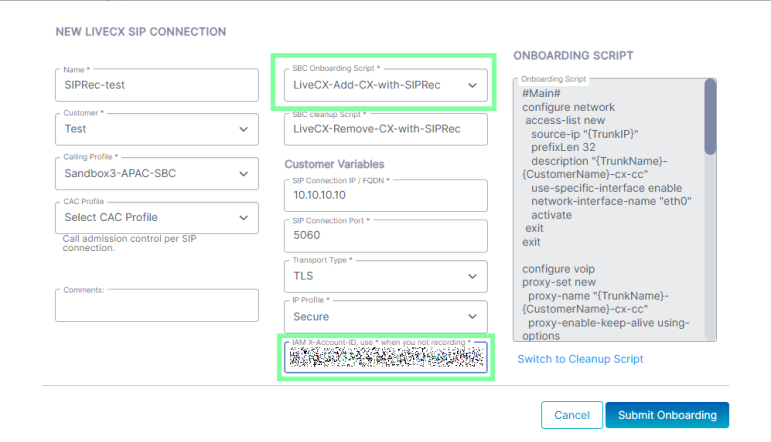
| 5. | For 'SBC Onboarding Script', select the supported script with SIPREC functionality. For example LiveCX-Add-CX-with-SIPRec. |
| 6. | Enter the customer's IAM Account ID that you extracted above. |
| 7. | Add a pairing SIP connection to the customer's PSTN (see table above). |
| 8. | Upload all numbers that should be recorded (see table above). |
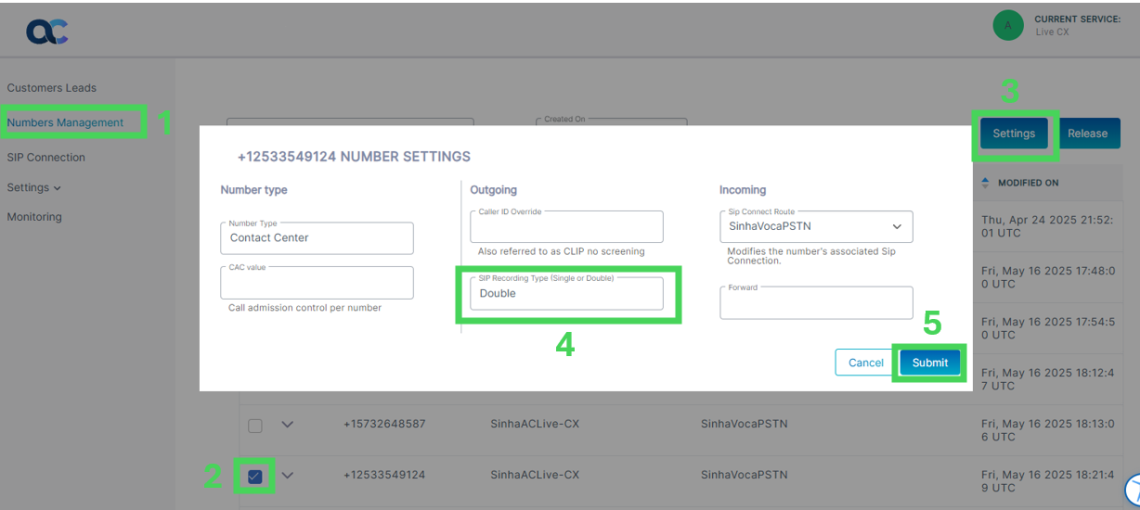
| 9. | Open the Number Settings page for each number to record (see table above): |
| a. | Select the number and click Settings. |
| b. | In the 'SIP Recording Type' field, type: |
| ❖ | Single: If the service was deployed with Interaction Insights Essential license which supports single recording. |
| ❖ | Double: If the service was deployed with Interaction Insights Pro license which supports double recording for redundancy. |
| a. | Click Submit. |
Important: For these numbers to be recorded, the customer operator must add them as devices in the Interaction Insights Service portal.