Managing SBC Devices
The Known SBCs page displays a list of all SBC devices that are connected to Live Platform.
| ➢ | To display list of managed SBC devices: |
| 1. | In the Multitenant portal Navigation pane, select Configuration > SBC. |
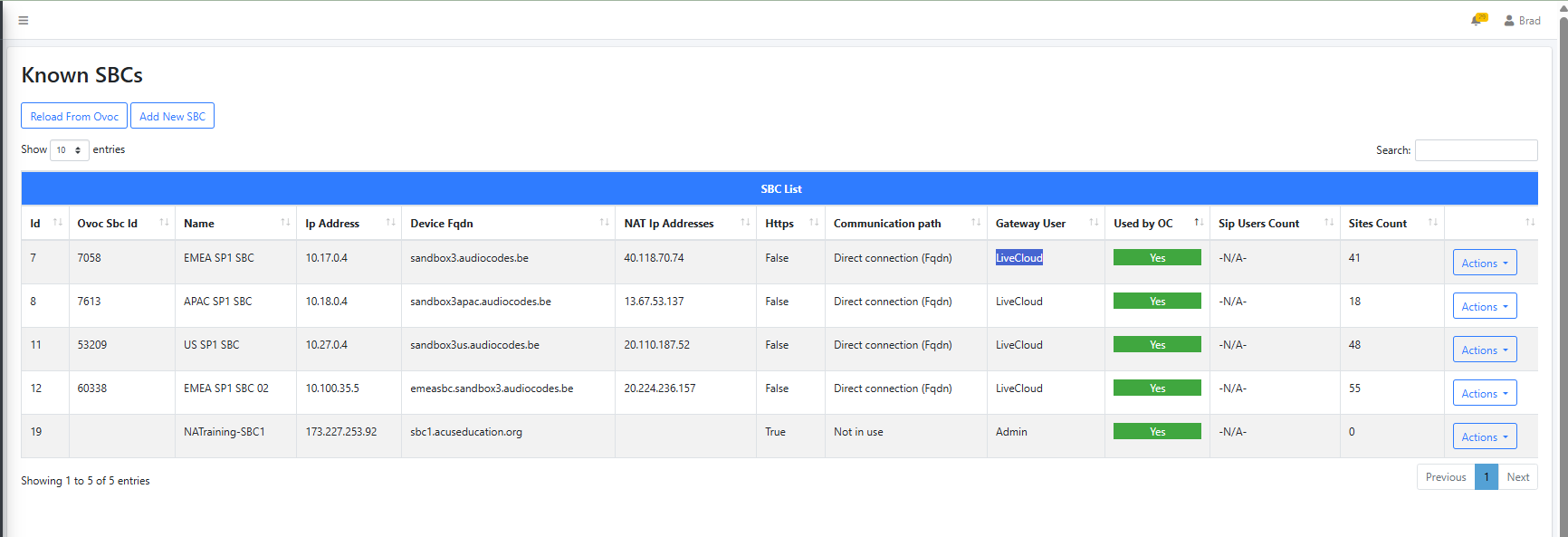
The table below describes the parameters in this page.
|
Parameter |
Description |
|---|---|
|
Id |
Id of an SBC device that is added directly on the UMP-365. |
|
OVOC Sbc Id |
Id of an SBC device that is added in the Live Platform Operation Center portal and synchronized with UMP-365 through a SIP Connection that is associated with this device. |
|
Name |
Known FQDN of the SBC device/NAT IP address. |
|
NAT IP Address |
NAT IP address of the SBC device. |
|
Device FQDN |
Known FQDN of the SBC device. |
|
HTTPS |
Indicates whether the device connects to Live Platform over an HTTPS connection. |
|
Communication path |
SBC Communication path (see Configure SBC Communication Mode). |
|
Gateway User |
The name of the Security administrator user account configured on the SBC that is used to connect to |
|
Used by OC |
Indicates Yes when the SBC device is attached to a Calling Profile that is attached to an Operator Connect service managed through this Live Platform instance. |
|
Status |
The status of the connection between |
|
SIP Users Count |
The number of Registered SIP users managed under Site Locations (see below). |
|
Sites Count |
The number of site locations including both Tenant-based and IP Group-based SIP Connections that are configured on the SBC device. |
|
Actions |
|
|
Reload from OVOC |
Updates the list of SBC devices that are connected to Live Platform Operation Center Live Platform |
|
Add SBC Devices |
Add new SBC devices directly on UMP-365 (Add SBC Devices). |
|
Check connections |
Checks the connection between
|
|
Show SIP Connections |
Displays a list of configured SIP connections that are connected to specific SBC devices (see Show SIP Connections). |
|
Edit |
Configure the communication method used to connect the SBC device to UMP-365 (see Configure SBC Communication Mode). |
|
Delete |
Delete a SIP connection. You are prompted to confirm.
|
|
Import |
Import a dial plan from an SBC device (Import Dial Plan from SBC Device (Import Customer Service). |
|
Show Prefixes |
Display a list of configured number prefixes in the dial plans loaded to the managed SBC devices (Show Prefixes). |