Update SIP Connection
You can update an existing SIP Connection.
| ➢ | To update a SIP connection: |
| 1. | Select the SIP connection that you wish to edit, open the right-click ... menu and then choose Update. |
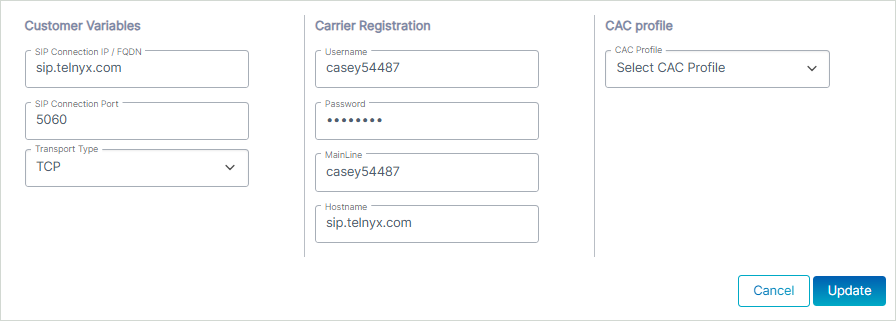
| 2. | Edit SIP Connection according to the table below and then click Update. |
|
Parameter |
Description |
|||||||||
|---|---|---|---|---|---|---|---|---|---|---|
| Customer Variables | ||||||||||
|
SIP Connection IP /FQDN |
IP address or FQDN of the SBC device where the connection (IP Group) is configured. |
|||||||||
|
SIP Connection port |
Port of the SBC device where the connection (IP Group) is configured. |
|||||||||
|
Transport type |
One of the following values:
|
|||||||||
|
IP Profile |
One of the following values:
|
|||||||||
|
SIP Group Name |
The host name of the device which is used to overwrite the original host part of the URI in certain SIP headers for the purpose of Topology hiding in the SIP messages. |
|||||||||
|
Switch to Onboarding or Cleanup Script |
Toggles between the Onboarding and Cleanup scripts. |
|||||||||
|
Carrier Registration |
||||||||||
|
Select this option to perform SIP Account Registration for the Carrier trunk: This option is only relevant if you are connecting your Carrier to a SIP Trunk (when SBC Onboarding script configures SIP Trunk or BYOC). The selected carrier binds to the configured SIP Interface, Proxy Set and IP Profile on the SBC device (where the same name is configured for all three entities on the SBC device). |
||||||||||
|
Username |
Defines the digest MD5 Authentication username. The valid value is a string of up to 60 characters. By default, no value is defined. |
|||||||||
|
Password |
Defines the digest MD5 Authentication password. The valid value is a string of up to 50 characters. The password cannot be configured with wide characters. |
|||||||||
|
MainLine (Contact User) |
Defines the AOR username. This appears in REGISTER From/To headers as ContactUser@HostName |
|||||||||
|
Host Name |
Defines the Address of Record (AOR) host name. The host name appears in SIP REGISTER From/To headers as ContactUser@HostName. |
|||||||||
| CAC profile | ||||||||||
|
Configure the relevant CAC Profile value according to the required number of sessions. |
||||||||||