
MCP tools
A tool of type MCP connects the agent to a Model Context Protocol (MCP) server. Instead of defining a single request, the agent discovers the tools the server advertises at the beginning of the conversation and then uses them during the conversation — following explicit instructions in the prompt, or by deducing each tool's purpose from the name and description provided by the server.
Because the tool names and descriptions come from the MCP server, the tool's own Description field is less important for MCP tools than it is for REST tools.
Configuration
MCP tools are created the same way as other tools (see Create a customer-defined tool). On the General tab, set Type to MCP and configure:
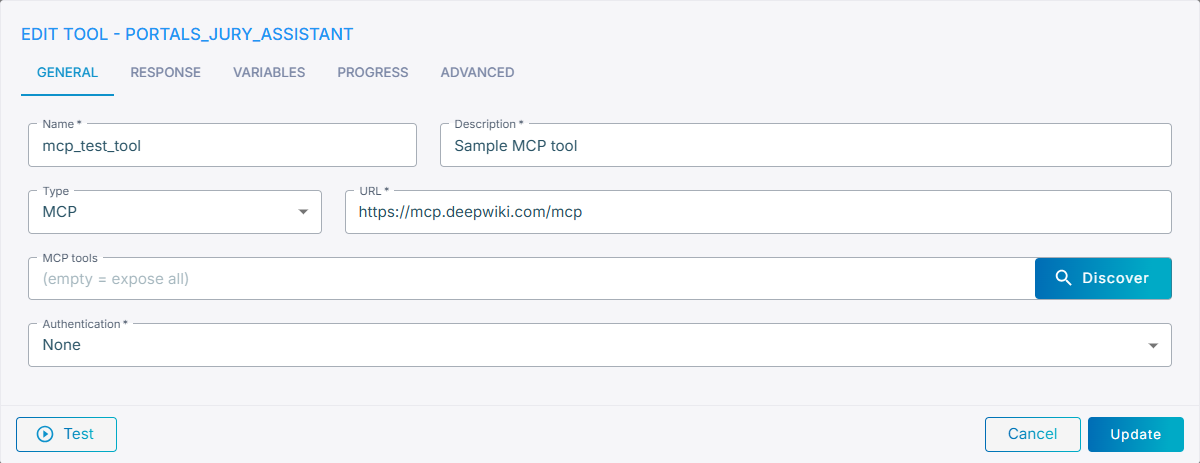
- URL – the URL of the MCP server. To connect to servers that use the legacy SSE transport protocol, make sure the URL ends with
/sse. - MCP tools – an optional allow-list, see Limiting the exposed tools.
- Authentication – the same authentication methods as REST tools (
None,Basic,Bearer,OAuth2).
Limiting the exposed tools
By default, all tools advertised by the MCP server are exposed to the agent. To expose only a subset, list the allowed tool names, comma-separated, in the MCP tools field. Leave the field empty to expose everything.
Rather than typing the names by hand, click Discover to connect to the server and pick the tools from a list:
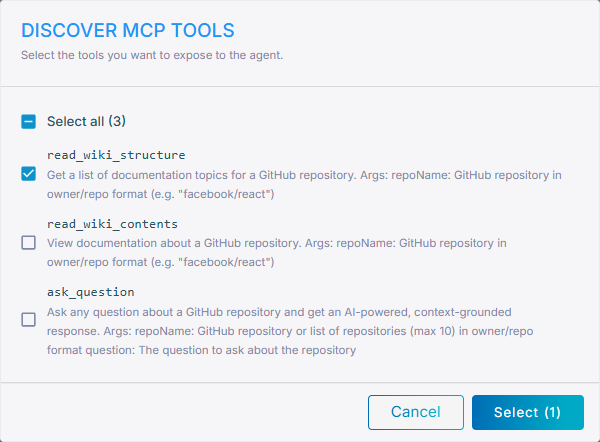
Select Select all, or check individual tools, then click Select to write the chosen names back into the MCP tools field.
Testing
Click Test at the bottom of the editor to try the server without saving. For MCP tools, first pick the tool to test from the discovered list, then provide its parameters and click Run. See Testing a tool.