
Webhooks configuration
Webhooks are HTTP/HTTPS callbacks that an agent or flow triggers on specific events during a conversation, sending conversation data to an external service. A webhook can also return data that modifies the conversation – for example, set variables, override a response, or call a pre-defined tool (see Webhook responses).
Webhooks are configured in the Webhooks tab of the Agent's or Flow's configuration screen.
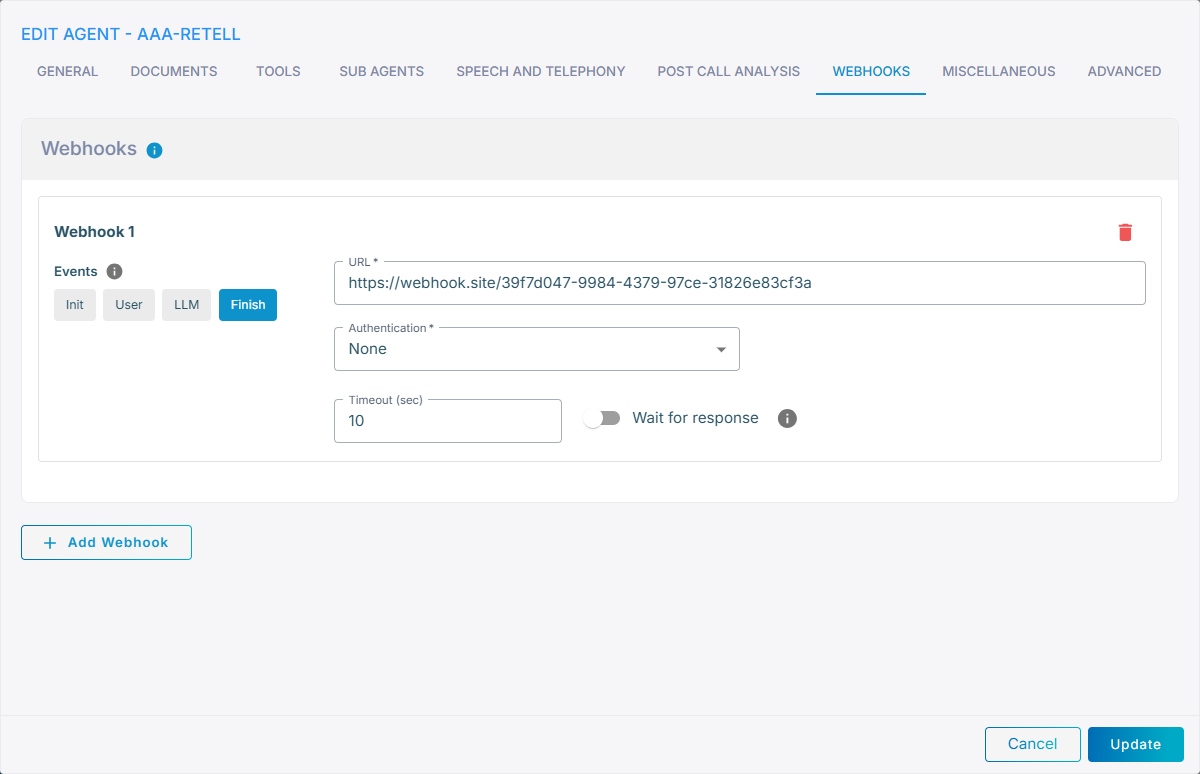
Click Add Webhook to add a webhook, then configure the following settings:
| Setting | Description |
|---|---|
| Events | One or more events that trigger the webhook – Init, User, LLM and Finish (see Event types below). Click an event to toggle it on or off. |
| URL | Webhook URL, which must start with http:// or https://. You can use agent variables or conversation data in the address. |
| Authentication | Authentication type for the webhook: • None – no authentication• Bearer – Bearer token authentication. When selected, an additional Token field is displayed for entering the bearer token. |
| Timeout (sec) | Timeout, in seconds, for the webhook call. Default: 10. |
| Wait for response | Wait for, and consume, the webhook response (see Webhook responses below). By default webhooks are sent asynchronously and don't introduce any delay in the conversation flow. |
| Enable logs | Record the webhook activity in the conversation history for troubleshooting (see Webhook logs below). Can be enabled independently of Wait for response. |
To configure additional webhooks, click Add Webhook again. To remove a webhook, click the delete (trash) icon next to it. Click Update to save your changes.
Event types
Webhooks can be triggered by the following events:
init- triggered when the agent is initializeduser- triggered on every user utterancellm- triggered on every LLM responsefinish- triggered when the agent completes execution
Webhook request
Webhook request contains the following data:
| Event | Parameter | Type | Description |
|---|---|---|---|
| any | account_id
|
str | Account ID |
| any | conversation_id
|
str | Unique conversation ID |
| any | agent
|
str | Agent name (Agent webhooks) |
| any | flow
|
str | Flow name (Flow webhooks – sent instead of agent) |
| any | event
|
str | Event name |
| any | conversation_data
|
dict | Conversation data |
| any | variables
|
dict | Current flow variables (Flow webhooks only) |
| user, llm | content
|
str | User utterance or LLM response |
| finish | start_time
|
str | Conversation start time (ISO 8601) |
| finish | end_time
|
str | Conversation end time (ISO 8601) |
| finish | duration
|
int | Conversation duration in seconds |
| finish | termination_reason
|
str | Why the conversation ended (see Termination reason) |
| finish | transcript
|
str | Complete conversation transcript |
| finish | history
|
list[HistoryModel] | Structured conversation history (see HistoryModel) |
| finish | token_usage
|
list[dict] | Per-LLM token usage statistics (included when available) |
| finish | embedding_tokens
|
int | Number of embedding tokens (included when available) |
Note: Flow webhooks differ slightly from Agent webhooks – the agent field is replaced by flow (the flow name), and a variables field carrying the current flow variables is included on every event.
For example:
{
    "account_id": "b2f48de4-f5e2-3a4d-7fcf-2594a1691d76",
    "conversation_id": "19254074-459e-4cb9-9c39-7c3f23cfac31",
    "agent": "appointment-reminder",
    "event": "finish",
    "conversation_data": {
        "callee": "+14081112222",
        "caller": "+14081113333",
        "type": "call"
    },
    "start_time": "2025-09-11T11:06:37.376Z",
    "end_time": "2025-09-11T11:07:11.721Z",
    "duration": 34,
    "termination_reason": "agent",
    "transcript": "LLM   : Hello, this is Dana from \"Tooth or Dare\" dental clinic. May I speak with Jonathan, please?\nUSER  : Yeah, I'm speaking.\nLLM   : Great!...",
    "history": [
        {
            "time": "2025-09-11T11:06:37.376Z",
            "task_name": "appointment-reminder",
            "from_name": "appointment-reminder",
            "to_name": "user",
            "message": "Hello, this is Dana from \"Tooth or Dare\" dental clinic. May I speak with Jonathan, please?",
            "label": "LLM"
        }
    ],
    "token_usage": [
        {
            "agentName": "appointment-reminder",
            "llmModel": "gpt-4o",
            "inputTokens": 1382,
            "cachedTokens": 0,
            "outputTokens": 94
        }
    ]
}
HistoryModel
| Parameter | Type | Description |
|---|---|---|
| time | str | Time of the event in ISO8601 format |
| task_name | str | Name of the agent that generated the event |
| from_name | str | Name of the entity that generated the event |
| to_name | str | Name of the entity that the event is sent to |
| message | str | Event message text |
| label | str | Label for the UI summarizing event type and routing |
Termination reason
termination_reason says how the conversation came to an end:
| Value | Meaning |
|---|---|
agent
|
The agent or flow ended the call itself |
user
|
The person on the other end hung up, or their chat client disconnected |
transfer
|
The call was handed to a transfer target |
transfer_failed
|
The transfer target could not be reached, so the call was dropped |
supervisor
|
The call was ended or transferred from the Live conversations screen |
max_turns
|
The conversation reached its configured turn limit |
expired
|
Nothing happened for the length of the session timeout |
error
|
The agent stopped on an error, or a turn never came back |
stopped
|
The agent or flow ran out without ending the call, so the platform ended it |
The same field is stored with the conversation and returned by
GET /conversations, where
you can also filter and sort on it.
Webhooks are by default sent asynchronously and don't introduce any delay in normal conversation flow. If you want to consume the webhook response (see below), enable the Wait for response toggle in the webhook configuration.
Webhook logs
Enable the Enable logs toggle to record the webhook activity in the conversation history (visible in the chat log and call-log transcript) for troubleshooting. When enabled, each webhook call produces the following log entries:
agent -> webhook(orflow -> webhook) – recorded when the webhook is sent; the message is{"event": "<name>"}identifying the event that triggered it (the request body is not logged).webhook -> agent(orwebhook -> flow) – recorded when the response is received; the message is the response payload. This entry is only added when Wait for response is enabled.
Enable logs can be turned on independently of Wait for response. When Wait for response is off, only the outgoing -> webhook entry is logged (there is no consumed response to record).
Webhook responses
Webhooks with the Wait for response toggle enabled may return the following data:
| Event | Parameter | Type | Description |
|---|---|---|---|
| any | variables
|
dict[str, str] | Dictionary of variables that are added / merged to the current agent's (or flow's) variables. |
| any | config
|
dict[str, str] | Dictionary of advanced configuration parameters that are added / merged to the current agent or flow. |
| init | agent
|
str | Name of the agent that starts the conversation. |
| init | documents
|
list[str] | Names of documents that the agent has access to. May be used to limit access to specific documents based, for example, on the callee number. |
| user, llm | content
|
str | Modified user utterance / LLM response. |
| user | response
|
str | Response to the user utterance, instead of using LLM to generate it. |
| init, user | tool
|
dict[ToolModel] | Calls one of the following pre-defined tools: • pass_question• send_message• end_call• transfer_call |
| init | welcome
|
str | Welcome message |
| init | welcome_dynamic
|
str | Initial user utterance for dynamic welcome message |
ToolModel
| Parameter | Type | Description |
|---|---|---|
name
|
str | Tool name |
data
|
dict[str, Any] | Tool parameters |
Response examples
set variables:
  {"variables": {"sex": "male", "age": 18}}

modify user utterance:
  {"content": "What is the weather in London, UK?"}

respond to user:
  {"response": "I'm not familiar with city Looondn. Please specify a different one."}

call pre-defined tools:
  {
    "tool": {
      "name": "pass_question",
      "data": {"agent": "hogwarts-finance"}
    }
  }
  {
    "tool": {
      "name": "send_message",
      "data": {
        "agent": "doctor-cancel",
        "message": "Cancel appointment for John"
      }
    }
  }
  {
    "tool": {
      "name": "end_call",
      "data": {
        "termination_message": "Have a nice day!"
      }
    }
  }
  {
    "tool": {
      "name": "transfer_call",
      "data": {
        "phone": "+12024561111",
        "transfer_message": "Let me transfer you to human agent"
      }
    }
  }