
HTTP mode
HTTP mode is the request-response form of the Bot API. Live Hub posts what the caller said to your service and reads the bot's reply from the response. For the bi-directional form, see WebSocket mode.
This mode carries text only, never audio: Live Hub performs the speech-to-text and text-to-speech itself, so your service works only with text.
AudioCodes maintains a channel for the RASA bot framework that implements this API. For a working reference implementation, go to rasa-audiocodes on GitHub.
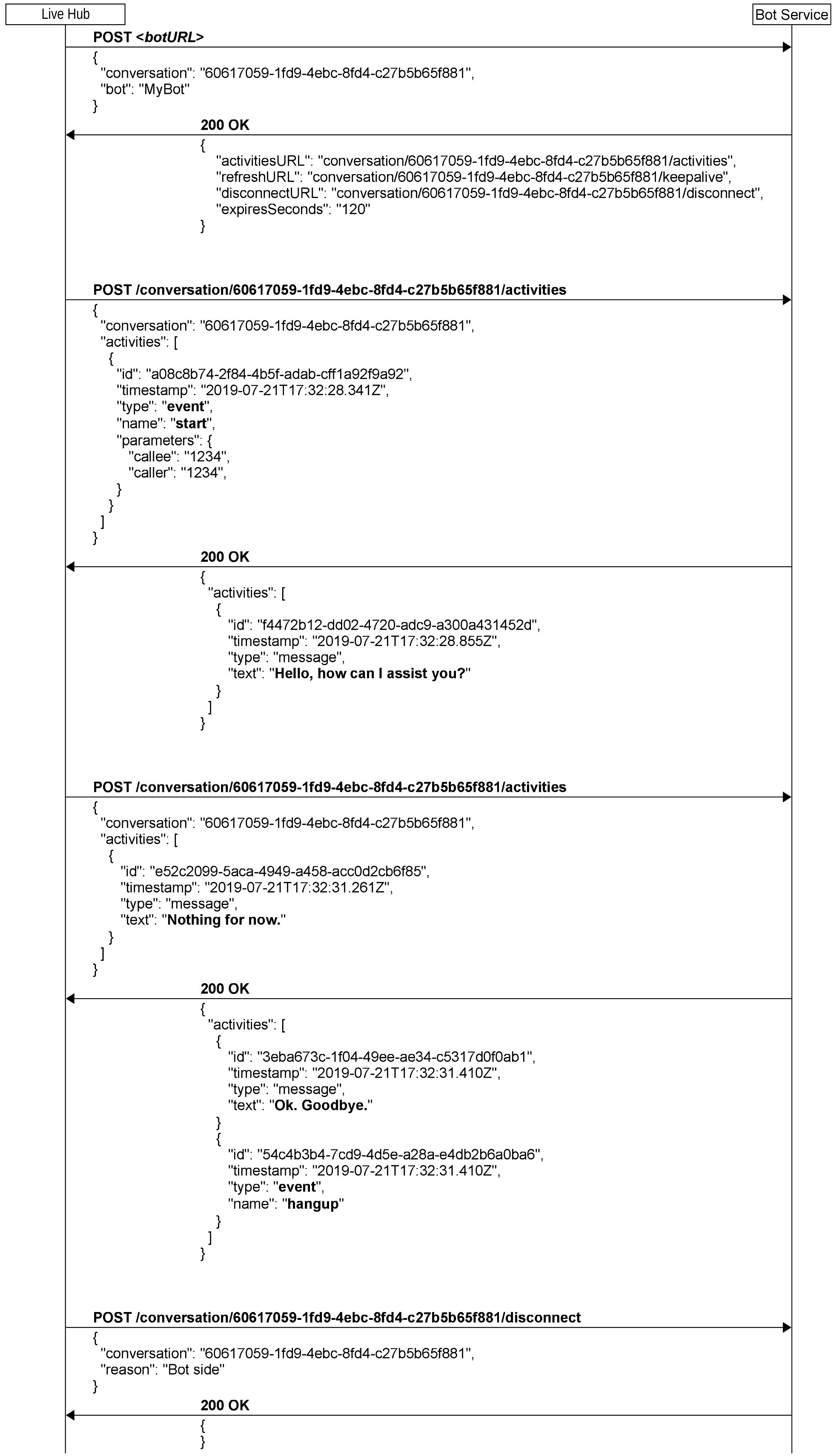
How a conversation runs
You are the server and Live Hub is the client, so every request travels from Live Hub to your service. A conversation proceeds in four stages:
- Live Hub creates a conversation by posting to the URL configured on the bot connection.
- Your service replies with the URLs Live Hub should use for the rest of the conversation.
- For as long as the call lasts, Live Hub posts the caller's messages to the activities URL, and reads the bot's replies from each response.
- Live Hub ends the conversation.
Rules for every request
These rules apply to every request in HTTP mode:
- Live Hub always uses
POST, except for the connectivity check. - Requests and responses carry a JSON body and a
Content-Type: application/jsonheader. - JSON bodies are UTF-8.
- Any response other than
200is a failure and disconnects the conversation. A failure response can carry a JSON body with areasonattribute. - Every request times out after 20 seconds. If no response arrives, the conversation is disconnected.
- Live Hub reuses connections with HTTP keep-alive. Set your keep-alive to at least 30 seconds.
- Live Hub retries after a connection error. Because both sides ignore duplicate activity IDs, a retry does not cause an activity to be handled twice.
- Set
sendRequestIdHeaderto have Live Hub put the unique message ID of each request into an HTTP header of that name.
Configuration
On the bot connection, set 'Bot connection API type' to HTTP mode and enter your
service's address in the 'Bot URL' field, the botURL parameter. For a RASA bot, that
address usually takes the form http://{host}/webhooks/audiocodes/webhook.
Live Hub uses botURL for two requests: a GET to
check connectivity, and a POST to
create a conversation.
Select an 'Authentication method' on the same screen: a permanent token or OAuth 2.0. See Security and authentication, and AudioCodes Bot API for the screen itself.
If several bots share one botURL, set providerBotName per bot connection. Live Hub
sends its value when it creates the conversation, so that your service can identify which
bot the call is for.
Create a conversation
Live Hub posts to botURL, passing the conversation's unique ID.
Reply with the set of URLs Live Hub should use for this conversation. Make them unique
per conversation by including a UUID in the path: either the conversation value you
were given, or one you generate. A relative URL is resolved against botURL as the
base, following section 4 of RFC 1808.
Once the conversation exists, Live Hub sends a start event activity.
Request
| Parameter | Type | Description |
|---|---|---|
conversation
|
string | Live Hub's conversation ID. |
bot
|
string | Optional. The value of providerBotName, when one is configured. |
capabilities
|
array | What Live Hub can accept. websocket means it can receive activities over a WebSocket. |
{
  "conversation": "ad8f59d2-4a72-4f19-ad34-e7e9b1636111",
  "capabilities": [
    "websocket"
  ]
}
Response
| Parameter | Type | Description |
|---|---|---|
activitiesURL
|
string | Required. Where Live Hub sends activities. Relative or absolute. |
refreshURL
|
string | Required. Where Live Hub sends conversation refreshes. Relative or absolute. |
disconnectURL
|
string | Required. Where Live Hub reports the end of the conversation. Relative or absolute. |
expiresSeconds
|
number | Required. How long the conversation survives without a refresh, from 60 to 3600. Use 120 unless you have a specific reason to choose another value. See Refresh a conversation. |
websocketURL
|
string | Optional. Set it to accept a WebSocket for proactive activities. Relative or absolute. See Send activities over a WebSocket. |
{
  "activitiesURL": "conversation/ad8f59d2-4a72-4f19-ad34-e7e9b1636111/activities",
  "refreshURL": "conversation/ad8f59d2-4a72-4f19-ad34-e7e9b1636111/refresh",
  "disconnectURL": "conversation/ad8f59d2-4a72-4f19-ad34-e7e9b1636111/disconnect",
  "expiresSeconds": 120
}
Send and receive activities
Activities are the messages the two sides exchange. Live Hub posts them to
activitiesURL as an activities array, and reads the bot's replies from an activities
array in the response. If the bot has nothing to say, omit the attribute or send an empty
array.
Respond 404 Not Found if the conversation does not exist.
Every activity, in either direction, also carries:
id— a UUID (RFC 4122 v4) generated per activity by whichever side sends it. Keep the set of IDs you have already seen in this conversation and ignore repeats. That is what makes a retry safe.timestamp— when the activity was created, RFC 3339 UTC with three decimal digits of milliseconds,2019-04-23T18:25:43.511Z. It records creation time, so do not change it when resending. It exists for logging and debugging.language— added by Live Hub on the activities it sends. Live Hub ignores it on activities from the bot.
Request
| Parameter | Type | Description |
|---|---|---|
conversation
|
string | Live Hub's conversation ID. |
activities
|
array | The activities being sent. |
The start event opens every conversation:
{
  "conversation": "ad8f59d2-4a72-4f19-ad34-e7e9b1636111",
  "activities": [
    {
      "id": "ecf2d78d-ef7b-4a5e-907c-53c97cef5f97",
      "timestamp": "2020-01-26T13:03:48.745Z",
      "language": "en-US",
      "type": "event",
      "name": "start",
      "parameters": {
        "callee": "1234",
        "calleeHost": "10.20.30.40",
        "caller": "+123456789",
        "callerHost": "10.20.30.40"
      }
    }
  ]
}
What the caller says arrives as a message activity. Alongside the recognized text,
Live Hub passes the speech-to-text engine's own output, including the alternatives it
considered:
{
  "conversation": "55b77909-82d8-4355-87f1-68081f4dbb36",
  "activities": [
    {
      "id": "bc44c054-846d-490d-85e9-d3aea96b4f0f",
      "timestamp": "2019-08-20T14:09:12.251Z",
      "language": "en-US",
      "type": "message",
      "text": "Hi.",
      "parameters": {
        "confidence": 0.6599681377410889,
        "recognitionOutput": {
          "RecognitionStatus": "Success",
          "Offset": 32300000,
          "Duration": 5800000,
          "NBest": [
            {
              "Confidence": 0.6599681377410889,
              "Lexical": "hi",
              "ITN": "Hi",
              "MaskedITN": "Hi",
              "Display": "Hi."
            },
            {
              "Confidence": 0.3150425851345062,
              "Lexical": "high",
              "ITN": "high",
              "MaskedITN": "high",
              "Display": "high"
            }
          ]
        }
      }
    }
  ]
}
Response
| Parameter | Type | Description |
|---|---|---|
activities
|
array | The bot's activities. Omit it, or send an empty array, if there are none. |
{
  "activities": [
    {
      "id": "dc4eb401-17f2-436f-80fa-b60156b8a804",
      "timestamp": "2020-01-26T13:04:00.885Z",
      "language": "en-US",
      "type": "message",
      "text": "How may I assist you?"
    }
  ]
}
Send activities over a WebSocket
With request and response alone, the bot can speak only when it is spoken to. That is a problem when the bot has to perform a slow operation, for example a database lookup, and needs to say "one moment" immediately and deliver the answer once it has it.
To allow that, return a websocketURL when you
create the conversation. Live Hub opens a WebSocket to it,
dedicated to that conversation, and your service must be ready to accept the incoming
connection. Use a WebSocket server library rather than writing one. The connection is
one-way in practice: Live Hub only receives on it and never sends.
Live Hub holds the connection open for the whole conversation and closes it at the end. If it cannot be established, or an unrecoverable error closes it, the conversation is terminated with an error.
Secure it with HTTPS. The token, permanent or OAuth, travels in the Authorization
header of the establishment request, exactly as it does for the HTTP requests. See
Security and authentication.
Send activities through it as WebSocket text frames, each a JSON object with a single
activities attribute, with the same structure as the response body above:
{
  "activities": [
    {
      "id": "15b3d407-5161-41e7-8114-a273859c5f6d",
      "timestamp": "2020-01-26T13:03:48.748Z",
      "language": "en-US",
      "type": "message",
      "text": "Hi there."
    }
  ]
}
Refresh a conversation
A conversation lives for expiresSeconds, counted from the moment it started or from the
last refresh. Live Hub posts to refreshURL at least 30 seconds before that period
elapses.
Reply 200 OK. If Live Hub receives no reply, or an error, the conversation is terminated
with an error. Respond 404 Not Found if the conversation does not exist.
From your side, treat a conversation as terminated if no refresh arrives before
expiresSeconds elapses. That is an error condition.
Request
| Parameter | Type | Description |
|---|---|---|
conversation
|
string | Live Hub's conversation ID. |
{
  "conversation": "ad8f59d2-4a72-4f19-ad34-e7e9b1636111"
}
Response
| Parameter | Type | Description |
|---|---|---|
expiresSeconds
|
number | Optional. A new expiry, from 60 to 3600. Leave it out to keep the current value. |
{
  "expiresSeconds": 120
}
End a conversation
Live Hub posts to disconnectURL when the conversation ends, whether because the call
ended (the caller hung up, the connection was lost, or a failure occurred on the SIP
side), because the bot sent a hangup event, or because of an error.
Reply with an empty JSON object. Respond 404 Not Found if the conversation does not
exist.
If the conversation expires on your side because no refresh arrived, Live Hub sends nothing. The absence of a refresh is the only indication you receive.
Request
| Parameter | Type | Description |
|---|---|---|
conversation
|
string | Live Hub's conversation ID. |
reasonCode
|
string | Optional. A short code for why it ended, such as client-disconnected. |
reason
|
string | Optional. Free text describing the reason. |
{
  "conversation": "ad8f59d2-4a72-4f19-ad34-e7e9b1636111",
  "reasonCode": "client-disconnected",
  "reason": "Client Side"
}
Response
{
}
Check connectivity
Handle GET on botURL without creating a conversation, and reply 200 OK with a
fixed body. POST is what creates the conversation. The Validate bot connection
configuration button on the bot connection sends this request.
The request body is empty. The response body has two attributes:
| Parameter | Type | Description |
|---|---|---|
type
|
string | Always ac-bot-api. |
success
|
boolean | Always true. |
{
  "type": "ac-bot-api",
  "success": true
}