
Verify license availability
Live Hub requires one eligible Office 365 license, free and unassigned, to manage your Teams tenant. Check that one is available before you continue.
This step requires Microsoft administrator permissions. If you do not have these permissions, ask your IT administrator to complete this step.
To verify license availability:
-
Open the Microsoft 365 Admin Center.
-
Sign in as a user with the Customer Administrator or Global Administrator role.
-
In the Navigation pane, select Billing > Licenses.
-
Check that one of the eligible licenses is available.
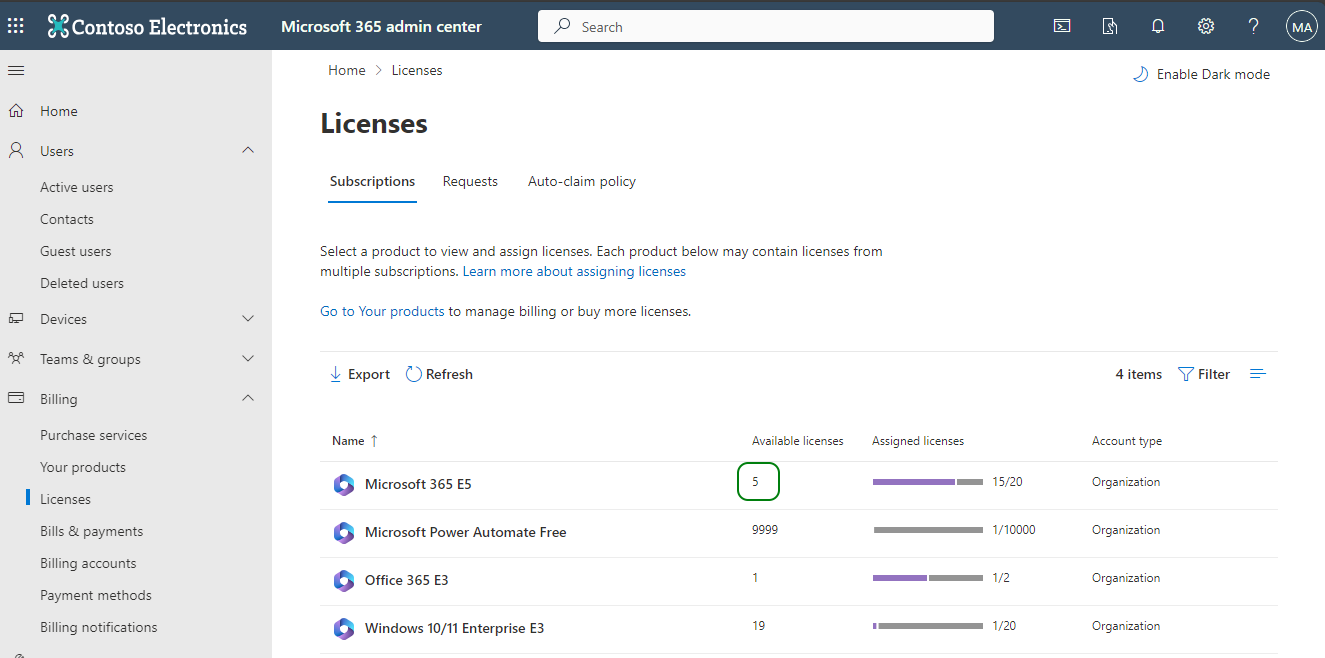
Eligible licenses
The following licenses are eligible on their own:
- Office 365 Enterprise E5
- Office 365 Enterprise E5 Without Audio Conferencing
- Office 365 Enterprise Developer E5
- Microsoft 365 E5
- Microsoft 365 E5 without Audio Conferencing
- Microsoft Business Voice Without Calling Plan
- Office 365 A5 for Faculty
- Microsoft 365 A5 for Faculty
- Office 365 G5 GCC
- Microsoft 365 G5 GCC
The following licenses are eligible only alongside a Teams Phone System add-on:
- Office 365 Enterprise E3
- Office 365 Enterprise E1
- Microsoft 365 E3
- Microsoft 365 Business Basic
- Microsoft 365 Business Standard
- Microsoft 365 Business Premium
- Microsoft Teams Essentials
- Office 365 A3 for Faculty
- Office 365 A1 for Faculty
- Microsoft 365 A3 for Faculty
- Microsoft 365 A1
- Office 365 F1
- Microsoft 365 F3
- Microsoft 365 F1
The eligible add-on is Microsoft Teams Phone Standard.