Viewing WAN Information
The WAN Interface page displays information of the WAN interface.
|
➢
|
To view WAN information: |
|
1.
|
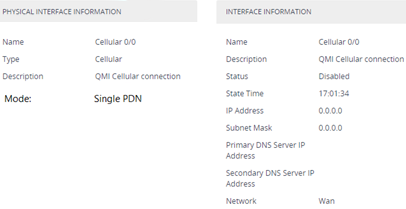
Open the WAN Interface page (Setup menu > IP Network tab > Core Entities folder > WAN Interface). |
|
2.
|
The Physical Interface Information group displays the following information if the cellular interface is used (read-only fields): |
|
●
|
Name': Displays the name of the physical WAN interface. |
|
●
|
'Type': Displays the type of physical interface (i.e., cellular). |
|
●
|
'Description': Displays a description (if configured) of the physical WAN interface. |
|
●
|
'Mode': Displays if one or two cellular Access Point Names (APN) are used (Single PDN or Multi PDN, respectively). |
|
3.
|
The Interface Information group displays the following information (read-only fields): |
|
●
|
'Name': Displays the name of the WAN interface. |
|
●
|
'Description': Displays a description (if configured) of the WAN interface. |
|
●
|
'Status': Displays the status of the WAN interface ("Connected" or "Disconnected"). |
|
●
|
'State Time': Displays the time since the WAN interface has been in the displayed status. |
|
●
|
'IP Address': Displays the IP address of the WAN interface. |
|
●
|
'Primary DNS Server IP Address': Displays the IP address of the primary DNS server (if configured). |
|
●
|
'Secondary DNS Server IP Address': Displays the IP address of the secondary DNS server (if configured). |
|
●
|
'Network': Displays the network type. |
The WAN Interface page is available only if you have configured the device to display various data-router configuration pages in the Web interface. For more information, see the [WebDataConfig] parameter.