Using Dial Plan Tags for Routing Destinations
You can use Dial Plan tags for determining the destination (IP Group) of an IP-to-IP Routing rule.
One of the benefits of using Dial Plan tags is that it can reduce the number of IP-to-IP Routing rules that you would normally need to configure. For example, assume that you need to route calls from IP Group "A" to two different IP Groups, "B" and "C", based on called (destination) prefix number (e.g., 102 and 103). When not using Dial Plan tags, you would need to configure two IP-to-IP Routing rules, where one rule sends calls with prefix number 102 to IP Group "B" and another rule sends calls with prefix number 103 to IP Group "C". However, when using Dial Plan tags, you would need to configure only a single IP-to-IP Routing rule whose destination IP Group is based on a Dial Plan tag.
The following briefly describes the process for using Dial Plan tags in IP-to-IP Routing rules:
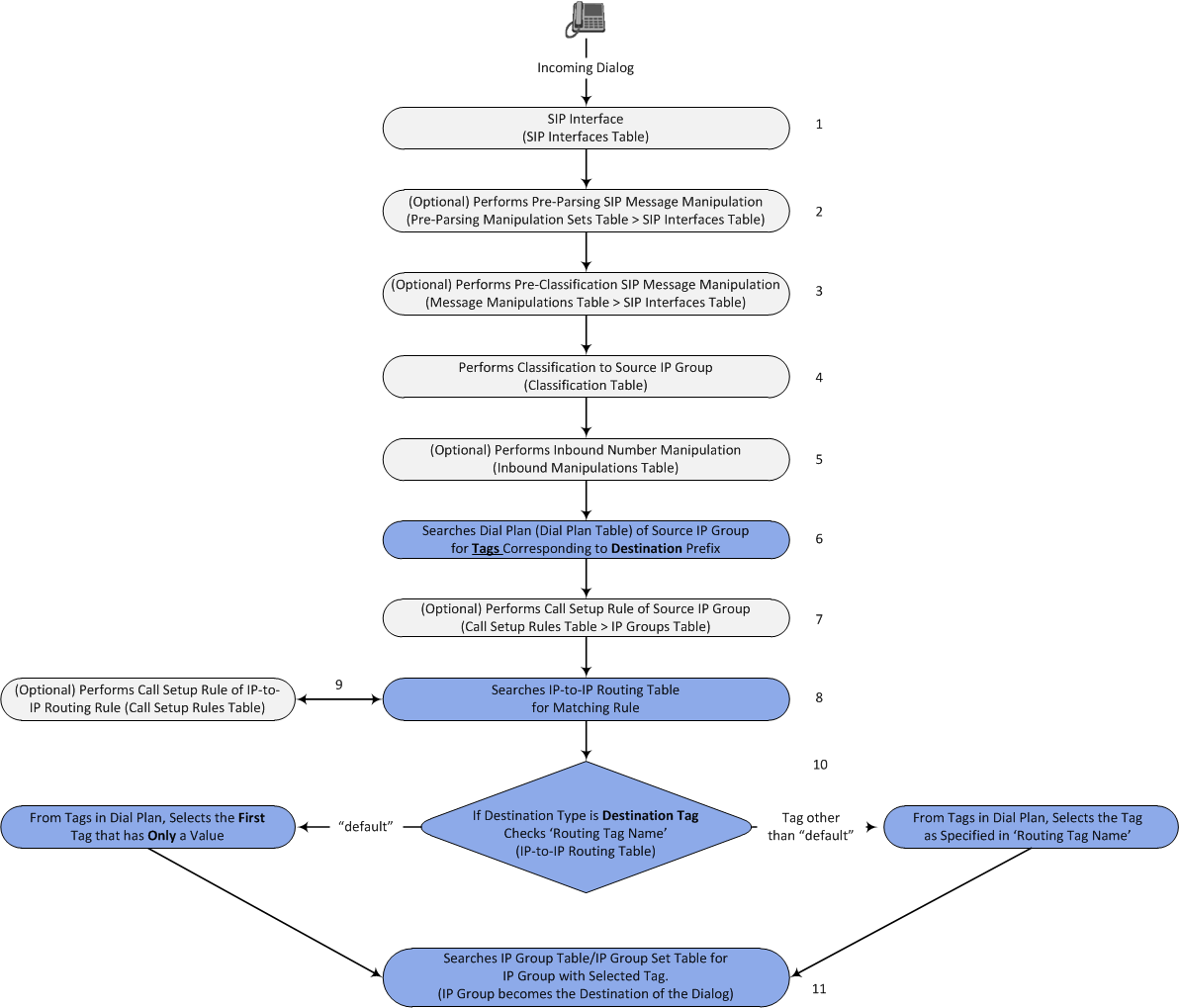
| 1. | The device searches the Dial Plan Index, associated with the source IP Group of the incoming SIP dialog, for a Dial Plan rule whose 'Prefix' parameter is configured with the same called prefix number as the SIP dialog (e.g., 102). If found, the device inspects the tags in the 'Tag' parameter (e.g., "Country=England;City=London;Essex") configured for that Dial Plan rule. |
Instead of assigning a Dial Plan to the IP Group, you can assign a Call Setup rule ('Call Setup Rules Set ID' parameter) to determine the IP Group's tag. For more information on Call Setup rules (seeConfiguring Call Setup Rules).
| 2. | The device searches for a matching rule in the IP-to-IP Routing table and if the 'Destination Type' parameter is configured to Destination Tag, it checks the tag name configured in the 'Routing Tag Name' parameter and compares it with the tags found in the Dial Plan rule. If the 'Routing Tag Name' parameter is configured as "default", the device selects the first tag name in the Dial Plan rule that is configured without a value, for example, "Essex" (see Step 1). If the 'Routing Tag Name' parameter is configured with a specific tag name (e.g., "Country"), the device selects the tag name with its value (e.g., "Country=England") in the Dial Plan rule. |
| 3. | The device searches the IP Groups table and IP Group Set table for an IP Group whose 'Tags' parameter is configured with the same tag as configured for the matching IP-to-IP Routing rule. If found, the device routes the call to this IP Group. |
The following figure displays the device's SIP dialog processing when Dial Plan tags are used to determine the destination IP Group:
The following procedure describes how to configure routing to destination IP Groups determined by Dial Plan tags. The procedure is based on the following example scenario: Calls from IP Group "HQ" with destination (called) prefix number 102 are sent to IP Group "ENG" while calls with destination prefix number 103 are sent to IP Group "BEL". The destination IP Groups are determined by the Dial Plan tags, where the tag "Country=England" is used to send calls to IP Group "ENG" and the tag "Country=Belgium" is used to send calls to IP Group "BEL".
| ➢ | To configure routing to destination IP Groups based on Dial Plan tags: |
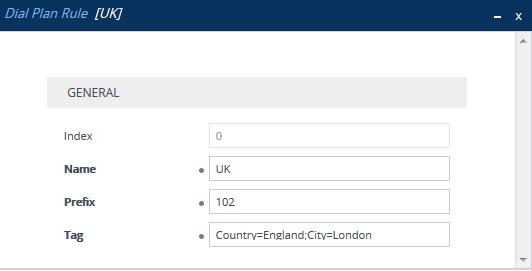
| 1. | In the Dial Plan table, configure a Dial Plan with Dial Plan rules, where the 'Prefix' parameter is the destination (called) prefix number. In our example, we will configure a Dial Plan called "Dial Plan 1" with two Dial Plan rules: |
|
Parameter |
Index 0 |
Index 1 |
|---|---|---|
|
'Name' |
UK |
Bel-Neth |
|
'Prefix' |
102 |
103 |
|
'Tag' |
Country=England;City=London |
Holland;City=Amsterdam;Country=Belgium |
The following displays the configuration in the Web interface of the Dial Plan rule for Index 0:
Regarding the 'Tag' parameter:
| ● | Only one tag name without a value can be configured. In the above example, "Holland" is the tag name without a value. If an additional tag name is configured, for example, "Holland;France", the setting is invalid. |
| ● | Tag names with values (i.e., name=value) must be unique within a Dial Plan rule. In the above example, "Country=England" is a tag name with value. Configuring the parameter with "Country=England;Country=Scotland" is invalid. A valid configuration would be "Country=England;Country1=Scotland". |
| 2. | In the IP Groups table, configure your IP Groups. Make sure that you assign the source IP Group with the Dial Plan that you configured in Step 1 and that you configure each destination IP Group with one of the required Dial Plan tags. If the tag has a value, include it as well. In our example, we will configure three IP Groups: |
|
Parameter |
Index 0 |
Index 1 |
Index 2 |
|---|---|---|---|
|
'Name ' |
HQ |
ENG |
BEL |
|
'Dial Plan' |
Dial Plan 1 |
- |
- |
|
'Tags' |
- |
Country=England |
Country=Belgium |
| 3. | In the IP-to-IP Routing table (see Configuring SBC IP-to-IP Routing), add a routing rule and configure the 'Destination Type' parameter to Destination Tag and the 'Routing Tag Name' to one of your Dial Plan tags. In our example, the tag "Country" is used: |
|
Parameter |
Index 0 |
|---|---|
|
'Name' |
Europe |
|
'Source IP Group' |
HQ |
|
'Destination Type' |
Destination Tag |
|
'Routing Tag Name' |
Country |
| ● | If the IP-to-IP Routing rule (initial route) is also configured with a Call Setup rule ('Call Setup Rules Set ID' parameter) and it results in a different tag, and you have also configured alternative (or forking) IP-to-IP Routing rules with 'Destination Type' set to Destination Tag, then this new tag is used for the destinations of these alternative (or forking) rules, instead of the tag used for the initial route. |
| ● | Configure the 'Routing Tag Name' parameter with only the name of the tag (i.e., without the value, if exists). For example, instead of "Country=England", configure it as "Country" only. |
| ● | If the same Dial Plan tag is configured for an IP Group in the IP Groups table and an IP Group Set in the IP Group Set table, the IP Group Set takes precedence and the device sends the SIP dialog to the IP Group(s) belonging to the IP Group Set. |