Logging in to Device Administration
| ➢ | To log into Device Administration: |
| 1. | Navigate to the 'Settings' page (see Accessing User Settings). |
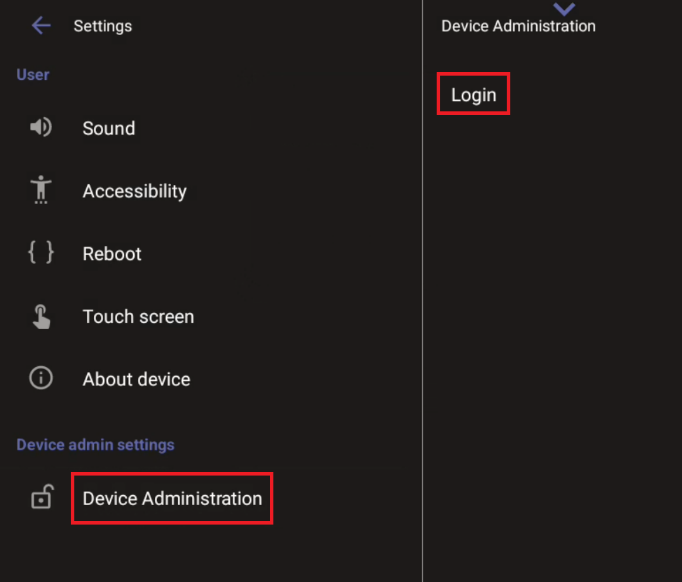
| 2. | Under ‘Device Admin Settings’, tap Device Administration, then tap Login. |
| 3. | Enter the password using the virtual keyboard, then tap OK. |
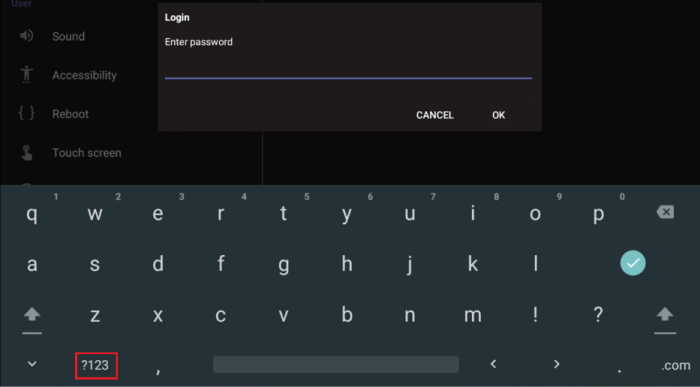
The virtual keyboard pops up for all ‘Settings’ fields to allow inputting characters and / or numbers. Two virtual keyboard types can be displayed: Numeric or QWERTY. To switch between these types, use the ?123 / ABC toggle key.
Upon successful login, the available device admin options appear under ‘Device Administration’ and can be set as required. If you log out or the admin login timeout has passed, the admin options disappear.
Upon initial login, you are required to change the default password (which is 1234).