Manually Connecting to a Wi-Fi Network
| ➢ | To manually connect to a Wi-Fi network: |
| 1. | Make sure to first disconnect your Ethernet cable. If it's connected, the device will not be able to connect to a Wi-Fi network. |
| 2. | If not already logged in, log in to Device Administration to get admin access (see Logging in to Device Administration). |
| 3. | Under ‘Device admin settings’, scroll down and tap Wi-Fi. |
| 4. | Tap Add network and then enter the SSID of the network to add manually. |
| 5. | From the 'Security' drop-down, select a security key strength (encryption method). For certificate based authentication, see also Configuring Wi-Fi Security Using Certificate-based Authentication. |
| 6. | Tap Advanced options and optionally meter the selected network: |
| ● | Leave the setting at its default value of Detect automatically if you don't want to meter the network. |
| ● | Select a Metered option to meter it. |
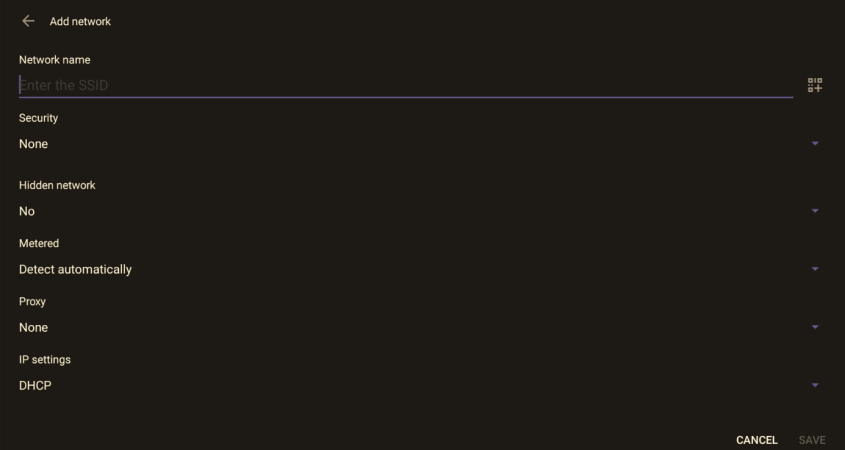
| ● | 'Proxy' and 'DHCP' will automatically be configured by the network. |
| ● | Enabling the setting Turn on Wi-Fi automatically allows the device to automatically connect in the future to the highest signal-quality network remembered by the device. |
As an alternative to manually configuring Wi-Fi settings via the device’s user interface, you can configure the Wi-Fi settings described in the following table, using the Configuration File.
Configuration File Wi-Fi Parameters
|
Parameter |
Description |
|---|---|
|
network/wireless/adavanced_ options/dns1 |
Defines the IP of the wireless DNS1. |
|
network/wireless/adavanced_ options/dns2 |
Defines the IP of the wireless DNS2. |
|
network/wireless/adavanced_ options/gateway |
Defines the IP address of the wireless gateway |
|
network/wireless/adavanced_ options/hidden_network |
Defines the name of the wireless hidden network. |
|
network/wireless/adavanced_ options/ip_addr |
Defines the IP address of the static Wi-Fi network if you’re operating with a static Wi-Fi network. |
|
network/wireless/adavanced_ options/ip_settings |
Used to define DHCP. |
|
network/wireless/adavanced_ options/network_prefix_length |
Defines the network prefix length to be used. |
|
network/wireless/adavanced_ options/proxy |
Defines the proxy wireless server source. |
|
network/wireless/adavanced_ options/proxy/auto_config/pac_url |
Defines the URL of the PAC file. |
|
network/wireless/adavanced_ options/proxy/manual/exclusion_list |
Defines the list of IP addresses that will be blocked. |
|
network/wireless/adavanced_ options/proxy/manual/proxy_ hostname |
Defines the name of the proxy host. |
|
network/wireless/adavanced_ options/proxy/manual/proxy_port |
Defines the proxy port. |
|
network/wireless/anon_identity |
Defines the anonymous wireless users who won’t be seen. |
|
network/wireless/ca_cert |
Defines which CA certificate to use. |
|
network/wireless/client_cert |
Defines which client certificate to use. |
|
network/wireless/domain |
Defines the domain name. |
|
network/wireless/eap_method |
Defines the EAP method. |
|
network/wireless/identity |
Defines the identity of the user. |
|
network/wireless/password |
Defines the password of the network. |
|
network/wireless/phase2_method NONE,MSCHAPV2,GTC,PAP,MSCHAP |
Defines the encryption method. Phase 2 applies only to the 802.1x EAP method. |
|
network/wireless/security |
Defines the security method (encryption protocol). |