Screen Sharing
The
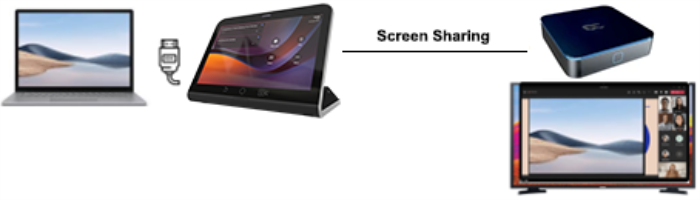
A short HDMI cable connects the PC/laptop to the RX-PAD HDMI In port. The connection between the RX-PAD and the MTRA is thus ‘cableless’.
The feature offers added flexibility by enabling the use of a shorter HDMI cable connected to the center of the meeting room desk, in contrast to a longer (more expensive) cable connected to the MTRA positioned in the front of the room.
| ■ | In-Meeting Mode: When the MTRA is in a meeting, the presenter can use the Teams app ‘Share’ key to share their PC screen with in-person attendees who are physically present in the same meeting room, as well as with remote attendees. [Audio sharing is currently unsupported]. |
| ■ | Idle Mode: When the MTRA is not in a meeting, the presenter can use the Teams app ‘Share’ key to share their PC screen only with in-person attendees who are physically present in the same meeting room. |
For sharing in either mode, the PC must be connected to the RX-PAD's HDMI In port.
The figure below shows the
 s
s