RX-PANEL Controls
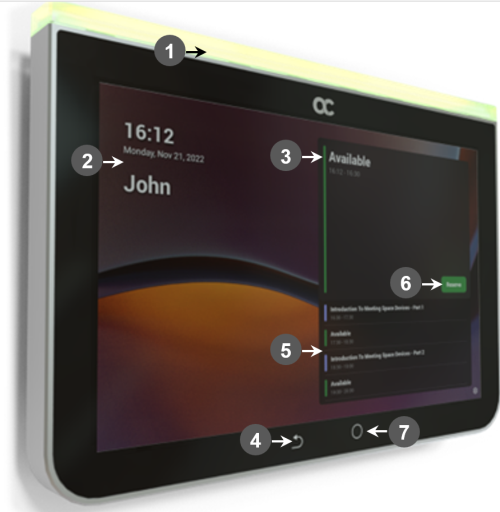
Use the following table as reference to the following figure.
|
L-R |
Description |
||||||||||||
|---|---|---|---|---|---|---|---|---|---|---|---|---|---|
|
1 |
Space availability status LED, viewable from a distance:
|
||||||||||||
|
2 |
Meeting details; meeting time | date | organizer |
||||||||||||
|
3 |
Meeting space availability status |
||||||||||||
|
4 |
‘Back’ button; tap to return to the screen previously accessed |
||||||||||||
|
5 |
All meeting spaces and availability statuses |
||||||||||||
|
6 |
Tap to reserve an available meeting space for an ad hoc meeting |
||||||||||||
|
7 |
|
||||||||||||
|
Note: Admin can change background wallpaper | color of status indicator | text contrast, etc. |
|||||||||||||