Pair RXV81 with the RCU
Customers that acquired a TEAMS-RXV81 bundle (see Bundles) need to pair the RXV81 with the RCU.
|
➢
|
To pair the RXV81 with the RCU: |
|
1.
|
After cabling, remove the RCU from its packaging and insert the batteries supplied into it. |
|
2.
|
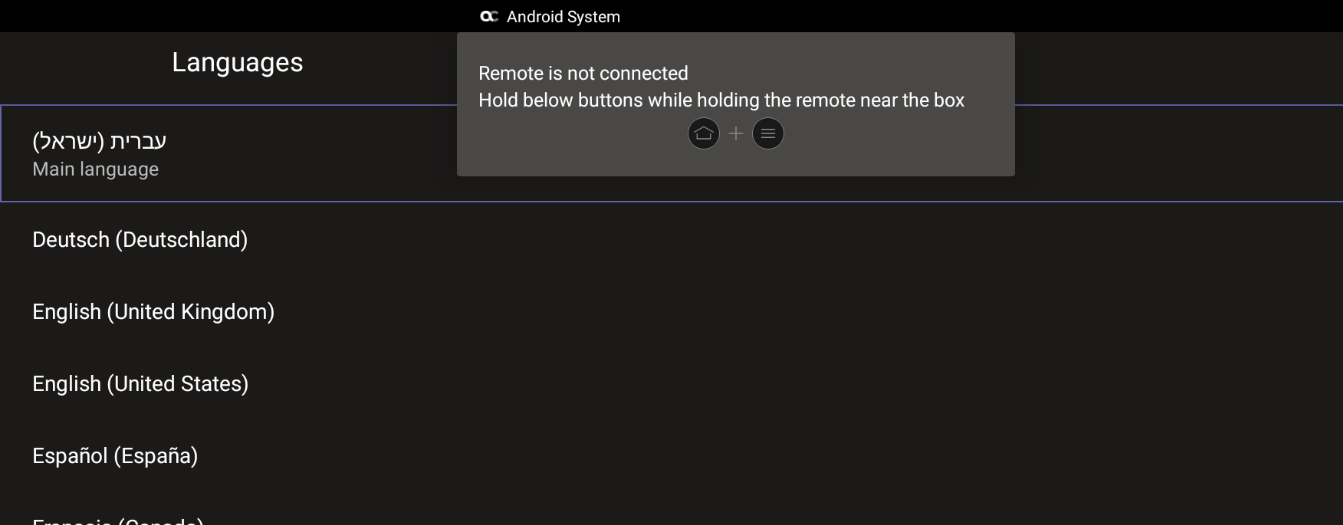
View in the display the message:
Remote is not connected. Hold below buttons while holding the remote near the box. |
|
3.
|
On the RCU, simultaneously press and hold  + +  until the RCU and the RXV81 are connected and a Remote connection succeeded message is displayed. until the RCU and the RXV81 are connected and a Remote connection succeeded message is displayed. |
|
4.
|
Use the remote control to navigate to and select a language; the Microsoft Teams sign-in screen is displayed. |
|
5.
|
Follow Teams instructions to sign in. The RXV81 home page is displayed. |