Configuring Push Notification Service for Unregistered Users
This section describes how to configure the device to handle push notifications for users who are not registered with the device. This type of service, called Dynamic Push Notification Service, enables the device to route incoming calls to mobile application users without requiring them to maintain a permanent (and prior) SIP registration. This capability is designed for large-scale mobile application deployments where maintaining persistent registrations for millions of dormant users is impractical.
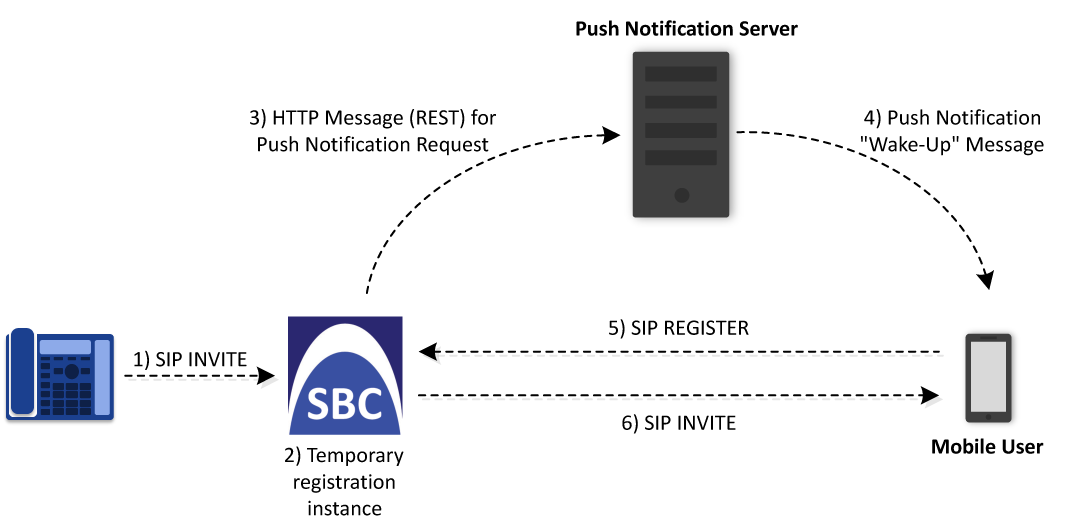
When the device receives an incoming SIP INVITE request for an unregistered destination user, it handles Dynamic Push Notification Service as follows:
|
1.
|
The device dynamically creates a temporary registration instance for the destination user (only URI user part). The registration instance is marked as requiring a push notification. |
|
2.
|
The device sends an HTTP POST request to the Push Notification Server, prompting it to wake the user's mobile application. |
|
3.
|
The Push Notification Server sends a push notification to wake the user's mobile application. |
|
4.
|
The user sends a SIP REGISTER request to the device, indicating that the application is active and ready to receive the call. |
|
5.
|
The device matches the incoming REGISTER request with the user's temporary registration instance in the registration database by the user part only, rather than by both user part and Contact header. |
|
6.
|
After the user successfully registers with the device, the device forwards the INVITE request to the user to complete call establishment. |
The following figure illustrates the push notification service process for users dynamically registered on the device:
The device rejects the call (INVITE message) with a SIP 480 (Temporarily Unavailable) response and removes the temporary registration instance for the user if any of the following occurs:
|
■
|
The push notification request sent by the device to the Push Notification Server fails. |
|
■
|
The device doesn't receive a SIP REGISTER message from the user within a user-defined timeout. The counter of this timeout is started from when the device sends the push notification request. |
|
●
|
The device doesn't refresh the temporary registration instance of a user via push notifications, and automatically deletes the registration instance upon expiration. |
|
●
|
The Push Notification Service feature is applicable only to the SBC application. |
|
➢
|
To configure Dynamic Push Notification Service for unregistered users: |
|
1.
|
Configure the IP Group of the Push Notification Service with the following special parameter settings: |
|
●
|
'Dynamic PNS Registration Mode': Use Original Username or Use Random Username |
|
●
|
'Registration Mode': User Initiates Registration |
For more information, see Configuring IP Groups.
|
2.
|
Configure a Remote Web Service to represent the HTTP-based Push Notification Server. Make sure you configure the 'Type' parameter to General. For more information, see Configuring Remote Web Services. |
|
3.
|
Configure a Call Setup Rule if your Dynamic PNS setup includes any of the following: |
|
●
|
The device is triggered by a Call Setup Rule to send an HTTP push notification request to the Push Notification Server when it receives an INVITE request destined for a user. This is enabled by configuring the 'Protocol' parameter to Using Call Setup Rules for the Push Notification Server (see Configuring Push Notification Servers). The Call Setup Rule also specifies the Push Notification Server as a Remote Web Service. |
For more information on Call Setup Rules, see Configuring Call Setup Rules.
|
5.
|
Configure the maximum time (in seconds) that the device waits for a SIP REGISTER request from the user, using the [PNSRegisterTimeout] parameter. If the REGISTER request is not received within this interval, the device rejects the call. |