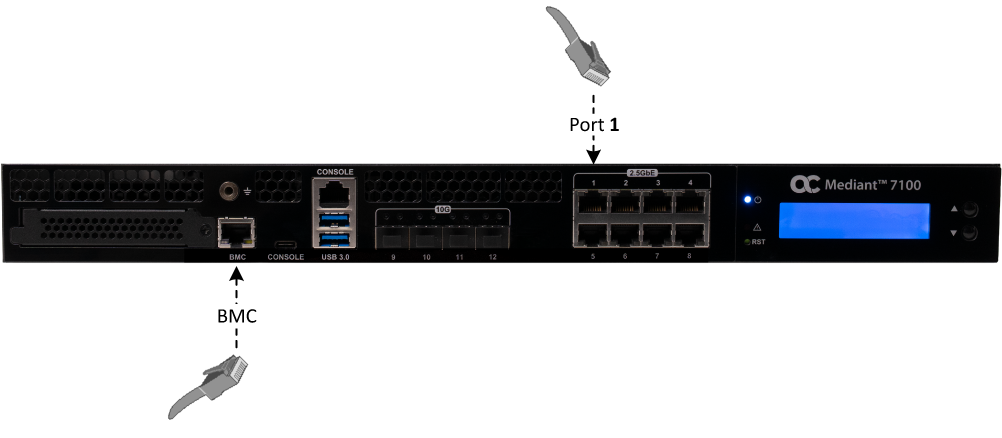
Connecting Device for Management
Device management includes the following:
| ■ | OAMP Management (SBC Application): Use the default port 1 (GE_1) to manage the SBC application. |
| ■ | Chassis Management and Monitoring: Use the BMC port (1-GbE RJ-45) for remote chassis management. This port supports operations such as power control, firmware updates, and SBC software reinstallation. |
Caution: Intra-building connections of the device require the use of shielded cables grounded at both ends. The intra-building ports of the equipment are suitable for connection to intra-building or unexposed wiring or cabling only. The intra-building ports of the equipment must not be metallically connected to interfaces that connect to the Outside Plant (OSP) or its wiring. These interfaces are designed for use as intra-building interfaces only (Type 2 or Type 4 ports, as described in GR-1089–CORE, Issue 4) and requires isolation from the exposed OSP cabling. The addition of primary protectors is not sufficient protection to connect these interfaces metallically to OSP wiring.
| ➢ | To connect the management ports: |
| 1. | Using an Ethernet cable, connect the RJ-45 OAMP port (labeled 1) on the device's front panel to the LAN. |
| 2. | Using an Ethernet cable, connect the RJ-45 BMC management port (labeled BMC) on the device's front panel to the LAN. |