Configuring OAuth 2.0 Servers
The OAuth Servers table lets you configure a single OAuth server. You can use the OAuth server for OAuth-based login authentication of users and authentication of incoming SIP message authentication.
You can configure only one OAuth server in the table with type Azure.
The following procedure describes how to configure the OAuth server through the Web interface. You can also configure it through ini file [OAuthServers] or CLI (configure system > oauth-servers).
| ➢ | To configure an OAuth server: |
| 1. | Open the OAuth Servers table (Setup menu > IP Network tab > AAA Servers folder > OAuth Servers). |
| 2. | Click New; the following dialog box appears: |
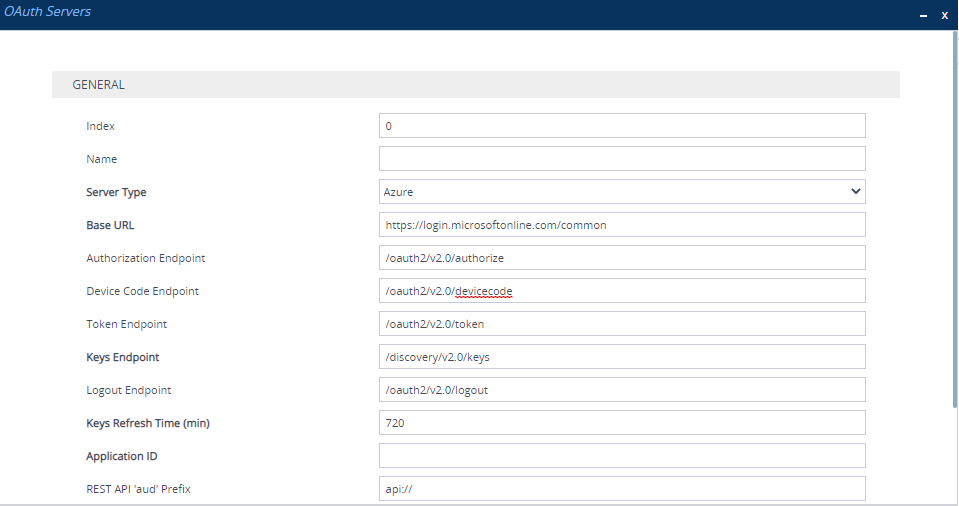
| 3. | Configure the OAuth server according to the parameters described in the table below. |
| 4. | Click Apply. |
OAuth Servers Table Parameter Descriptions
|
Parameter |
Description |
|||||||||||||||
|---|---|---|---|---|---|---|---|---|---|---|---|---|---|---|---|---|
|
'Index' [Index] |
Defines an index number for the new table row. Note: Each row must have a unique index. |
|||||||||||||||
|
'Name' server-name [OAuthServerName] |
Defines an arbitrary name to easily identify the row. The valid value is a string of up to 20 characters. Note:
|
|||||||||||||||
|
'Server Type' server-type [OAuthServerType] |
Defines the provider of the OAuth service.
Note:
|
|||||||||||||||
|
'Base URL' base-url [OAuthBaseURL] |
Defines the base URL. The endpoints configured by the below parameters follow this base URL. For example, the full URL path of the default authorization endpoint is "https://login.microsoftonline.com/common/oauth2/v2.0/authorize". The default is "https://login.microsoftonline.com/common". Note: The parameter is mandatory. |
|||||||||||||||
|
'Authorization Endpoint' authorization-endpoint [OAuthAuthorizeEndpoint] |
Defines the authorization endpoint URL path (which follows the base URL). The default is "/oauth2/v2.0/authorize". Note: The parameter is applicable only when the 'Server Type' parameter is configured to Azure. |
|||||||||||||||
|
'Device Code Endpoint' devicecode-endpoint [OAuthDeviceCodeEndpoint] |
Defines the device code endpoint URL. The default is "/oauth2/v2.0/devicecode". Note: The parameter is applicable only when the 'Server Type' parameter is configured to Azure. |
|||||||||||||||
|
'Token Endpoint' token-endpoint [OAuthTokenEndpoint] |
Defines the token endpoint URL. The default is "/oauth2/v2.0/token". Note: The parameter is applicable only when the 'Server Type' parameter is configured to Azure, and is mandatory. |
|||||||||||||||
|
'Keys Endpoint' keys-endpoint [OAuthKeysEndpoint] |
Defines the key endpoint. The default is "/discovery/v2.0/keys". Note: The parameter is mandatory. |
|||||||||||||||
|
'Logout Endpoint' logout-endpoint [OAuthLogoutEndpoint] |
Defines the logout endpoint URL. The default is "/oauth2/v2.0/logout". Note: The parameter is applicable only when the 'Server Type' parameter is configured to Azure. |
|||||||||||||||
|
'Keys Refresh Time' keys-refresh-time [OAuthKeysRefreshTime] |
Defines the periodic time (in minutes) to refresh the public keys (by requesting them from Azure Microsoft Entra ID). The valid value range is 360 to 1440. The default is 720. Note: The parameter is applicable only when the 'Server Type' parameter is configured to Azure, and is mandatory. |
|||||||||||||||
|
'Application ID' application-id [OAuthAppId] |
Defines the Application (client) ID assigned by your Azure Microsoft Entra ID account for the app created (registered) for the device in Microsoft Entra ID. By default, no value is defined. Note: The parameter is mandatory. |
|||||||||||||||
|
'Scope' scope [OAuthScope] |
Defines the scope to access resources. By default, no value is defined. Note:
|
|||||||||||||||
|
'Grant Type' grant-type [OAuthGrantType] |
Defines the grant type when the device requests OAuth 2.0 access tokens for the HTTP client.
If you select this option, you need to configure the secret key using the 'Secret Key' parameter (see below).
If you select this option, you need to configure the username and password using the 'Username' and 'Password' parameters, respectively (see below). Note: The password grant type is generally discouraged in for OAuth 2.0 implementations because it's less secure. |
|||||||||||||||
|
'Secret Key' secret-key [OAuthSecretKey] |
Defines the secret key (or client secret) that the device sends to the OAuth server for authentication. By default, no value is defined. Note:
|
|||||||||||||||
|
'Username' username [OAuthUsername] |
Defines the user's username that the device sends to the OAuth server for authentication. By default, no value is defined. Note:
|
|||||||||||||||
|
'Password' password [OAuthPassword] |
Defines the user's password that the device sends to the OAuth server for authentication. By default, no value is defined.
|
|||||||||||||||
|
'REST API 'aud' Prefix' rest-api-aud-prefix [RestApiAudPrefix] |
Defines the REST API 'aud' prefix. This is used when validating the 'aud' specified when the validation request is from the REST API. The default is "api://". |
|||||||||||||||
|
'TLS Context' tls-context [TLSContext] |
Assigns a TLS Context from the TLS Contexts table (see Configuring TLS Contexts). By default, no value is defined (and TLS Context #0 is used). |
|||||||||||||||
|
'Verify Certificate' verify-certificate [VerifyCertificate] |
Enables the verification of the TLS certificate that is used in the incoming connection request from the OAuth server.
|
|||||||||||||||
|
'Network Interface' network-interface [NetworkInterface] |
Assigns an IP network interface from the IP Interfaces table (see Configuring IP Network Interfaces) for communication with the OAuth server. By default, no value is defined (and OAMP interface is used). Note: The parameter is mandatory. |