
View activity log
VoiceAI Connect logs activities performed by its users.
The following activities are logged:
-
Logins and logouts of users.
-
Addition (new), modification, or deletion of users.
-
Software updates for VoiceAI Connect.
-
Configuration changes made through the Web user interface, REST API, auto-update, or command line.
-
Call recording downloads and deletions.
For viewing the Activity Log, your Administrator needs to provide you with the appropriate IAM policy (roles and scopes). For more information, see Manage users.
To view the Activity Log:
-
From the Navigation menu, click Activity Log:
-
Time: The date and time the activity occurred.
-
User: The user that performed the activity.
-
User Type: The type of user (SSH, UI, REST, AUTO-UPDATE, MIGRATION-SCRIPT, or CONFIG-FULL-SYNC)
-
Action Type:
-
Security: Login
-
Security: Logou:
-
Security: Add Operator
-
Security: Edit Operator .
-
Security: Remove Operator
-
Configuration: Update
-
Configuration: SW Download
-
Calls: Delete Recording
-
Calls: Download Recording
-
-
Description: You can run a substring search on the Description field. This is useful, for example, for finding configuration changes related to a specific bot or configuration parameter.
-
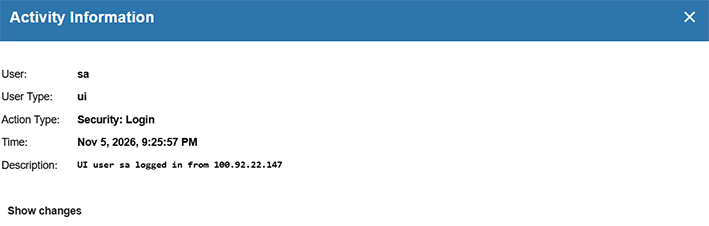
To view detailed information about a logged activity, click the Info icon:

You can filter the activity log display by:
View configuration updates
To view configuration updates:
-
Click the Info icon for a configuration-update activity to display details of the configuration change.
-
Click Show changes to open a navigable tree of all changes included in the update (useful when there are many changes).
-
Use the search box (top right) to find a substring within a parameter name or value.
Details include: the user and user type who performed the update, the time of the update, and a concise description of the change.
Example:

Example:

In the above example, in the bots section, which is a list of bot objects keyed by the name field (shown as embeddedKey), the third item, name=6116b4ee-48cd-477e-b8a5-e70e397664a9, was updated. The change added a new parameter, sensitiveInfo, set to true.