Worker State Summary Report
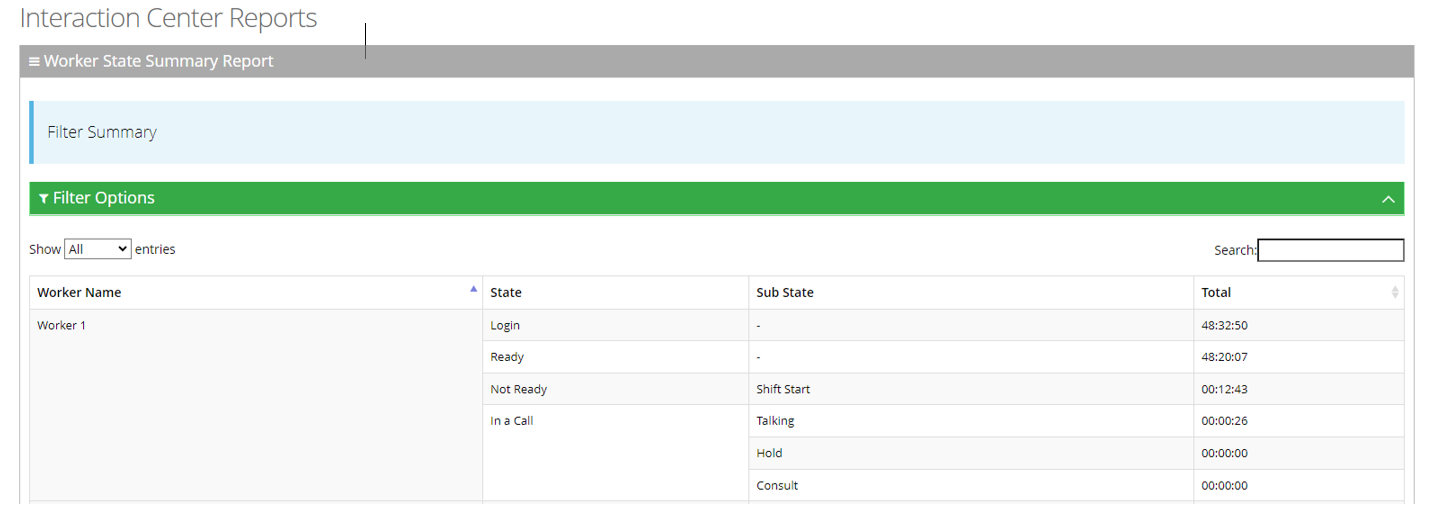
The Worker State Summary Report displays a summary of the time workers spend in various states. This report is divided by Worker’s names.
|
➢
|
To generate a Worker State Report: |
|
1.
|
Open the Worker State Summary Report page (Reports > Interaction Center Reports > Worker State Summary Report); the following appears: |

|
2.
|
Select the appropriate filter fields to generate your report: |
|
●
|
Date From: Defines this report for a specific time range. |
|
●
|
Date To: Defines this report for a specific time range. |
|
●
|
Worker: Defines information that is related to a specific worker. |
|
●
|
State: Defines information that is related to a specific worker state or “Any’. The worker state can be any of the following values: |
|
◆
|
Any: Defines the information that relates to all states. |
|
◆
|
Logged-in: Defines the information that is related only to the login time. |
|
◆
|
Ready: Defines the information that is related only to the ready time. |
|
◆
|
Not Ready: Defines the information that is related only to the not ready time. |
|
◆
|
In a Call: Defines the information that is related only to the talking time. |
|
◆
|
Wrap-up: Defines the information that is related only to the wrap-up time. |
|
●
|
Timezone Display Mode: Defines this report in different time zones. The time zone of calls can be one of the following options: |
|
◆
|
Tenant time zone: Defines the information in this report based on the tenant configured time zone. |
|
◆
|
Flow time zone: Defines the information in this report based on the time zone configured under the Telephony Setting settings. |
|
◆
|
Local time zone (Web): Defines the information in this report on the browser local time zone. |
|
3.
|
The following is a description of the report fields. |
|
|
|
| Worker Name |
Defines the name of the worker.
|
| State |
Defines the various states in which a worker can be. |
| Sub State |
Defines the 'Sub' state information related to the state (e.g., Not- Ready reasons). |
| Total |
Defines the total time the worker spent on a sub state. |
|
4.
|
Click Generate to generate the report; click Export CSV to export the report in CSV format. |