Configuring Voice Settings
The procedures below describe how to view and configure voice settings and assign DNIS numbers.
|
➢
|
To view voice settings: |
|
1.
|
Open the Voice Settings screen (Configuration > Interaction Manager > Voice); the following appears. |
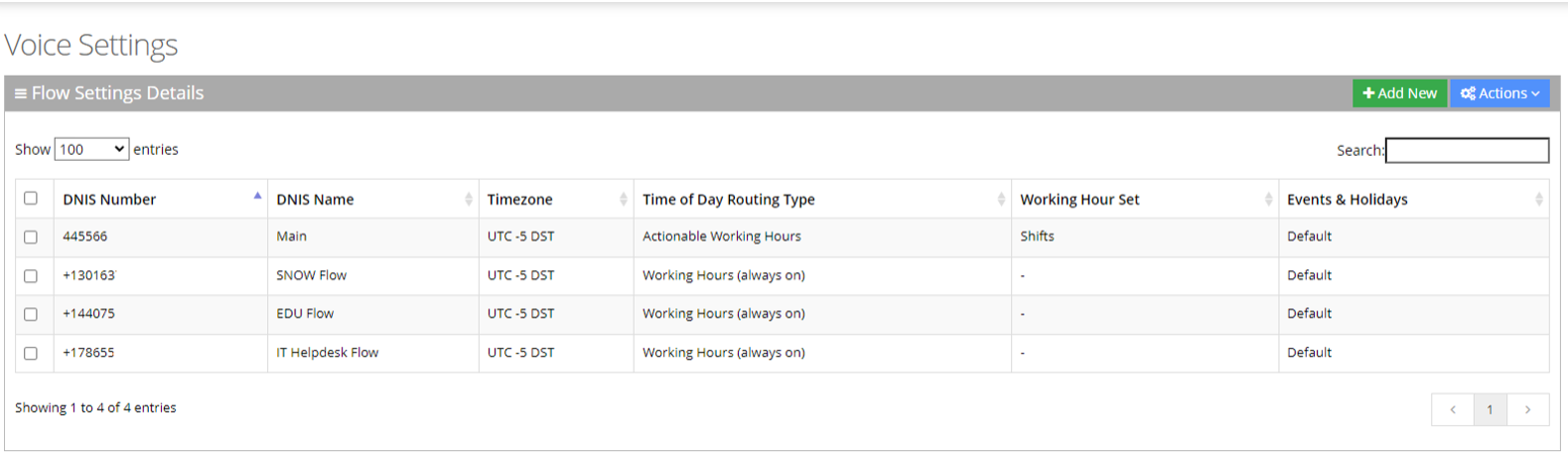
The Voice Settings page is described below:
|
■
|
DNIS Number: Defines the Access phone number for the IVR service. e.g., 5555 |
|
■
|
DNIS Name: Defines the name of the IVR service. |
|
■
|
Timezone: Defines the timezone associated with the DNIS number. When calling this number, working hours, holidays and events are checked based on the timezone. |
|
■
|
Time Of Day Routing Type: Defines how to handle incoming calls based on working hours. This can be set by editing the three options in the Flow Settings records: |
|
■
|
Working Hour Set: Defines which working hour set will be used to define the working/non-working days/time for the flow. |
|
■
|
Events & Holidays: Selects the relevant Events and Holidays set. Events and Holidays actions take precedence over Working Hours actions. (see Defining Events and Holidays) |