Call Operations
When you answer a call, the Customer Details group provides you with buttons that allow you to perform various call operations, as described in the following table:
|
Button |
Button Name |
Description |
|||||||||
|---|---|---|---|---|---|---|---|---|---|---|---|
|
|
Pause Recording |
Displayed when recording is in use. Pauses the recording. |
|||||||||
|
|
EN-US (language) |
Displayed when recording is in use. Choose the transcript language. The default is EN-US; select another from the drop-down. |
|||||||||
|
|
Mute |
Mutes the call on your side. |
|||||||||
|
|
Hold |
Puts the call on hold. |
|||||||||
|
Add Participants |
Creates a conference with any participants you choose to add. |
||||||||||
|
Manage Participants |
Manages conference participants: add new participants or remove/mute existing participants. |
||||||||||
|
|
Transfer |
Transfers the call to another destination. |
|||||||||
|
|
Consult |
Puts the caller on-hold and connects you with a Supervisor for consultation. When consulting, there is an option to use a keypad. |
|||||||||
|
|
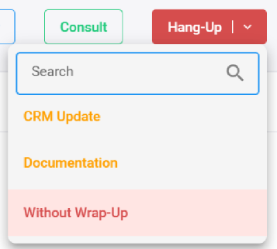
Hang-Up |
Ends the call. |
|||||||||
|
|
Transfer & Hang-Up |
If you choose to consult with a Supervisor, clicking this button transfers the customer to the Supervisor and disconnects your call with the customer. After selecting this option, a drop-down menu appears listing wrap-up options for you to select. |
|||||||||
|
|
Wrap-Up (Customized) |
The Hang Up and Transfer & Hang-Up menus include wrap-up options for ending calls and beginning post-call activities. Available options are configured by your administrator. When you select Agent Insights wrap up, the system initiates Agent Insights, which automatically generates:
For details, see Wrap up a call with Agent Insights. |