User-level Device Settings
The following table describes the
To access these settings,  in the home screen, select Settings ,and then press the Settings softkey.
|
Setting |
Description |
||||||||||||
|---|---|---|---|---|---|---|---|---|---|---|---|---|---|
|
Sound |
Allows you to customize the phone volume for a friendlier user experience:
|
||||||||||||
|
Display |
Opens the ‘Display’ screen, where you can adjust:
|
||||||||||||
Also supported is a simplified version of NTP called Simple Network Time Protocol (SNTP). Both can be used to synchronize device clocks. SNTP is typically used if full implementation of NTP is not required. See also Configure Time on Teams Devices. |
|||||||||||||
|
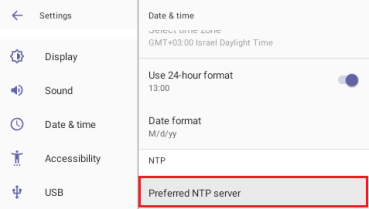
NTP |
Administrators can use this parameter to manually define the NTP server, to comply with enterprise security requirements if those requirements preclude using DHCP Option 42. Manual configuration takes precedence over DHCP Option 42 and the time servers. Two ways to manually define the NTP server are available:
See also Configure Time on Teams Devices. |
||||||||||||
|
Accessibility |
Allows making the phone screen reader-friendlier:
|
||||||||||||
|
USB |
If enabled, allows the phone to be used as an audio device (see Enable a Phone to be used as an Audio Device). |
||||||||||||
|
Speaker Mode |
Use to enable or disable the speaker. If disabled, the user needs to speak into the handset during calls. |
||||||||||||
|
Power Saving |
Allows users to contribute to power saving in the enterprise. Set:
|
||||||||||||
|
Reboot |
Enables users to reboot the device. Log in as Administrator for more debugging settings to be available. |
||||||||||||
|
Security |
Helps secure the enterprise telephony network against breaches.
See also 'Lock Screen & PIN' under Configure Teams Application Settings. To apply default security settings to multiple phones, administrators can specify them in the phones' configuration files. Relevant parameters are:
|
||||||||||||
|
Languages |
Allows users to customize inputting to suit personal requirements. |
||||||||||||
|
AudioCodes pairing |
Displays the name of the phone and allows you to pair it to a nearby connected PC. |
||||||||||||
|
About device |
Provides users with device information.
|