Services Details Quick Glance
The Service Details pane provides you with a quick glance summary of the status of the service.
| ➢ | Do the following: |
| 1. | Select the check box adjacent to the service whose details you wish to view. The Service Details are displayed in the right pane. |
Meeting Insights
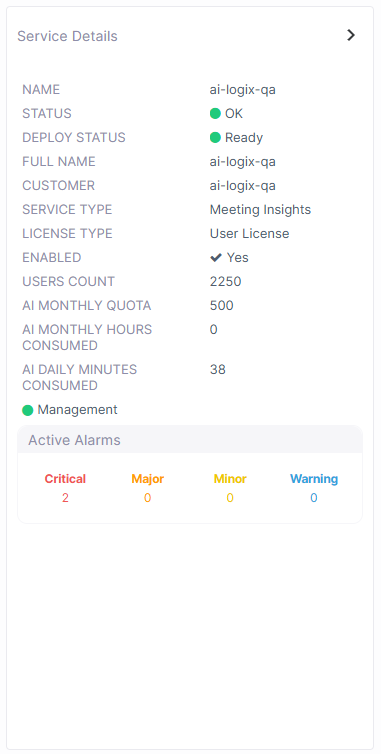
Interaction Insights
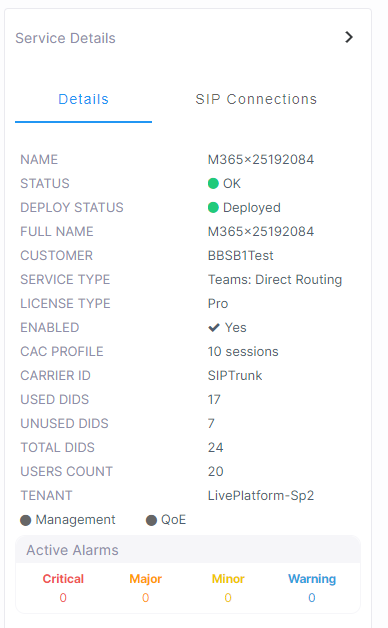
Direct Routing
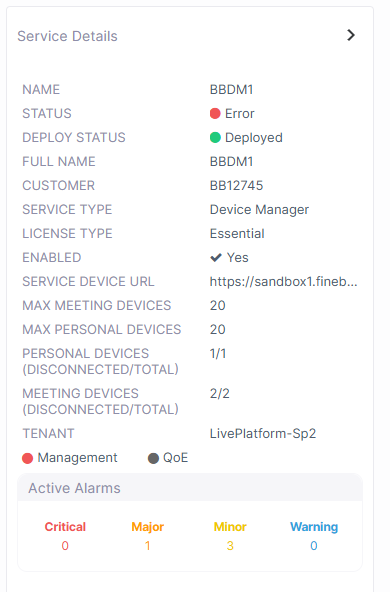
Device Manager
Hybrid Entities

Live CX
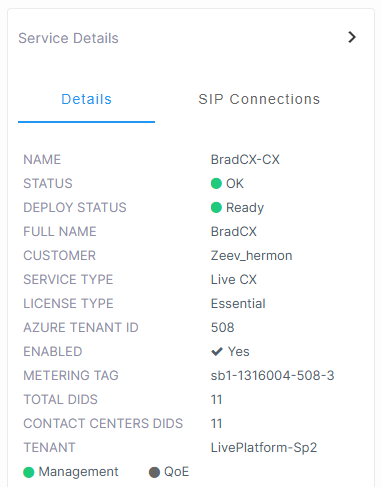
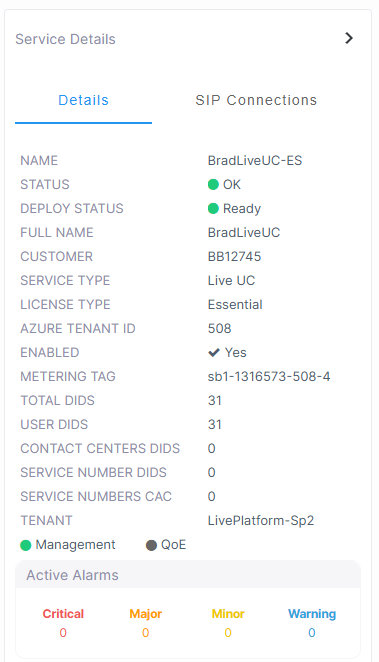
Live UC
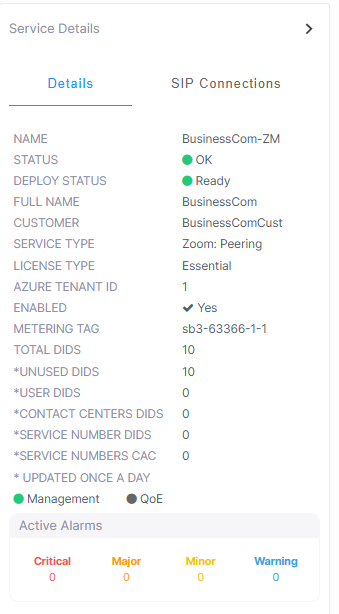
Zoom Peering
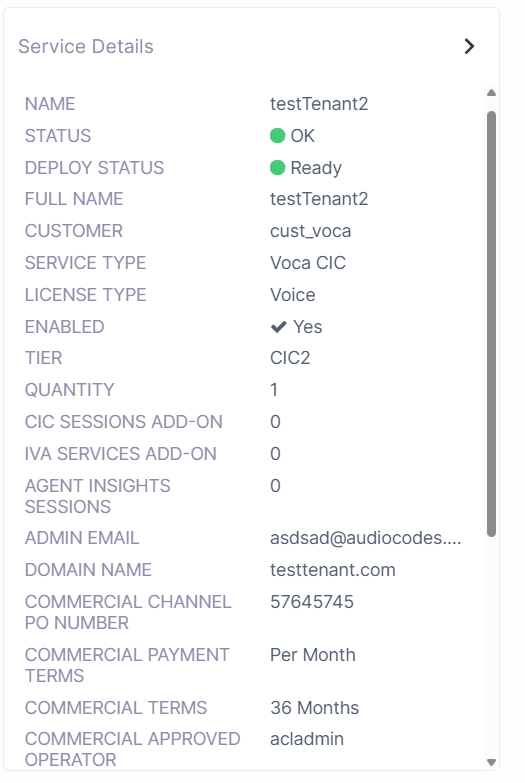
Voca CIC
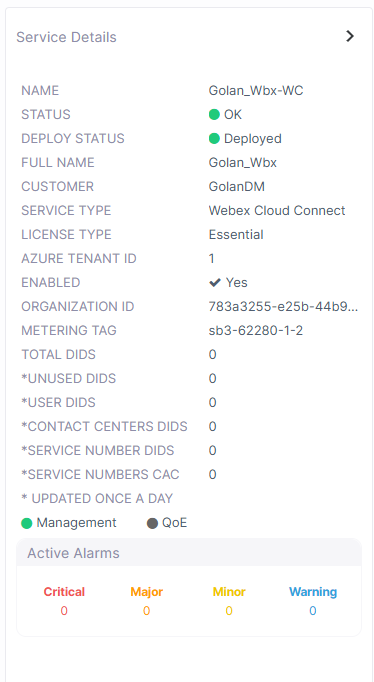
Webex Cloud Connect-Integrated Service
Webex Non-Integrated Service
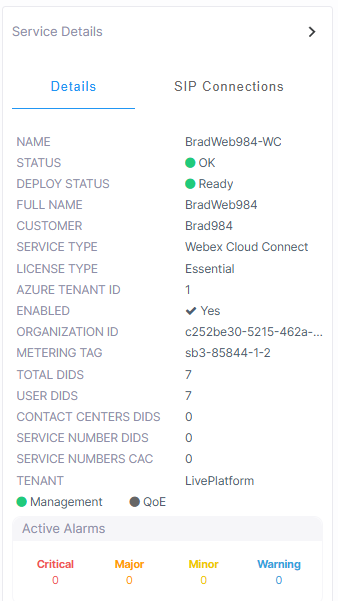
|
Parameter |
Description |
|||||||||||||||||||||||||||||||||||||||||||||||||||||||||
|---|---|---|---|---|---|---|---|---|---|---|---|---|---|---|---|---|---|---|---|---|---|---|---|---|---|---|---|---|---|---|---|---|---|---|---|---|---|---|---|---|---|---|---|---|---|---|---|---|---|---|---|---|---|---|---|---|---|---|
|
Name |
Service Shortname as defined in the Onboarding. |
|||||||||||||||||||||||||||||||||||||||||||||||||||||||||
|
Status |
Management Status (see Management Statuses) |
|||||||||||||||||||||||||||||||||||||||||||||||||||||||||
|
Deploy Status |
||||||||||||||||||||||||||||||||||||||||||||||||||||||||||
|
Full Name |
Service Full name as defined in the Onboarding. |
|||||||||||||||||||||||||||||||||||||||||||||||||||||||||
|
Customer |
Name of the customer attached. |
|||||||||||||||||||||||||||||||||||||||||||||||||||||||||
|
Service Type |
Live Platform Service Type:
|
|||||||||||||||||||||||||||||||||||||||||||||||||||||||||
|
License Type |
The License type of the service:
|
|||||||||||||||||||||||||||||||||||||||||||||||||||||||||
|
Enabled |
Indicates whether the Live Platform license is enabled for the service. |
|||||||||||||||||||||||||||||||||||||||||||||||||||||||||
|
CAC Profile (Direct Routing and Operator Connect) |
Enable Call Admission Control (CAC) profile with configured number of sessions. |
|||||||||||||||||||||||||||||||||||||||||||||||||||||||||
|
Carrier ID |
The Carrier ID of the Service Provider or BYOC SIP Trunk (Proxy Set on the SBC device). |
|||||||||||||||||||||||||||||||||||||||||||||||||||||||||
|
Used DIDS |
M365 user properties including phone number assignment is not supported for Hosted Essentials services.
|
|||||||||||||||||||||||||||||||||||||||||||||||||||||||||
|
Unused DIDS |
|
|||||||||||||||||||||||||||||||||||||||||||||||||||||||||
|
Total DIDS |
|
|||||||||||||||||||||||||||||||||||||||||||||||||||||||||
|
Users Count |
|
|||||||||||||||||||||||||||||||||||||||||||||||||||||||||
|
Tenant |
Name of the attached Live Platform Service Provider tenant. |
|||||||||||||||||||||||||||||||||||||||||||||||||||||||||
|
Management and QoE Status |
Indicates the status of the Management and QoE managed entities. |
|||||||||||||||||||||||||||||||||||||||||||||||||||||||||
|
Active Alarms |
Summary of Active Alarms for the service (click to drill down to Service alarms). See Monitoring Alarms from Customer Service Sites. |
|||||||||||||||||||||||||||||||||||||||||||||||||||||||||
|
Device Manager |
||||||||||||||||||||||||||||||||||||||||||||||||||||||||||
|
Service Device URL |
The URL used by the service to retrieve firmware and configuration files from Live Platform. Used by AudioCodes Redirect server for initial provisioning of phone upon connection to the network. |
|||||||||||||||||||||||||||||||||||||||||||||||||||||||||
|
Max Meetings Devices |
The Maximum number of licensed Meeting Room devices. |
|||||||||||||||||||||||||||||||||||||||||||||||||||||||||
|
Max Personal Devices |
The Maximum number of licensed Personal Devices. |
|||||||||||||||||||||||||||||||||||||||||||||||||||||||||
|
Meeting Device (Disconnected/Total) |
The number of disconnected devices in proportion to the total number of devices that are attached to the service. |
|||||||||||||||||||||||||||||||||||||||||||||||||||||||||
|
Personal Devices / |
|
|||||||||||||||||||||||||||||||||||||||||||||||||||||||||
| AI Summary (only for AI Summary license type) |
The following are only shown if AI Summary Status is enabled:
|
|||||||||||||||||||||||||||||||||||||||||||||||||||||||||
|
Live CX |
||||||||||||||||||||||||||||||||||||||||||||||||||||||||||
|
Metering Tag |
The ID tag used to identify the SIP Connection that is attached to the service. For example sb1-1316004-508-3. This value is also displayed in the SIP Connection details in the Services page. Note that the Live Platform instance is appended to the value in the Live Platform Service Details. |
|||||||||||||||||||||||||||||||||||||||||||||||||||||||||
|
Total DIDs |
The total number of DIDs loaded to the customer tenant. |
|||||||||||||||||||||||||||||||||||||||||||||||||||||||||
|
Contact Center DIDs |
The total number of DIDs loaded to customer tenant of number type Contact Center (this is the only number type supported for the CX service). |
|||||||||||||||||||||||||||||||||||||||||||||||||||||||||
|
Live UC, Webex Cloud Connect and Zoom Peering |
|
|||||||||||||||||||||||||||||||||||||||||||||||||||||||||
|
Metering Tag (CID) |
The ID tag used to identify the SIP Connection that is attached to the service. For example sb1-1316004-508-3. This value is also displayed in the SIP Connection details in the Services portal. Note that the Live Platform instance is appended to the value in the Live Platform Service Details. |
|||||||||||||||||||||||||||||||||||||||||||||||||||||||||
|
Total DIDs |
The total number of DIDs loaded to the customer tenant. |
|||||||||||||||||||||||||||||||||||||||||||||||||||||||||
|
Unused DIDs |
The total number of DIDs that are not yet assigned to users. |
|||||||||||||||||||||||||||||||||||||||||||||||||||||||||
|
User DIDs |
The total number of DIDs assigned to customer tenant of number type "user" for user voice calling. |
|||||||||||||||||||||||||||||||||||||||||||||||||||||||||
|
Contact Centers DIDs |
The total number of DIDs loaded to customer tenant of number type Contact Center. |
|||||||||||||||||||||||||||||||||||||||||||||||||||||||||
|
Service Number DIDs |
The total number of DIDs loaded to customer tenant of number type 'Service' for service numbers such for applications such as Fax IVR and Emergency calling. |
|||||||||||||||||||||||||||||||||||||||||||||||||||||||||
|
Service Numbers CAC |
The total CAC value aggregated for the Service numbers DIDs. |
|||||||||||||||||||||||||||||||||||||||||||||||||||||||||
|
updated once a day |
The parameters indicated with * are synchronized once a day with the Webex Cloud Connect platform when the managed Webex Cloud Connect is integrated. |
|||||||||||||||||||||||||||||||||||||||||||||||||||||||||
|
Interaction Insights |
||||||||||||||||||||||||||||||||||||||||||||||||||||||||||
|
Teams Recording Enabled |
Indicates whether recording of Microsoft Teams calls is enabled for the Interaction Insights tenant. |
|||||||||||||||||||||||||||||||||||||||||||||||||||||||||
|
Users Count |
The number of users licensed for Teams recording. |
|||||||||||||||||||||||||||||||||||||||||||||||||||||||||
|
IM Enabled |
Indicates whether recording of Microsoft Teams Instant Messages is enabled. |
|||||||||||||||||||||||||||||||||||||||||||||||||||||||||
|
IM Users Count |
The number of users licensed for Instant Message recording. |
|||||||||||||||||||||||||||||||||||||||||||||||||||||||||
|
IM Users Consumed |
The number of users for which Instant Messages are recorded. |
|||||||||||||||||||||||||||||||||||||||||||||||||||||||||
|
SIPREC Enabled |
Indicates whether recording of SIPREC sessions is enabled. |
|||||||||||||||||||||||||||||||||||||||||||||||||||||||||
|
SIPREC Sessions Count |
The number of licensed concurrent SIPREC sessions recordings. |
|||||||||||||||||||||||||||||||||||||||||||||||||||||||||
|
SIPREC Sessions Consumed |
The number of consumed SIPREC sessions recordings. |
|||||||||||||||||||||||||||||||||||||||||||||||||||||||||
|
STT Enabled |
Indicates whether transcription recording is enabled. |
|||||||||||||||||||||||||||||||||||||||||||||||||||||||||
|
STT Hours Count |
The number of licensed transcription hours. |
|||||||||||||||||||||||||||||||||||||||||||||||||||||||||
|
STT Monthly Hours Consumed |
The number of transcription hours consumed in the last month. |
|||||||||||||||||||||||||||||||||||||||||||||||||||||||||
|
STT Daily Minutes Consumed |
The number of transcription minutes consumed in the last 24 hours. |
|||||||||||||||||||||||||||||||||||||||||||||||||||||||||
|
Unlimited Retention (Interaction Insights) |
Indicates whether the Unlimited Retention feature is enabled. This feature enables unlimited Azure Blob recording storage capabilities for the service. |
|||||||||||||||||||||||||||||||||||||||||||||||||||||||||
|
Video & Screen Share |
Indicates whether Video & Screen sharing recording is enabled for the service. |
|||||||||||||||||||||||||||||||||||||||||||||||||||||||||
|
Meeting Insights |
||||||||||||||||||||||||||||||||||||||||||||||||||||||||||
|
AI Monthly Quota |
The Total number of hours allowed for AI usage per month, configured in the Tenant Management ('AI Monthly Hours'). |
|||||||||||||||||||||||||||||||||||||||||||||||||||||||||
|
Custom Templates |
Indicates whether Custom templates are enabled. |
|||||||||||||||||||||||||||||||||||||||||||||||||||||||||
|
Limited Prebuild Templates |
Indicates whether Limited Prebuild templates are enabled. |
|||||||||||||||||||||||||||||||||||||||||||||||||||||||||
|
Advanced Prebuild Templates |
Indicates whether Advanced Prebuild templates are enabled. |
|||||||||||||||||||||||||||||||||||||||||||||||||||||||||
|
Extended Retention |
Indicates whether Extended Retention for media storage has been enabled. |
|||||||||||||||||||||||||||||||||||||||||||||||||||||||||
|
AI Monthly Hours Consumed |
The Total number of hours consumed for AI in the month. |
|||||||||||||||||||||||||||||||||||||||||||||||||||||||||
|
Voca CIC |
||||||||||||||||||||||||||||||||||||||||||||||||||||||||||
|
Tier |
The name of the tier configuration . |
|||||||||||||||||||||||||||||||||||||||||||||||||||||||||
|
Quantity |
Number of licensed users for the tier. |
|||||||||||||||||||||||||||||||||||||||||||||||||||||||||
|
CIC Sessions Add On |
Number of licensed CIC sessions. |
|||||||||||||||||||||||||||||||||||||||||||||||||||||||||
|
IVA Sessions Add On |
Number of licensed IVA sessions. |
|||||||||||||||||||||||||||||||||||||||||||||||||||||||||
|
Agent Insights Sessions |
Number of licensed Agent Insights sessions. |
|||||||||||||||||||||||||||||||||||||||||||||||||||||||||
|
Admin Email |
Email of the tenant administrator of the service. |
|||||||||||||||||||||||||||||||||||||||||||||||||||||||||
|
Domain Name |
Domain Name of the Voca CIC service. |
|||||||||||||||||||||||||||||||||||||||||||||||||||||||||
|
Service Entity |
The Voca CIC device (sub region) attached to the in the Services tab of the Managing entity (Service Provider or tenant). |
|||||||||||||||||||||||||||||||||||||||||||||||||||||||||
|
Tenant |
The name of the Voca CIC Service Provider tenant. |
|||||||||||||||||||||||||||||||||||||||||||||||||||||||||
Commercial Tracking (only if enabled for the service)
|
Parameter |
Description |
||||||||||||
|---|---|---|---|---|---|---|---|---|---|---|---|---|---|
| Commercial Channel PO Number |
The channel purchase order number.
|
||||||||||||
| Commercial Payment Terms | One-time payment, monthly, or yearly. | ||||||||||||
| Commercial Terms | Pay-as-you-go, 12 months, 24 months, or 36 months. | ||||||||||||
| Commercial Approved Operator | The operator that approved the commercial Terms and Conditions. | ||||||||||||
|
Commercial Approval Time |
The date and time of the approval. |
||||||||||||
|
Commercial Deployment Time |
The date of time of the service deployment. |
||||||||||||
|
Commercial Expiry Date |
The expiry date of the deployment. |
SIP Connections
|
Parameter |
Description |
|---|---|
|
Name |
The name of the SIP Connection for the service. For example, SouthSide-c. |
|
Source |
The name of the SBC attached to the SIP Connection. |
|
Users Count |
The counter representing the voice-enabled users |
|
CAC Profile |
The name of the preconfigured CAC Profile call session number template. |
|
Carrier Name |
The name of the configured Proxy Set. |
|
Management Status |
See Management Statuses. |
Teams
|
Parameter |
Description |
|---|---|
|
Name |
Name of the SIP Connection for the service. For example, SouthSide-c. |
|
Management Status |
See Management Statuses. . |