Basic Call Transcription
This feature provides Interaction Insights with the capability to transcript call recordings (currently Teams calls only).
Enabling Transcription on Tenant
When generating or editing an Interaction Insights tenant, the Tenant Admin can enable or disable transcription. Currently, the maximum number of transcribed recording hours per month is set to 99,999 and cannot be changed.
If transcription is disabled, call recordings cannot be transcribed in Interaction Insights.
Transcription Related Permissions
In Interaction Insights, permissions are granted through Access Profiles. In this release, the following transcription related permissions have been added or enhanced:
| ■ | Create or edit transcriptions |
| ■ | Create and modify analytics profiles, recording profiles, and device recording profiles |
Once your Interaction Insight system has been upgraded to this release version, enable transcription related permissions in your access profiles. These permissions are disabled by default.
Analytics Profiles
To have call recordings transcribed, the recorded users must be associated with an Analytics Profile. The association is made through the Recording Profiles assigned to the user. If a user's Recording Profile does not specify an Analytics Profile, that user's recordings cannot be transcribed.
Analytics Profiles are configured in the Interaction Insights Customer Portal by Customer Portal administrators, or by Customer Portal users with the appropriate permissions in their Access Profile. An Analytics Profile specifies:
| ■ | Whether the transcription should be automatically performed at the end of a recorded call, or be started manually by authorized users. |
| ● | For automated transcription, the transcription language. Recordings will always be transcribed in that language. |
| ● | For manually triggered transcription, the language or languages that can be selected for transcription. |
| ■ | Whether profane language should be hidden (default) or spelled out. |
Analytics Profiles are managed from the Analytics Profiles page, which also displays the total number of recording hours transcribed compared to the maximum allowed.
Viewing and Monitoring Transcriptions
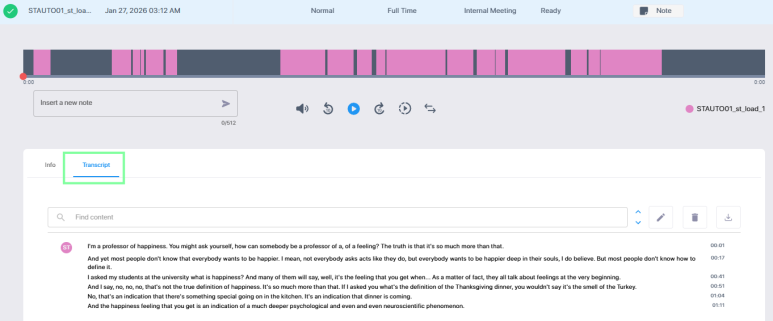
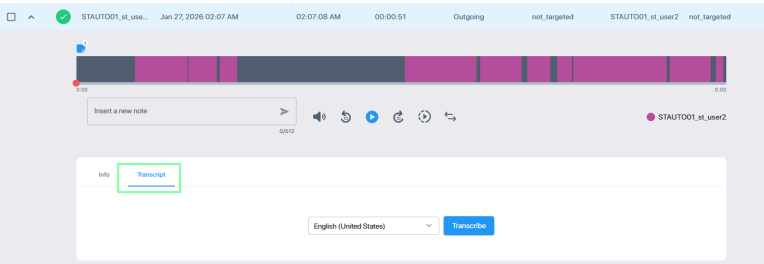
Users with permissions to access transcriptions can view or start the transcription of a call recording, depending on the applicable Analytics Profile.
| ■ | If the profile is set up for automatic transcription, the transcription is displayed on the Transcript tab. |
| ■ | If the profile is set up for manual transcription, the user can select a language and start the transcription. |
| ■ | If no Analytics Profile is associated, the Transcript tab is disabled. |
The user can edit a transcription, search for and replace content, or delete the transcription and start a new one. The transcription can also be downloaded.
Filtering by Transcription Status or Analytics Profile
Columns have been added to pages listing interactions, recording profiles , or users, allowing you to view or filter by the associated Transcription Status or Analytics Profile.
Monitoring Transcription Related Changes
| ■ | If the number of used transcription hours reaches 80% or 100% of the allowed maximum, an alarm is raised and added to the System Activity Log. |
| ■ | Transcription related changes are audited in the Audit Trail. |