Add Phone Prefix SIP Connection
The Phone Prefix SIP connections lets you monitor call data traversing specific phone prefixes configured on the SBC device.
Ensure that the SBC device attached to the LiveOps 360 Management service is connected to Live Platform portal and has been properly configured.
| ➢ | Do the following: |
| 1. | From the Add SIP Connection drop-down, choose Phone Prefix. |
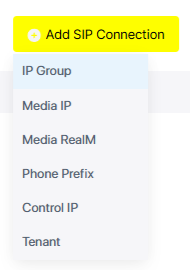
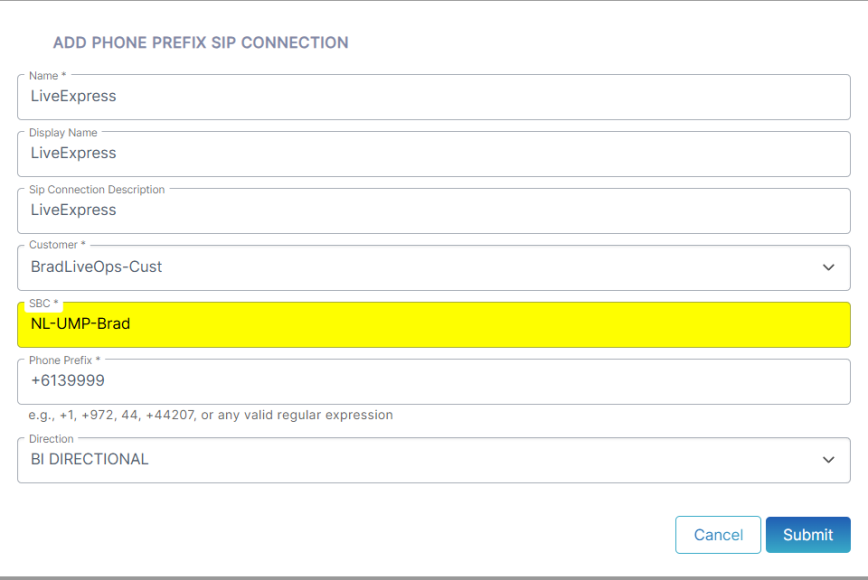
| 2. | Configure parameters according to the table below and then click Submit. |
|
Parameter |
Description |
|||||||||||||||||||||
|---|---|---|---|---|---|---|---|---|---|---|---|---|---|---|---|---|---|---|---|---|---|---|
|
Name |
The name of the SIP connection. |
|||||||||||||||||||||
|
Display Name |
The Display name in the Live Platform portal SIP Connection page. |
|||||||||||||||||||||
|
SIP Connection Description |
A Brief description of the connection. |
|||||||||||||||||||||
|
Customer |
From the drop-down list, select the customer to attach to the connection. |
|||||||||||||||||||||
|
SBC |
From the drop-down list, select the SBC device to attach to the connection. |
|||||||||||||||||||||
|
Phone Prefix |
Enter the valid phone prefix or regular expression with comma separation. Following are examples of regular expressions:
To test complex regular expressions use either:
|
|||||||||||||||||||||
|
Direction |
Indicates the direction of the call traffic managed by the SIP Connection.
|
A confirmation message is displayed upon successful creation of the service and the details of the new connection are displayed.

