Managing Operator Connect SIP Connections
Operator Connect SIP Connection management includes the following:
| ■ | Add Calling Profiles (see Managing Operator Connect SIP Connections) |
| ■ | Manage numbers in SBC dial plans (see Managing SBC Prefixes) |
| ➢ | To manage SIP Connections: |
| 1. | In the Service portal Navigation pane, select Configuration > SIP Connections. |
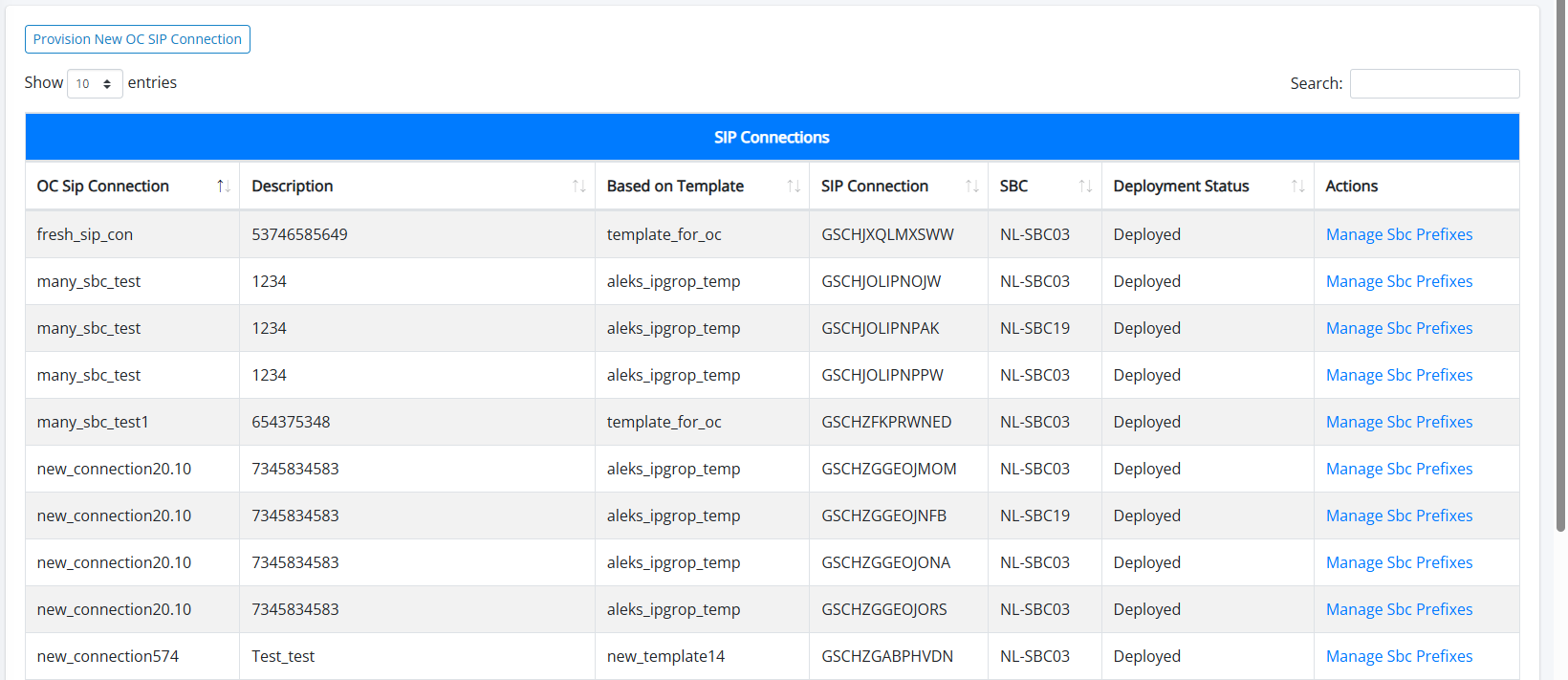
The table below describes the site location parameters.
OC SIP Connections
|
Parameter |
Description |
|---|---|
|
OC SIP Connection |
The name of the Operator Connect SIP Connection that is attached to a specific Calling Profile template and Proxy Set. A Calling Profile template can only be mapped to single OC SIP Connection, however a specific Proxy Set can be attached to multiple OC SIP Connections. |
|
Description |
Free text description. |
|
Based on Template |
The name of the attached Calling Profile template. |
|
SIP Connection |
The name of the SIP Connection that is created on Live Platform and on the SBC device. |
|
SBC |
The name of the SBC device through which the SIP Connection is configured. |
|
Deployment Status |
Indicates the SBC deployment state. |
|
Actions |