Services Details Quick Glance
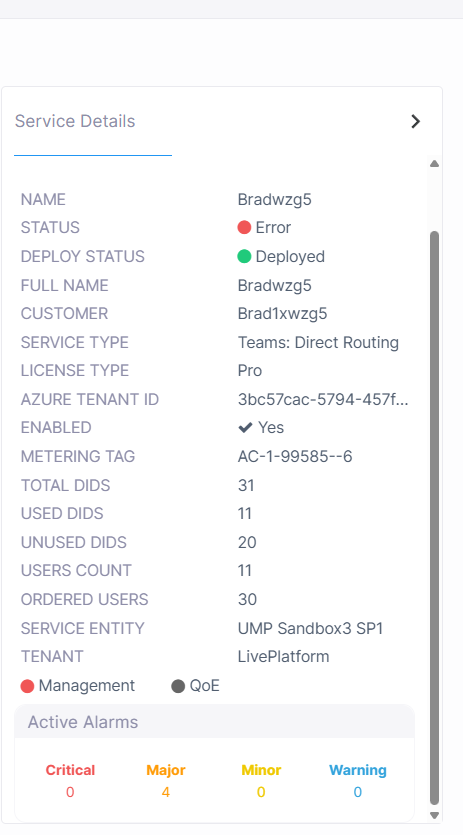
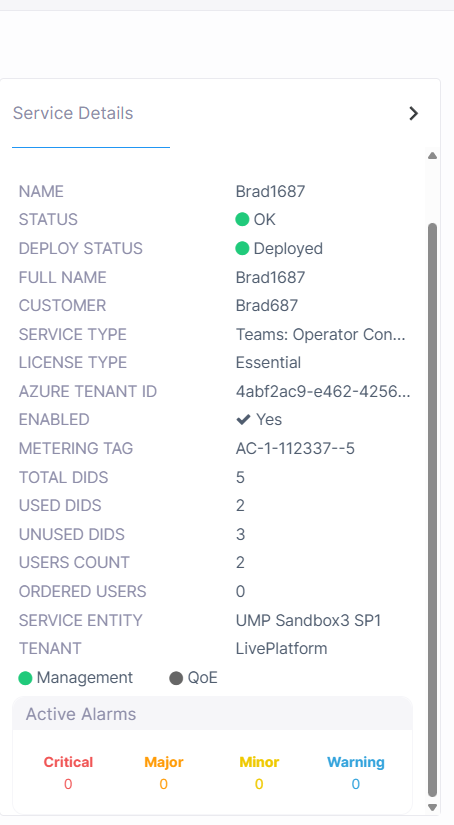
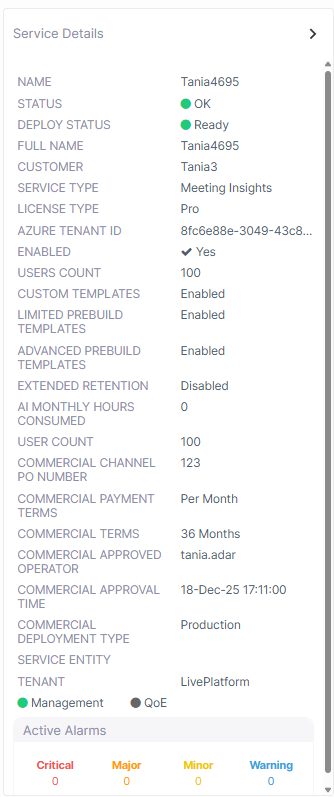
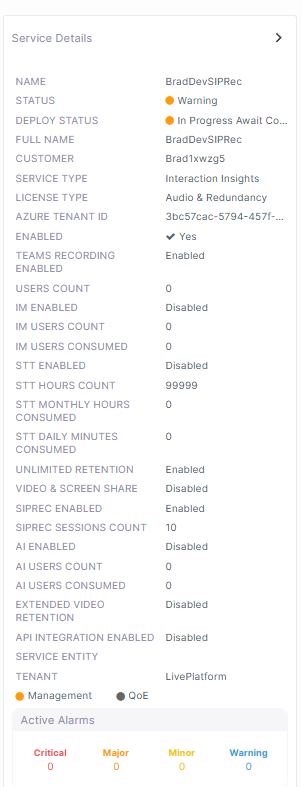
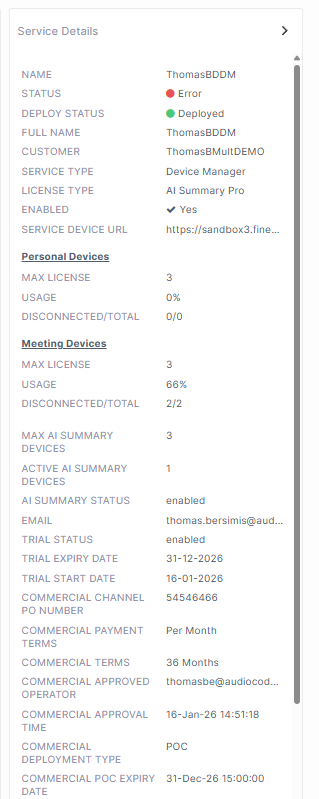
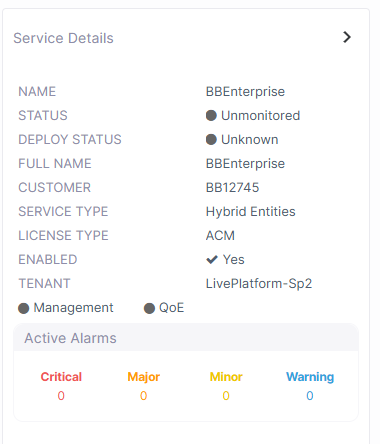
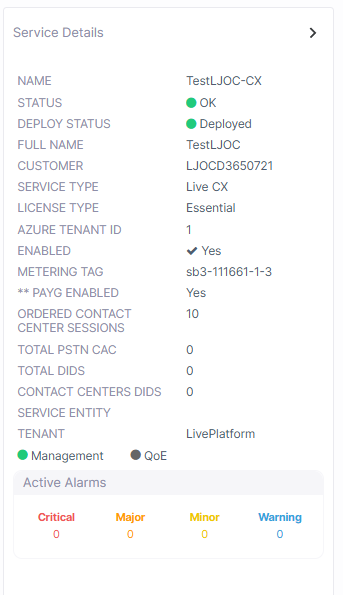
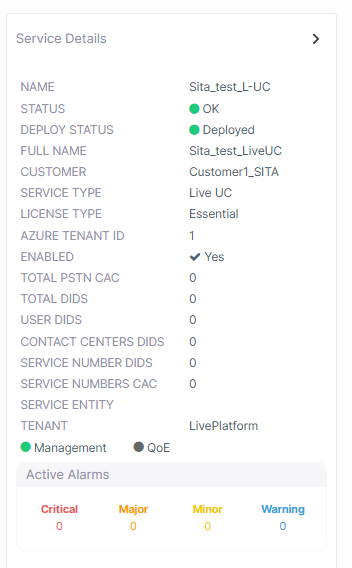
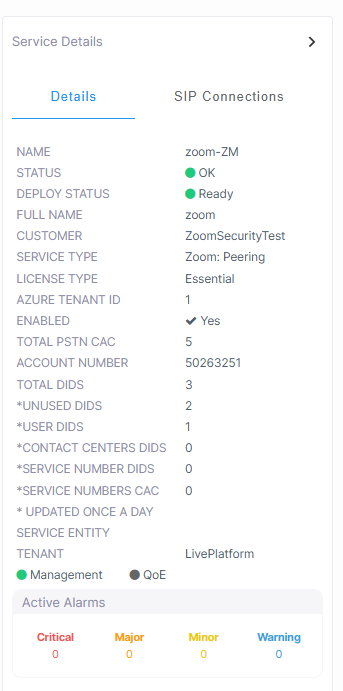
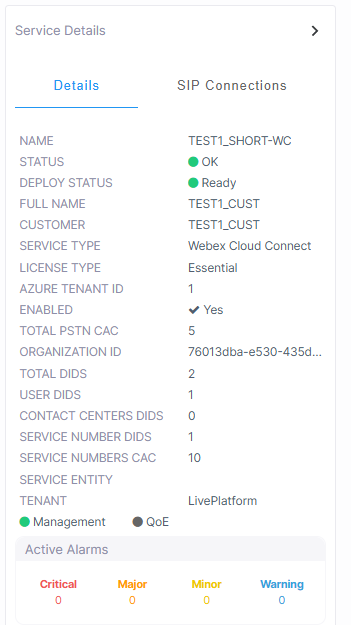
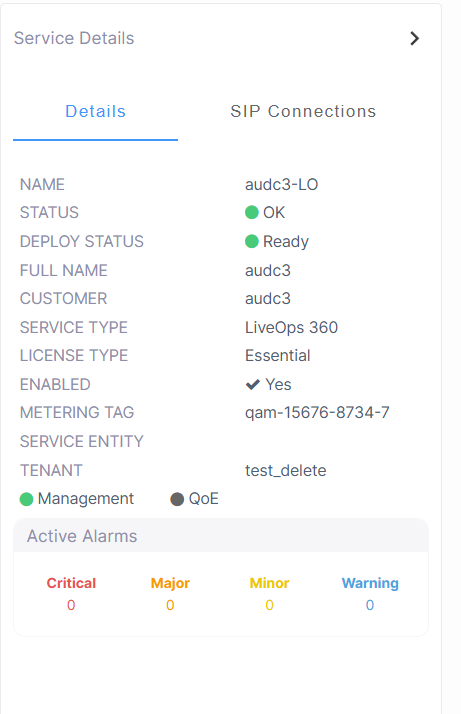
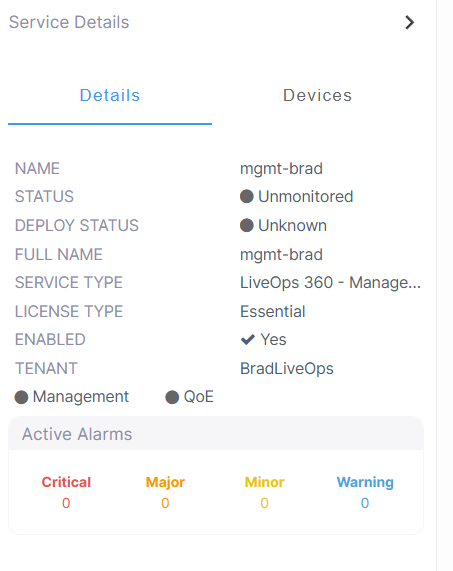
The Service Details pane provides you with a quick glance summary of the status of the service including the following information:
| ■ | Customer naming details |
| ■ | Entity topology |
| ■ | Licensing information |
| ■ | Configuration of user, number and other feature capacities and monitoring of their respective usages |
| ■ | Indicators of enabled features |
| ■ | Component statuses |
| ■ | Details of active alarms |
| ■ | Details of attached SIP Connections |
| ➢ | Do the following: |
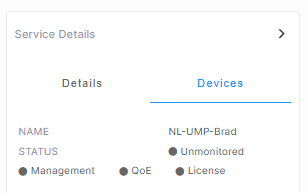
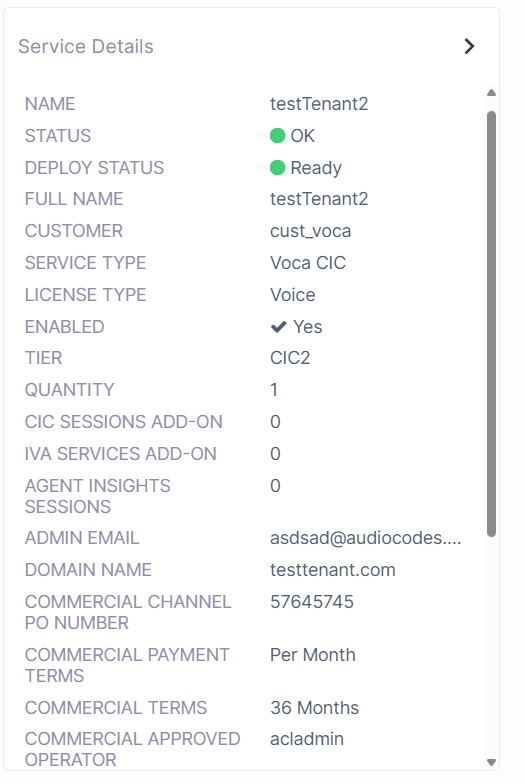
| 1. | Select the check box adjacent to the service whose details you wish to view. The Service Details are displayed in the right pane. |
|
Direct Routing |
Operator Connect |
|
|
|
|
Meeting Insights |
Interaction Insights |
|
|
|
|
Device Manager |
Hybrid Entities |
|
|
|
|
Live CX |
Live UC |
|
|
|
| Zoom Provider Exchange | Webex Cloud Connect-Integrated Service |
|
|
|
|
LiveOps 360 Service |
LiveOps Management Service |
|
|
|
| Voca CIC |
|
|
|
|
|
Parameter |
Description |
|||||||||||||||||||||||||||||||||||||||||||||||||||||||||
|---|---|---|---|---|---|---|---|---|---|---|---|---|---|---|---|---|---|---|---|---|---|---|---|---|---|---|---|---|---|---|---|---|---|---|---|---|---|---|---|---|---|---|---|---|---|---|---|---|---|---|---|---|---|---|---|---|---|---|
|
Name |
Service Shortname as defined in the Onboarding. |
|||||||||||||||||||||||||||||||||||||||||||||||||||||||||
|
Status |
Management Status (see Management Statuses) |
|||||||||||||||||||||||||||||||||||||||||||||||||||||||||
|
Deploy Status |
||||||||||||||||||||||||||||||||||||||||||||||||||||||||||
|
Full Name |
Service Full name as defined in the Onboarding. |
|||||||||||||||||||||||||||||||||||||||||||||||||||||||||
|
Customer |
Name of the customer attached. |
|||||||||||||||||||||||||||||||||||||||||||||||||||||||||
|
Service Type |
Live Platform Service Type:
|
|||||||||||||||||||||||||||||||||||||||||||||||||||||||||
|
License Type |
The License type of the service:
|
|||||||||||||||||||||||||||||||||||||||||||||||||||||||||
|
Enabled |
Indicates whether the Live Platform license is enabled for the service. |
|||||||||||||||||||||||||||||||||||||||||||||||||||||||||
|
Metering Tag |
This tag assigned to DIDs and is used by the Metering server for billing purposes. This value is a unique identifier representing the entity in the Live Platform topology
|
|||||||||||||||||||||||||||||||||||||||||||||||||||||||||
|
CAC Profile (Direct Routing and Operator Connect) |
Enable Call Admission Control (CAC) profile with configured number of sessions. |
|||||||||||||||||||||||||||||||||||||||||||||||||||||||||
|
Carrier ID |
The Carrier ID of the Service Provider or BYOC SIP Trunk (Proxy Set on the SBC device). |
|||||||||||||||||||||||||||||||||||||||||||||||||||||||||
|
Total DIDS |
Numbers that are configured as either SBC prefixes, unassigned number ranges or Line URIs.
|
|||||||||||||||||||||||||||||||||||||||||||||||||||||||||
|
Used DIDs |
M365 user properties including phone number assignment is not supported for Hosted Essentials services.
|
|||||||||||||||||||||||||||||||||||||||||||||||||||||||||
|
Unused DIDS |
|
|||||||||||||||||||||||||||||||||||||||||||||||||||||||||
|
Users Count |
|
|||||||||||||||||||||||||||||||||||||||||||||||||||||||||
|
Ordered Users |
The number of licenses configured in the Onboarding wizard. For Direct Routing and Operator Connect services, this value is indicated as Acquired Licenses in the License page in the Service portal. |
|||||||||||||||||||||||||||||||||||||||||||||||||||||||||
|
Tenant |
Name of the attached Live Platform Service Provider tenant. |
|||||||||||||||||||||||||||||||||||||||||||||||||||||||||
|
Management and QoE Status |
Indicates the status of the Management and QoE managed entities. |
|||||||||||||||||||||||||||||||||||||||||||||||||||||||||
|
Active Alarms |
Summary of Active Alarms for the service (click to drill down to Service alarms). See Monitoring Alarms from Customer Sites. |
|||||||||||||||||||||||||||||||||||||||||||||||||||||||||
|
Device Manager |
||||||||||||||||||||||||||||||||||||||||||||||||||||||||||
|
Service Device URL |
The URL used by the service to retrieve firmware and configuration files from Live Platform. Used by AudioCodes Redirect server for initial provisioning of phone upon connection to the network. |
|||||||||||||||||||||||||||||||||||||||||||||||||||||||||
|
Max Meetings Devices |
The maximum number of licensed Meeting Room devices. |
|||||||||||||||||||||||||||||||||||||||||||||||||||||||||
|
Personal Devices / |
|
|||||||||||||||||||||||||||||||||||||||||||||||||||||||||
| AI Summary (only for AI Summary license type) |
The following are only shown if AI Summary Status is enabled:
|
|||||||||||||||||||||||||||||||||||||||||||||||||||||||||
|
UCaaS Services including Live CX, Live UC, Webex Cloud Connect and Zoom Provider Exchange |
||||||||||||||||||||||||||||||||||||||||||||||||||||||||||
|
PayG Enabled |
The Pay-as-you-go feature enables you to support future growth and flexibility scenarios. This feature let's you expand your service beyond the pre-allocated license quantity if required, without incurring an operational restriction in the platform. The availability of this field does not modify the current licensing model, billing methodology, commercial agreement, or committed quantities. Current commercial terms remain unchanged. If AudioCodes implements any future changes to Pay-as-you-go functionality, billing methodology, or commercial terms, those changes will be communicated in advance and reflected in the applicable service documentation and agreements before taking effect. |
|||||||||||||||||||||||||||||||||||||||||||||||||||||||||
|
Ordered User 1 |
The ordered number of licensed sessions (configured in the Onboarding) for managing numbers of type "User": User-based phone number that allows the user two sessions (one concurrent call and one forwarded call transferred back through the SBC). |
|||||||||||||||||||||||||||||||||||||||||||||||||||||||||
|
Ordered Service Number sessions |
The ordered number of licensed sessions (configured in the Onboarding) for managing numbers of type "Service": Session-based unique main phone number that is limited to three or more sessions or concurrent calls (e.g., for groups of users sharing the same E.164 phone number call queues, shared calling, auto-attendants, IVRs, BOTS, hunt groups, etc.). |
|||||||||||||||||||||||||||||||||||||||||||||||||||||||||
|
Ordered Contact Center sessions |
The ordered number of licensed sessions (configured in the Onboarding) for managing numbers of type "Contact Center": Session-based main phone number for a contact center. The contact center number can be limited to three or more sessions or can be open-ended (sessions will be billed according to actual usage). |
|||||||||||||||||||||||||||||||||||||||||||||||||||||||||
|
Total PSTN CAC |
The total CAC value aggregated for the CAC sessions that are configured for the PSTN SIP connections This value is not configured at the "Number" level. |
|||||||||||||||||||||||||||||||||||||||||||||||||||||||||
|
Account Number (Zoom Provider Exchange) |
The account number of the Zoom Provider Exchange customer. |
|||||||||||||||||||||||||||||||||||||||||||||||||||||||||
|
Organization ID (Webex Cloud Connect) |
The Webex Cloud Connect Organization ID of the customer. |
|||||||||||||||||||||||||||||||||||||||||||||||||||||||||
|
Contact Center DIDs |
The total number of DIDs loaded to customer tenant of number type Contact Center (this is the only number type supported for the CX service). |
|||||||||||||||||||||||||||||||||||||||||||||||||||||||||
|
Total DIDs |
The total number of used and unused DIDs. |
|||||||||||||||||||||||||||||||||||||||||||||||||||||||||
|
Unused DIDs2 |
The total number of DIDs that are not yet assigned to users. |
|||||||||||||||||||||||||||||||||||||||||||||||||||||||||
|
User DIDs3 |
The total number of DIDs assigned to customer tenant of number type "user" for user voice calling. |
|||||||||||||||||||||||||||||||||||||||||||||||||||||||||
|
Contact Centers DIDs |
The total number of DIDs loaded to customer tenant of number type Contact Center. |
|||||||||||||||||||||||||||||||||||||||||||||||||||||||||
|
Service Number DIDs4 |
The total number of DIDs loaded to customer tenant of number type 'Service' for service numbers such for applications such as Fax IVR and Emergency calling. |
|||||||||||||||||||||||||||||||||||||||||||||||||||||||||
|
Service Numbers CAC |
The total CAC value aggregated for the Service number DIDs. |
|||||||||||||||||||||||||||||||||||||||||||||||||||||||||
|
Updated Once a Day |
The parameters indicated with * are synchronized once a day for integrated services. This parameter is relevant for WebEx Cloud Connect and Zoom Carrier Exchange services. |
|||||||||||||||||||||||||||||||||||||||||||||||||||||||||
|
Interaction Insights |
||||||||||||||||||||||||||||||||||||||||||||||||||||||||||
|
Teams Recording Enabled |
Indicates whether recording of Microsoft Teams calls is enabled for the Interaction Insights tenant. |
|||||||||||||||||||||||||||||||||||||||||||||||||||||||||
|
Users Count |
The number of users licensed for Teams recording. |
|||||||||||||||||||||||||||||||||||||||||||||||||||||||||
|
IM Enabled |
Indicates whether recording of Microsoft Teams Instant Messages is enabled. |
|||||||||||||||||||||||||||||||||||||||||||||||||||||||||
|
IM Users Count |
The number of users licensed for Instant Message recording. |
|||||||||||||||||||||||||||||||||||||||||||||||||||||||||
|
IM Users Consumed |
The number of users for which Instant Messages are recorded. |
|||||||||||||||||||||||||||||||||||||||||||||||||||||||||
|
SIPREC Enabled |
Indicates whether recording of SIPREC sessions is enabled. |
|||||||||||||||||||||||||||||||||||||||||||||||||||||||||
|
SIPREC Sessions Count |
The number of licensed concurrent SIPREC sessions recordings. |
|||||||||||||||||||||||||||||||||||||||||||||||||||||||||
|
SIPREC Sessions Consumed |
The number of consumed SIPREC sessions recordings. |
|||||||||||||||||||||||||||||||||||||||||||||||||||||||||
|
STT Enabled |
Indicates whether transcription recording is enabled. |
|||||||||||||||||||||||||||||||||||||||||||||||||||||||||
|
STT Hours Count |
The number of licensed transcription hours. |
|||||||||||||||||||||||||||||||||||||||||||||||||||||||||
|
STT Monthly Hours Consumed |
The number of transcription hours consumed in the last month. |
|||||||||||||||||||||||||||||||||||||||||||||||||||||||||
|
STT Daily Minutes Consumed |
The number of transcription minutes consumed in the last 24 hours. |
|||||||||||||||||||||||||||||||||||||||||||||||||||||||||
|
Unlimited Retention (Interaction Insights) |
Indicates whether the Unlimited Retention feature is enabled. This feature enables unlimited Azure Blob recording storage capabilities for the service. |
|||||||||||||||||||||||||||||||||||||||||||||||||||||||||
|
Video & Screen Share |
Indicates whether Video & Screen sharing recording is enabled for the service. |
|||||||||||||||||||||||||||||||||||||||||||||||||||||||||
|
Extended Video Retention |
Indicates whether Extended Video Retention is enabled for the service. When enabled, the Retention period can be extended in 6-month increments, up to a defined Maximum limit. |
|||||||||||||||||||||||||||||||||||||||||||||||||||||||||
|
AI Enabled |
Indicates whether the AI Summary feature is enabled for the service. |
|||||||||||||||||||||||||||||||||||||||||||||||||||||||||
|
AI Users Count |
The number of users who are licensed with the AI Summary feature. |
|||||||||||||||||||||||||||||||||||||||||||||||||||||||||
|
AI Users Consumed |
The number of users for whom AI Summary recordings have been generated. |
|||||||||||||||||||||||||||||||||||||||||||||||||||||||||
|
API Integration Enabled |
Indicates whether API Integration is enabled for the service. If enabled, exposes an API for integrating Interaction Insights with the customer's system. |
|||||||||||||||||||||||||||||||||||||||||||||||||||||||||
|
Meeting Insights |
||||||||||||||||||||||||||||||||||||||||||||||||||||||||||
|
License type |
The license type for the service:
|
|||||||||||||||||||||||||||||||||||||||||||||||||||||||||
|
Custom Templates |
Indicates whether the "Custom Templates" feature is enabled for the service. |
|||||||||||||||||||||||||||||||||||||||||||||||||||||||||
|
Limited Prebuild Templates |
Indicates whether the "Limited Prebuild" templates feature is enabled for the service. |
|||||||||||||||||||||||||||||||||||||||||||||||||||||||||
|
Advanced Prebuild Templates |
Indicates whether the "Advanced Prebuild" templates feature is enabled for the service. |
|||||||||||||||||||||||||||||||||||||||||||||||||||||||||
|
Extended Retention |
Indicates whether the "Extended Retention" feature for media storage is enabled for the service. |
|||||||||||||||||||||||||||||||||||||||||||||||||||||||||
|
License Modified |
Indicates that the license has been upgraded. |
|||||||||||||||||||||||||||||||||||||||||||||||||||||||||
|
API Integration Enabled |
Indicates that the Meeting Insights REST API integration is enabled for the service. |
|||||||||||||||||||||||||||||||||||||||||||||||||||||||||
|
AI Monthly Hours Consumed |
The total number of hours consumed for AI usage in a month. |
|||||||||||||||||||||||||||||||||||||||||||||||||||||||||
|
Voca CIC |
||||||||||||||||||||||||||||||||||||||||||||||||||||||||||
|
Tier |
The name of the tier configuration . |
|||||||||||||||||||||||||||||||||||||||||||||||||||||||||
|
Quantity |
Number of licensed users for the tier. |
|||||||||||||||||||||||||||||||||||||||||||||||||||||||||
|
CIC Sessions Add On |
Number of licensed CIC sessions. |
|||||||||||||||||||||||||||||||||||||||||||||||||||||||||
|
IVA Sessions Add On |
Number of licensed IVA sessions. |
|||||||||||||||||||||||||||||||||||||||||||||||||||||||||
|
Agent Insights Sessions |
Number of licensed Agent Insights sessions. |
|||||||||||||||||||||||||||||||||||||||||||||||||||||||||
|
Admin Email |
Email of the tenant administrator of the service. |
|||||||||||||||||||||||||||||||||||||||||||||||||||||||||
|
Domain Name |
Domain Name of the Voca CIC service. |
|||||||||||||||||||||||||||||||||||||||||||||||||||||||||
|
Service Entity |
The Voca CIC device (sub region) attached to the in the Services tab of the Managing entity (Service Provider or tenant). |
|||||||||||||||||||||||||||||||||||||||||||||||||||||||||
|
Tenant |
The name of the Voca CIC Service Provider tenant. |
|||||||||||||||||||||||||||||||||||||||||||||||||||||||||
Commercial Tracking (only if enabled for the service)
|
Parameter |
Description |
||||||||||||
|---|---|---|---|---|---|---|---|---|---|---|---|---|---|
| Commercial Channel PO Number |
The channel purchase order number.
|
||||||||||||
| Commercial Payment Terms | One-time payment, monthly, or yearly. | ||||||||||||
| Commercial Terms | Pay-as-you-go, 12 months, 24 months, or 36 months. | ||||||||||||
| Commercial Approved Operator | The operator that approved the commercial Terms and Conditions. | ||||||||||||
|
Commercial Approval Time |
The date and time of the approval. |
||||||||||||
|
Commercial Deployment Time |
The date of time of the service deployment. |
||||||||||||
|
Commercial Expiry Date |
The expiry date of the deployment. |
SIP Connections
|
Parameter |
Description |
|---|---|
|
Name |
The name of the SIP Connection for the service. For example, SouthSide-c. |
|
Source |
The name of the SBC attached to the SIP Connection. |
|
Users Count |
The counter representing the voice-enabled users |
|
CAC Profile |
The name of the preconfigured CAC Profile call session number template. |
|
Carrier Name |
The name of the configured Proxy Set. |
|
Management Status |
See Management Statuses. |
Teams
|
Parameter |
Description |
|---|---|
|
Name |
Name of the SIP Connection for the service. For example, SouthSide-c. |
|
Management Status |
See Management Statuses. . |
| ■ | The number of analog extensions is calculated as the sum of all the IP Group and SBC SIP Registrations. For each IP group SIP Connection, reports the value of SIP registrations PM values 'SBC Successful Registrations' for this IP group in the last 24 hours. |