Before Running wyUpdate
Before running the wyUpdate Tool to upgrade UMP-365 to the latest version, you need to stop UMP-365 services running on the Windows server.
|
1.
|
On the UMP server, open the Windows Services Manager, stop all sysadmin services, or type the following command in PowerShell (Run as Admin) to stop all UMP sysadmin services: |
stop-service sysadmin*
|
2.
|
Type the following PowerShell command to stop all www services/internet IIS services. |
stop-service w3svc
|
3.
|
To verify whether the services have been started, type the following commands: |
get-service sysadmin*
get-service w3svc
|
4.
|
If one of the above services has not been stopped, open the Windows Services Manager (click (click  and type Services) right-click each of the above services, and then select Stop. and type Services) right-click each of the above services, and then select Stop. |
To save time, type only the following command:
stop-service sysadmin*, w3svc
The following services are stopped prior to running the wyUpdate.exe:
|
●
|
all SysAdmin.CacheSrv.[tenant_shortname] |
|
5.
|
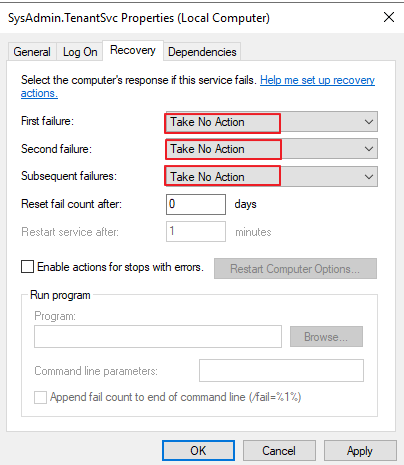
If a service keeps restarting, set the properties of the service SysAdmin.TenantSvc to Take No Action (see example in figure below). |