Architecture
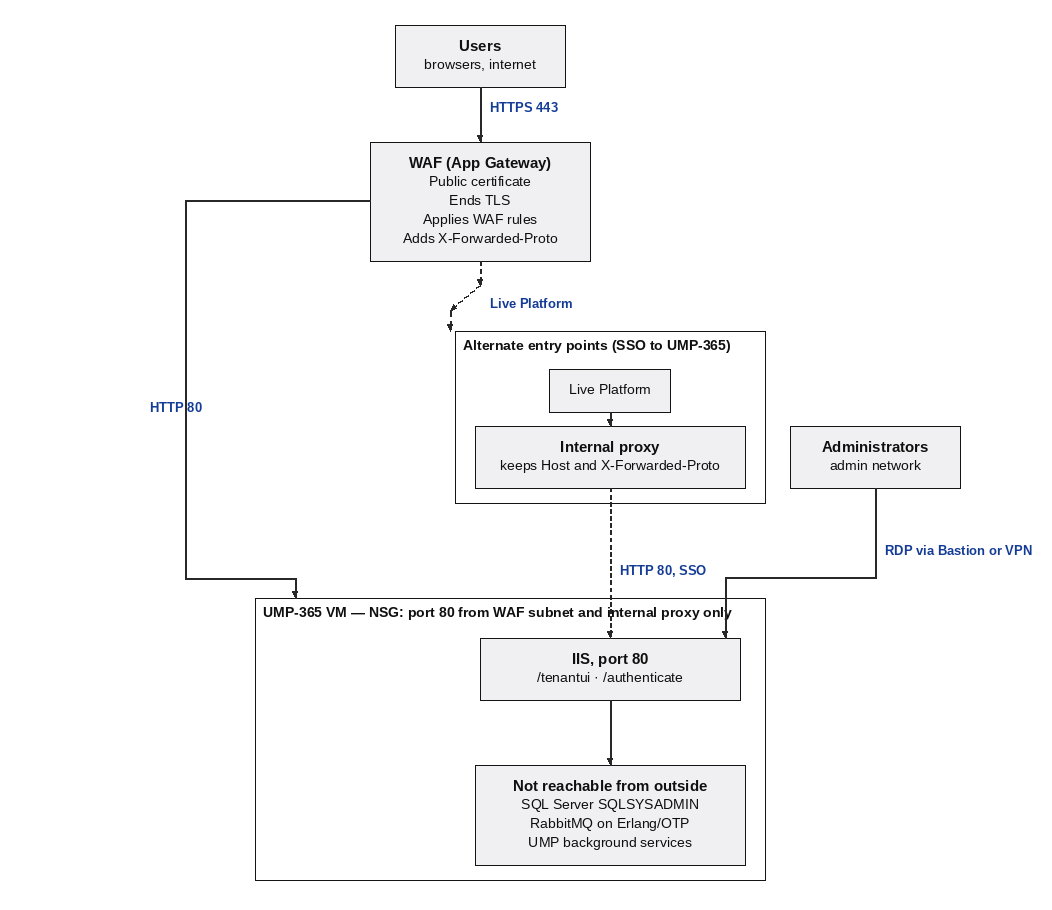
An HTTPS port 443 public internet connection is established between the Live Platform user client browser and WAF. The WAF decrypts the incoming HTTPS traffic, then forwards the request to IIS over HTTP port 80, adding the X-Forwarded-Proto: https header. The network security group allows only the WAF subnet and the internal proxy (shown in the figure below) to reach port 80. SQL Server, RabbitMQ, and the UMP-365 background services are used from inside the VM only. Administrators connect via Remote Desktop to the VM through Azure Bastion or a VPN, never through the WAF.
Live Platform users can connect to the UMP-365 Live Platform portal using Single Sign-on as an alternate entry point, passing through an internal proxy that preserves the Host and X-Forwarded-Proto headers before forwarding the request to IIS on port 80.
Users can also reach UMP-365 through Single sign-on from Live Platform portal . An internal proxy transports the user's requests from Live Platform to UMP-365 on port 80, so UMP-365 itself is still not exposed directly.
| ■ | The proxy server must behave like the WAF towards UMP-365 It keeps the public host name in the Host header and sends X-Forwarded-Proto: https. |
| ■ | The proxy is a second allowed source for port 80. Add it to the NSG rule in Firewall Rules |