
Authenticate using authentication code
Authentication codes provide a robust security layer for the click-to-call functionality, protecting against unauthorized call initiation and potential abuse. By implementing short-lived, single-use codes generated on your secure backend, you gain fine-grained control over who can make calls and when. This approach significantly enhances security compared to static credentials, while still maintaining a seamless user experience.
This method requires your backend system to generate a short-lived authentication code that AudioCodes click-to-call SDK will use to initiate calls.
The following diagram depicts the typical flow of this authentication method:
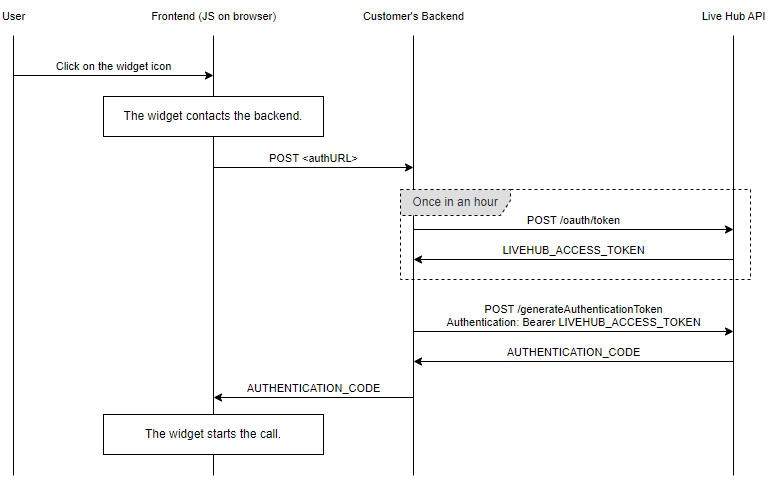
Backend Implementation
Your backend system needs to implement an HTTP endpoint that generates authentication codes.
This endpoint should:
-
Authenticate the user (if applicable to your use case).
-
Make a request to the Live Hub API to generate an authentication code.
-
Return the generated code to your frontend application.
Generating Authentication Code
To generate an authentication code, you need to access Live Hub API.
Follow the instructions on the Secured REST API page to obtain a Live Hub access token. Use the token when accessing the API. The token is valid for an hour, so you can use it for multiple API calls.
After obtaining a token, call the Live Hub generateAuthenticationCode endpoint, see Generating authentication code for Click-to-Call to generate the following authentication code:
POST /api/v1/sipConnections/<sipConnectionId>/generateAuthenticationCode
Host: livehub.audiocodes.io
Authorization: Bearer <LIVEHUB_ACCESS_TOKEN>
Content-Type: application/json

{
  "callerPhone": "+123456789" // optional
}
Replace <sipConnectionId> with your Click-to-Call SIP Connection ID, and <LIVEHUB_ACCESS_TOKEN> with the access token you obtained.
The callerPhone field is optional. If provided, it will be used to assert the caller phone number.
The API will respond with a JSON object containing the authentication code:
{
  "authenticationCode": "LHv1_8e22ba993a094a85af5b3d9fd2c87f2a"
}
Implementation Notes:
-
If applicable, this endpoint should authenticate the user that browses your site. This can be done either by using the user’s session cookie or by implementing your own logic on the frontend for passing a bearer token to the backend. See below for more details.
-
The generated authentication code is valid for 1 minute and can only be used once.
-
Do not expose your Live Hub credentials or access token to the frontend application.
Frontend Implementation
After implementing the backend, configure the Click-to-Call JavaScript widget (see Use the Click-to-Call JavaScript Widget).
If the endpoint uses session cookies for authentication, set the authURL parameter to the URL of the endpoint. The widget will access the endpoint before making a call to retrieve the authentication code.
For using this method, the endpoint must follow the same syntax of Live Hub generateAuthenticationCode endpoint: Use POST, accept a JSON request and reply a JSON with a single authenticationCode field.
If the endpoint uses another authentication method, you can implement your own code on the frontend for accessing it. This is done by setting the generateCode attribute of the widget to a function that fetches the code.