Get Help from the AI Agent
Meeting Insights includes an AI agent (chat bot) that connects you with the Meeting Insights Support Team and Customer Success Team.
Use the AI agent for the following:
|
■
|
Ask questions about Meeting Insights features and functionality. |
|
■
|
Report an issue to Meeting Insights Support Team. |
|
■
|
Provide feedback (suggestions or functionality that you like or don't like) to Meeting Insights Customer Success Team. |
|
■
|
Watch video tutorials on specific how-to functionality. |
|
➢
|
To chat with Meeting Insights AI agent: |
|
1.
|
In the bottom-right corner of the Meeting Insights window, click the following icon. |

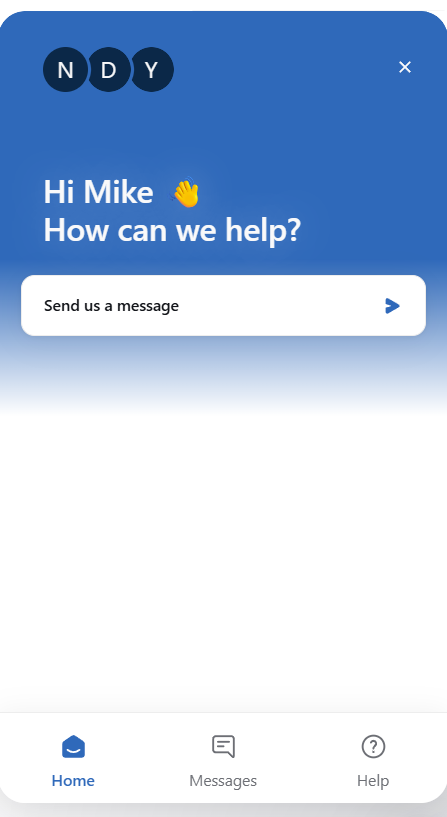
The following appears:
|
2.
|
To ask a question, report an issue, or provide feedback:
|
|
a.
|
On the bottom menu bar, click Messages. |
|
b.
|
Click Send us a message. |
|
c.
|
Select one of the following options: |
|
◆
|
Ask a Question: Ask the bot about Meeting Insights features or usage. |
|
◆
|
Report an Issue: Report a problem to the Meeting Insights Support Team. |
|
◆
|
Provide Feedback: Send feedback to the Meeting Insights Customer Success Team, including suggestions or comments about functionality you like or dislike. |
|
3.
|
To view video tutorials:
|
|
a.
|
On the bottom menu bar, click Help. |
|
b.
|
Select a subject, and then play the video tutorial. |
|
4.
|
To close the AI agent, click the arrow located at the bottom of the chat window. |