Configure System Settings
The System Settings page enables admin to configure devices according to enterprise requirements. Settings under some tabs also include placeholders so that when you generate a template, the settings values will be applied to the template. Default placeholder values can be viewed in the Default Placeholders Values page.
| ➢ | To configure system settings: |
| 1. | Open the System Settings page (Setup > Settings > System Settings). |
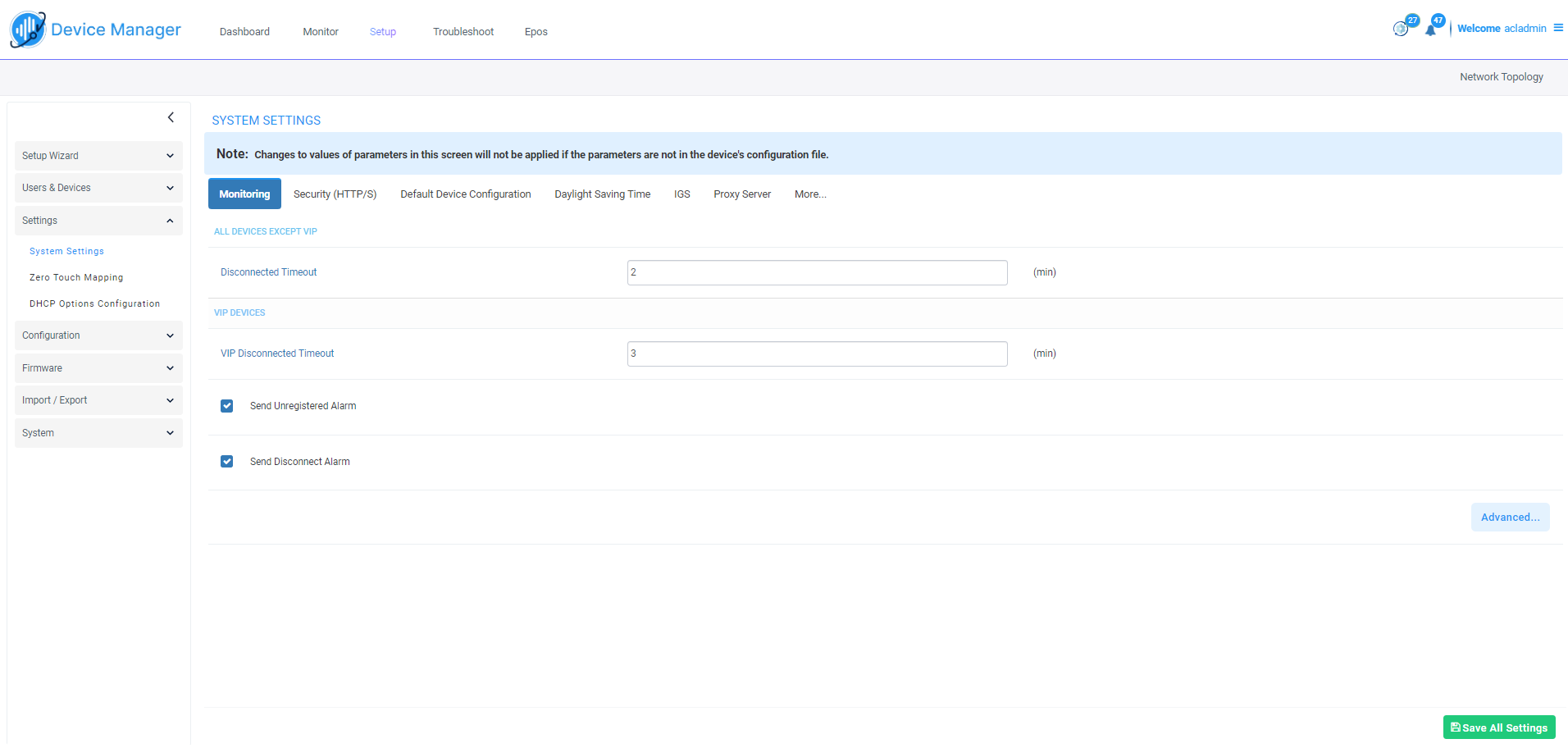
| 2. | Use the table below as reference; tabs in the page are (L-R): Monitoring, Security (HTTP/S), Default Device Configuration, Daylight Saving Time, IGS and More. |
| ● | Teams devices function flawlessly behind a NAT in all scenarios; ignore the IGS tab if you're using Teams devices. |
| ● | Enable IGS if |
| ✔ | you're using non-Teams devices; if using the 405HD phone, you may require a firmware upgrade |
| ✔ | devices are located behind a NAT or Device Manager is unable to establish communication with them |
| ● | 420HD, 430HD and 440HD phones are incompatible when behind a NAT. |
|
Tab | Parameter |
Description |
|||||||||||||||
|---|---|---|---|---|---|---|---|---|---|---|---|---|---|---|---|---|
|
Monitoring |
||||||||||||||||
|
Disconnected Timeout |
Determines how long, in minutes, a device's status will be indicated as 'Disconnected' if not reported otherwise. Default: 20 minutes. The phone reports its status to the server every hour. If it does not report its status before 'Disconnect Timeout' lapses, i.e., if the parameter is left at its default and two hours pass without a status report, the status will change from Registered to Disconnected and the device's 'Status' column in the Devices Status screen will be red-coded. |
|||||||||||||||
|
Send KEEP-ALIVE Every |
[Only displayed after clicking Advanced] Determines how often, in minutes, a KEEP-ALIVE message is sent from the device. |
|||||||||||||||
|
VIP Disconnected Timeout |
Determines how long, in minutes, a VIP device's status will be indicated as 'Disconnected' if not reported otherwise. An alarm can be sent to admin if the timeout is exceeded. Default: 5 minutes. A VIP device is typically a Common Area Phone (CAP) located in the lobby of an enterprise, or a conference phone located in an enterprise's meeting rooms. It's important for a VIP device to be connected, hence the default timeout of 5 minutes compared to the default of 20 minutes for a non VIP device. |
|||||||||||||||
|
VIP Send KEEP-ALIVE Every |
[Only displayed after clicking Advanced] Determines how often, in minutes, a KEEP-ALIVE message is sent from the VIP device. |
|||||||||||||||
|
Send Unregistered alarm |
Select this option for an alarm to be sent when VIP device status changes to 'Unregistered'. |
|||||||||||||||
|
Send Disconnect Alarm |
Select this option for an alarm to be sent when VIP device status changes to 'Disconnected'. It's important for a VIP device to be connected, hence the default Disconnected Timeout of 5 minutes compared to the default of 20 minutes for a non VIP device. |
|||||||||||||||
|
Security (HTTP/S) |
||||||||||||||||
|
Secure (HTTPS) communication from Device Manager to the Devices |
Sends secured (HTTPS) requests from the Device Manager server to the phone. If the option is selected, communications and REST actions such as Restart, Send Message, etc., will be carried out over HTTPS. |
|||||||||||||||
|
Secure (HTTPS) communication from the Devices to the Device Manager |
Sends secured (HTTPS) requests from the phone to the Device Manager server. If the option is selected, communications and REST updates such as keep-alive, alarms and statuses between phone and server will be carried out over HTTPS. Also used for loading firmware and configuration files, and when there is an SBC proxy (see Edit the SBC HTTP Proxy). |
|||||||||||||||
|
Devices Status: Open Device Web Administrator using HTTPS |
The browser immediately opens the device's Web interface, over HTTPS, without prompting that there is a problem with the website's security certificate and that it is not recommended to continue to the website. |
|||||||||||||||
|
Only allow devices added by the administrator into OVOC |
Select this option to allow into OVOC only those phones that were added by admin.
The OVOC must be restarted for the parameter to take effect. |
|||||||||||||||
|
Default Device Configuration |
||||||||||||||||
|
Server FQDN |
[Recommended] Points phones to the OVOC server using the server's name rather than its IP address. If phones are pointed to the OVOC server's IP address, then if the server is moved due to organizational changes within the enterprise, all phones are disconnected from it. Pointing using the server's name prevents this, making organizational changes easier. |
|||||||||||||||
|
Devices Language |
From the dropdown select the language you want displayed in the phones' screens: English (default), French, German, Hebrew, Italian, Polish, Portuguese, Russian, Spanish or Ukraine. |
|||||||||||||||
|
NTP Server IP Address |
Enter the IP address of the Network Time Protocol (NTP) server from which the phones can get the time. |
|||||||||||||||
|
Voice Mail Number |
Enter the number of the enterprise's exchange. Configuration depends on the enterprise environment, specifically, on the type of enterprise exchange. . Default=1000. |
|||||||||||||||
|
Require SRTP in the Phone Configuration File |
Select this option for Secure RTP. Real-time Transport Protocol (RTP) is the standard packet format for delivering voice over IP. |
|||||||||||||||
|
Daylight Saving Time |
||||||||||||||||
|
Active |
Determines whether the phone automatically detects the Daylight Saving Time for the selected Time Zone.
|
|||||||||||||||
|
Date Format |
Configures the date format. Valid values are:
|
|||||||||||||||
|
Start Time |
Defines precisely when to start the daylight saving offset.
Configures the precise moment the phone will start daylight savings with a specific offset. |
|||||||||||||||
|
End Time |
Defines precisely when to end the daylight saving offset.
Configures the precise moment the phone will end daylight savings with a specific offset. |
|||||||||||||||
|
Offset |
The offset value for the daylight saving. Range: 0 to 180. |
|||||||||||||||
|
IGS |
||||||||||||||||
|
Enable IGS behind NAT |
Enables administrators to send requests to devices behind NAT.
|
|||||||||||||||
|
Outbound Proxy |
||||||||||||||||
|
Redundant Mode |
Allows the administrator to set the primary PBX / Skype for Business server to which the phone registers and the fallback option if the server is unavailable. One of the following values:
(%ITCS_Redundant_outbound_proxy_enable%) |
|||||||||||||||
|
Primary |
Enter the primary PBX/Skype for Business server's IP address, i.e., the outbound proxy's IP address. Primary Outbound Proxy (%ITCS_Outbound_proxy%) |
|||||||||||||||
|
HTTP AUTH Provisioning no password |
If set to Enabled, only the extension number will be used for provisioning HTTP authentication. The default HTTP AUTH password will be 1234. In DHCP option 160 and on the templates, the setting 'provisioning/configuration/http_auth/password' must be configured to 1234 to activate the feature. |
|||||||||||||||
| 3. | Click Save All Settings. |
If you try to save while a mandatory field is not set, an error message pops up, and your changes are not saved.