Storing (Persistent) Alarms History on Flash
By default, alarms in the Alarms History table are automatically deleted upon a device restart. You can avoid this by enabling the device to store these alarms on its flash memory.
|
●
|
If you enable this feature, you cannot connect and manage the device with OVOC. |
|
●
|
If the device powers off, the alarms stored on flash are deleted and the alarms in the Alarms History table are removed. |
|
●
|
To configure the maximum number of stored alarms (rows in Alarms History table), use the [AlarmHistoryTableMaxSize] parameter. |
|
➢
|
To enable persistent storage of alarms history on flash: |
|
1.
|
Enable the feature, by configuring the [AlarmsPersistentHistory] parameter to 1. |
|
2.
|
Configure how often you want the device to save all the alarms of the Alarms History table to flash, using the [SavePersistentHistoryInterval] parameter. By default, the device saves the alarms every 24 hours. When the device does a new save, it overwrites the previously stored alarms. |
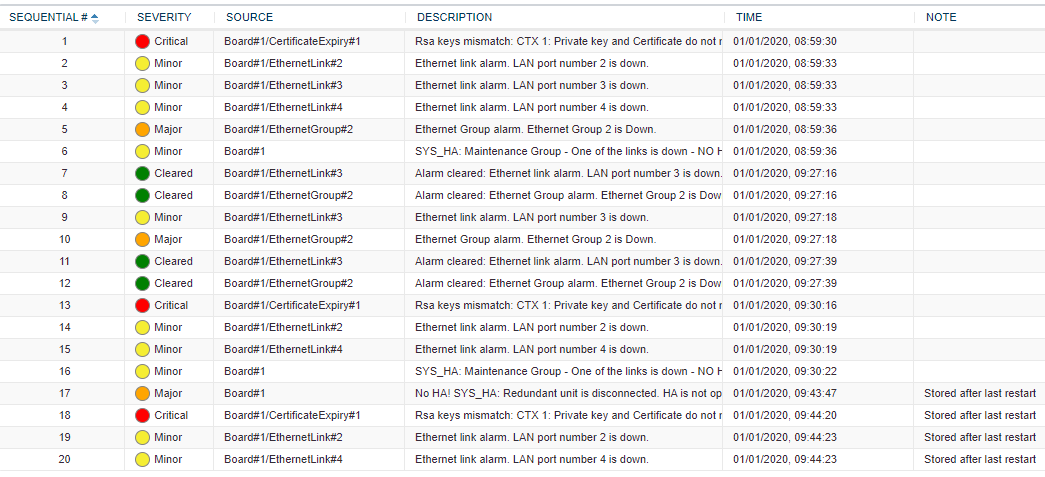
After you enable this feature, the Alarms History table displays an additional column titled 'Note'. This column indicates if the alarm was raised (or cleared) before or after the last device restart:
|
■
|
"Stored after last restart": The alarm was raised after the last restart. |
|
■
|
" " (empty): The alarm was raised before the last restart. |
The following shows an example of the Alarms History table with four alarms that occurred after the last restart (bottom of table):