Enable Syslog
The device supports generation and reporting of syslog messages and SNMP traps to external logging servers. It's crucial that you enable one or both these features (preferably syslog) so that you can monitor events on your device. In addition, as the device does not retain logged reports (SNMP is limited), it's recommended that you make sure that your syslog server saves all logged events for future analysis and reference.
It's also recommended that you configure the device to communicate with the syslog server over TLS to secure the connection.
| ➢ | To enable syslog: |
| 1. | Open the Logging Settings page (Troubleshoot menu > Troubleshoot tab > Logging folder > Logging Settings). |
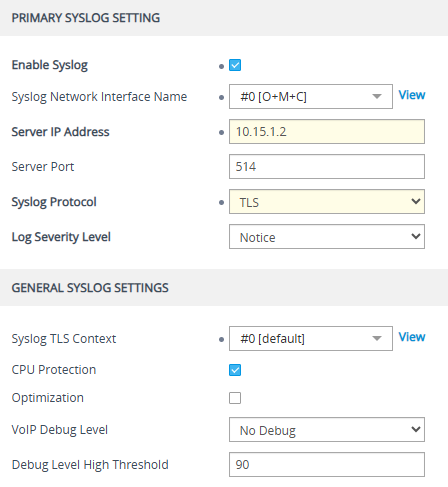
| 2. | Select the 'Enable Syslog' check box, and then configure the relevant parameters: |
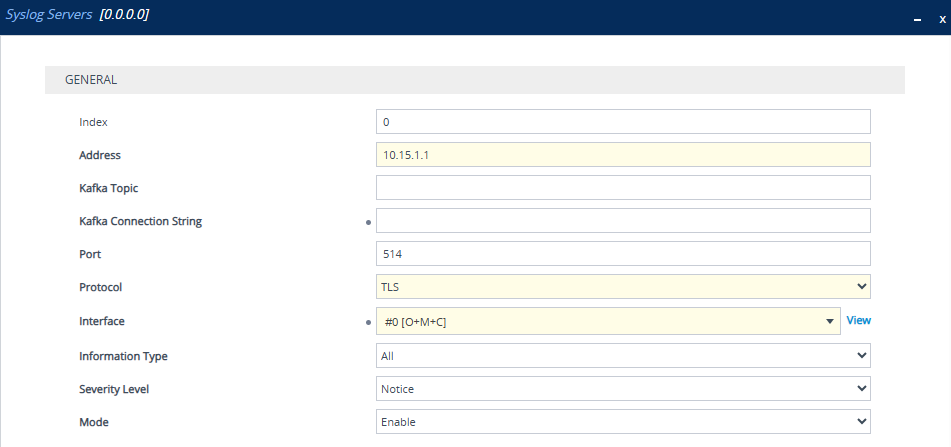
| 3. | Open the Syslog Servers table (Troubleshoot menu > Troubleshoot tab > Logging folder > Syslog Servers), and then configure a syslog server(s): |