Secure Communication between HA devices
It's recommended to secure communication between the active and redundant devices in the High-Availability (HA) system. HA communication occurs through the device's Maintenance IP Interface, which is used for HA synchronization, including file transfer between devices.
|
➢
|
To secure file transfer between HA devices: |
|
1.
|
Open the HA Settings page (Setup menu > IP Networktab > Core Entities folder > HA Settings). |
|
2.
|
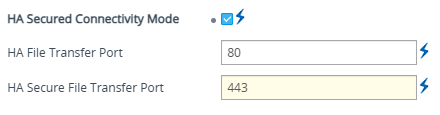
Select the 'HA Secured Connectivity Mode' check box. |
|
3.
|
In the 'HA Secure File Transfer Port' field, type the local port number for secured communication. |
|
4.
|
Click Apply, and then restart the device with a burn-to-flash for your settings to take effect. |
This section is applicable only to devices supporting HA mode.