Configuring Scrollback of Syslog Message Lines
You can configure the maximum number of logged lines (scrollback) that Syslog Viewer displays in the window. When the maximum number of lines is reached and Syslog Viewer receives a new syslog message, it hides the oldest currently displayed syslog message line to accommodate for the new syslog message line.
If you are writing syslog messages to file (see Writing Real-time Syslog Messages to File), even though the syslog messages become hidden from display because of line scrollback, they're still saved to file.
The default line scrollback is 10,000 lines. You can change it to any value from 1 to 100,000 lines.
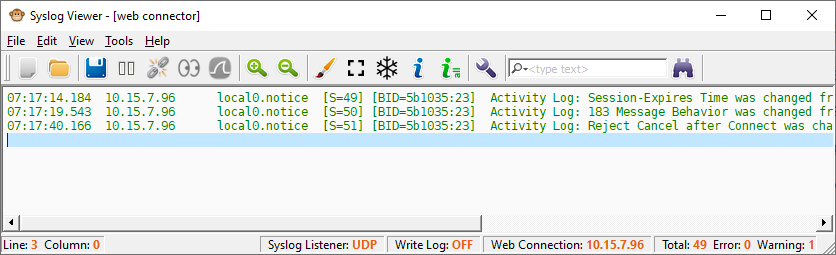
The maximum number of lines that Syslog Viewer displays is the line scrollback value plus 1. For example, if you configure scrollback to 2, a maximum of 3 lines are displayed, as shown in the following example:
|
●
|
Increasing the line scrollback to many lines may reduce performance. |
|
●
|
Total counters on the status bar in the bottom-right corner display total statistics for Syslog Viewer output; the total data statistics may be greater than what is displayed on the screen (which is acceptable). |
|
➢
|
To configure line scrollback: |
|
1.
|
On the toolbar, click the Options  icon; the Options dialog box appears. icon; the Options dialog box appears. |
|
2.
|
Under the Viewer group, in the 'Lines of scrollback' field, enter the maximum number of lines that you want displayed. |