Filtering Display of Syslog Messages
You can filter the displayed syslog so that it displays only the following:
|
■
|
Messages relating to a specific session (SID) |
|
■
|
Messages that are non-call related (e.g., SIP REGISTER messages) |
|
■
|
Messages that are errors |
|
■
|
Messages that are warnings |
When you filter the syslog, a new tab appears displaying the filtered syslog. The tag's title is in the format "FILTER#<filter number>", which you can rename. The following example shows a new filter tab (#1 in figure) with its filtered syslog by CDRs (#2 in figure):
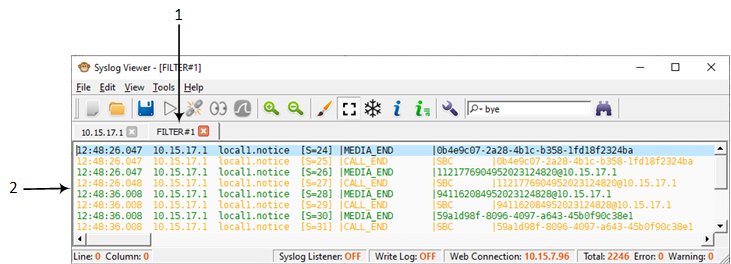
You can also add a filter to an existing filter tab or create a new filter tab with both filters.
|
➢
|
To filter syslog messages: |
|
1.
|
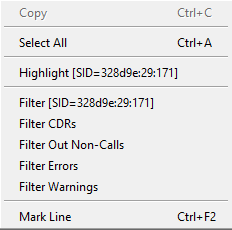
In the main syslog, right-click a line; a shortcut menu appears: |
|
2.
|
Choose one of the following options: |
|
●
|
Filter [SID of selected line]: Filters the log by the SID of the selected message. T |
|
●
|
Filter CDRs: Filters the log by CDRs. |
|
●
|
Filter Out Non-Calls: Filters the log by messages that are only call related. |
|
●
|
Filter Errors: Filters the log by messages that are errors. |
|
●
|
Filter Warnings: Filters the log by messages that are warnings. |
|
a.
|
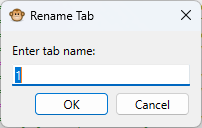
Right-click the filter tab, and then from the shortcut menu, choose Rename Tab; the following dialog box appears: |
|
b.
|
In the field, type a new name for the filter. |
|
4.
|
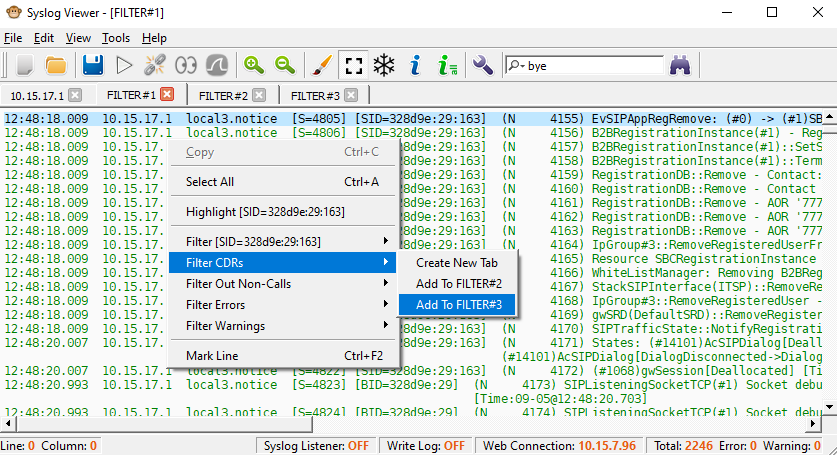
You can add another filter to an existing filter tab, or create a new filter tab: |
|
a.
|
Right-click in the display; a shortcut menu appears. |
|
b.
|
From the shortcut menu, point to the desired filter, and then choose Create New Tab or Add To FILTER#<filter tab>: |