Reconstructing New Lines for Syslog Messages
Typically, syslog messages include new line characters (\n) that indicate the end of lines. However, unlike AudioCodes devices, some third-party syslog servers create syslog messages without new line characters. In such cases, Syslog Viewer tries to re-construct new lines, by identifying where each line ends, and then splitting the lines accordingly.
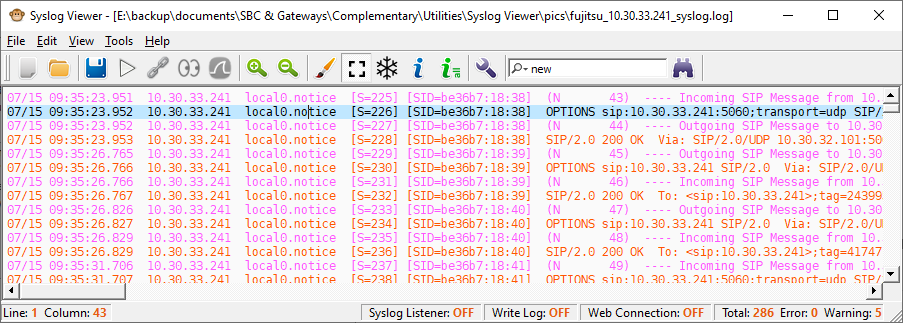
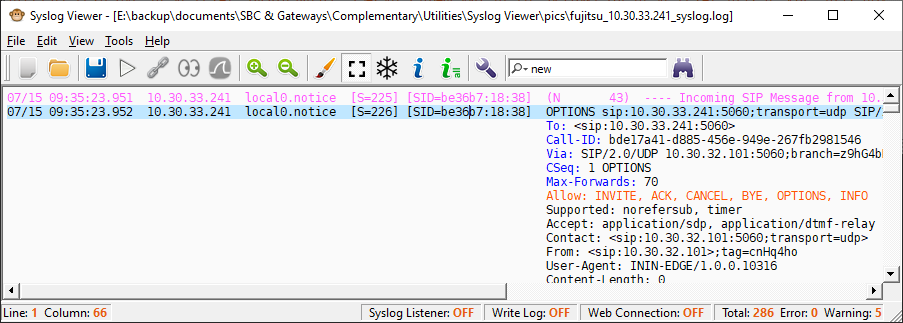
The following example shows received syslog messages that don't include new line characters. The first figure shows when this feature is disabled (i.e., no splitting onto new lines); the second figure shows when it's enabled (i.e., split onto new lines):
|
■
|
Splitting lines disabled: |
|
■
|
Splitting lines enabled: |
|
➢
|
To enable new line breaks: |
|
1.
|
On the toolbar, click the Options  icon; the Options dialog box opens. icon; the Options dialog box opens. |
|
2.
|
Under the Miscellaneous group, from the 'Split lines without EOL' drop-down list, select one of the following: |
|
●
|
Enable: (Default) Syslog Viewer tries to identify the end of lines and splits them accordingly. |
|
●
|
Disable: Syslog Viewer displays the syslog as is. |