Logging Out of Flex Application
When you've finished your shift, you must log out of the Flex Application.
| ● | You can only log out when you’re not interacting ("Talking" shift status) with a customer. |
| ● | If you forget to log out, your Supervisor can log you out using the 'Team Management' page (see Signing Out Workers). |
| ➢ | To log out of Flex Application: |
| 1. | Click your profile icon located on the top-right corner of the window, a drop-down menu appears: |
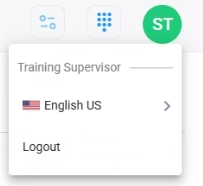
| 2. | Click Logout. |