Advanced Transcription and AI Summary Features
Transcription management has been enhanced.
The following features require the relevant permissions in the user’s access profile.
Speaker changes reflected in the audio bar
When you change the speaker for one or more transcript lines, the audio bar labels and colors update immediately.
Unified transcription language in group calls
In group calls, such as calls involving call transfer, the transcription language cannot be changed once it has been set. The 'Language' drop-down is disabled if a transcription already exists for that group, thereby ensuring consistency.
AI summary enhancements
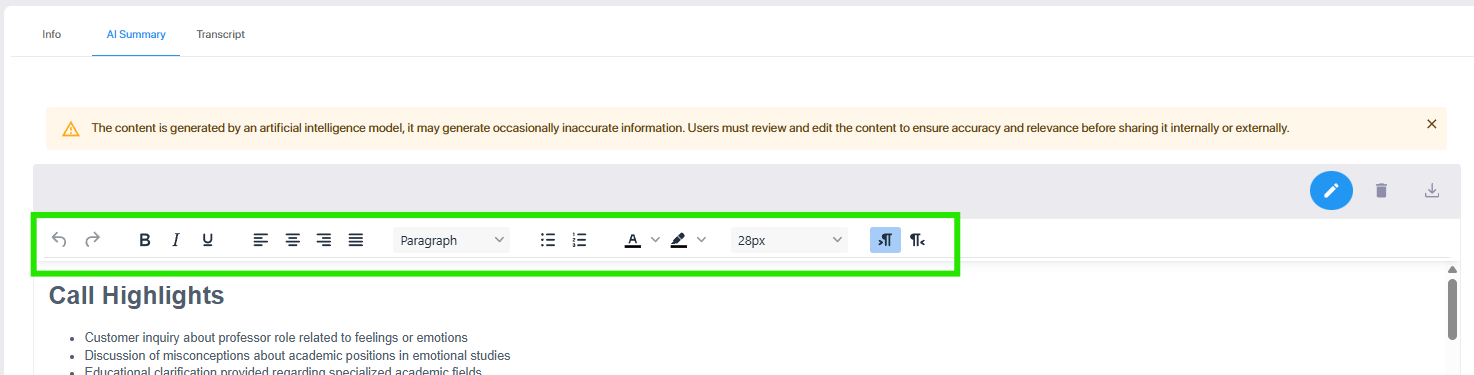
| ■ | Click the Edit icon to open the Edit toolbar above the summary. |
| ■ | If an AI summary is available for a transcription, you can download it as a Microsoft Word file by clicking the Download button on the AI Summary tab. The file specifies the date and time of the interaction, duration, and participant names, followed by the AI-generated summary text. |

The download action is logged in the audit log.