Modify the Provisioning Order Configuration
In On-prem Device Manager, devices are configured to register using DHCP 160 (or 66/67). By contrast, in Live Platform, devices register to a Device Manager Service instance via the AudioCodes Redirect Server. Consequently, to migrate devices to Live Platform, their provisioning order must be modified to register via Redirect.
To modify the provisioning order to Redirect as the preferred provisioning option, change the configuration parameter auto_discovery_order to use RedirectServer as the first option:
provisioning/auto_discovery_order=RedirectServer DHCP160 DHCP66/67
| ➢ | Modify this parameter at the requested level, depending on the devices you wish to migrate: |
| ■ | To migrate all devices of a specific Model, navigate to the Setup > Configuration > Templates page, open the relevant template and add or update the provisioning/auto_discovery_order parameter as instructed above. |
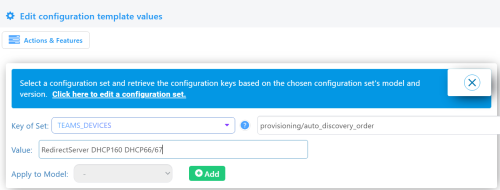
| ■ | To migrate all devices of a specific Tenant, Site, Group, or User, navigate to the relevant page under Setup > Configuration, open the relevant item, and add or update the provisioning/auto_discovery_order parameter. |
Tip: To migrate multiple devices of different models or levels, you can create a dedicated group containing these devices for the migration.
If your On-prem Device Manager version is earlier than version 8.4.3500, you need to additionally set the following parameter: provisioning/method=DYNAMIC. This will be needed for deleting devices from the On-prem Device Manager once migrated (see Remove Migrated Devices from On-prem Device Manager).
Export Devices to CSV File
If there are many devices to migrate, it is recommended to export the filtered list to a CSV file. This will accelerate importing the devices into Live Platform.
| ➢ | To export the devices to migrate to a CSV file: |
| 1. | Navigate to the Devices Status page and filter the list by the Model / Template, Tenant, Site, Group, or User for which you modified the provisioning order. |
| 2. | Select all devices or those you wish to migrate, then click the  button. button. |