Enabling Commercial Information for Services
You can enable Live Platform to present a Commercial Information form requesting basic Purchase Order (PO) related information (commercial) when adding a service for a customer (Channel or End Customer). Enabling this form also includes uploading a customized Terms and Conditions (T&CS) file for the form.
The Commercial Information form requests the following information when adding a service (see Add a Service):
|
■
|
Channel Purchase Order (PO) number |
|
■
|
Terms (pay-as-you-go, 12 months, 24 months, 36 months) |
|
■
|
Payment Terms (per month, year, or one-time) |
|
■
|
Deployment type (production or proof of concept / POC) |
|
●
|
The Commercial Information form feature is applicable to all Live Platform services, except the following: |
|
●
|
Only Administrator and Operator levels can enable this feature. |
|
●
|
If you update the T&Cs, the first Channel user to log into Live Platform after the change will receive a pop-up displaying the Commercial Information form along with the new T&Cs. The user must accept the updated T&Cs before gaining access to Live Platform. |
|
➢
|
To enable Commercial Information form for services: |
|
1.
|
Prepare your Terms and Conditions in a text-based file (.txt) or markdown file (.md). |
|
2.
|
Open the Tenants Manage page (Topology > Tenants > Manage). |
|
3.
|
Select the required Tenant. |
|
4.
|
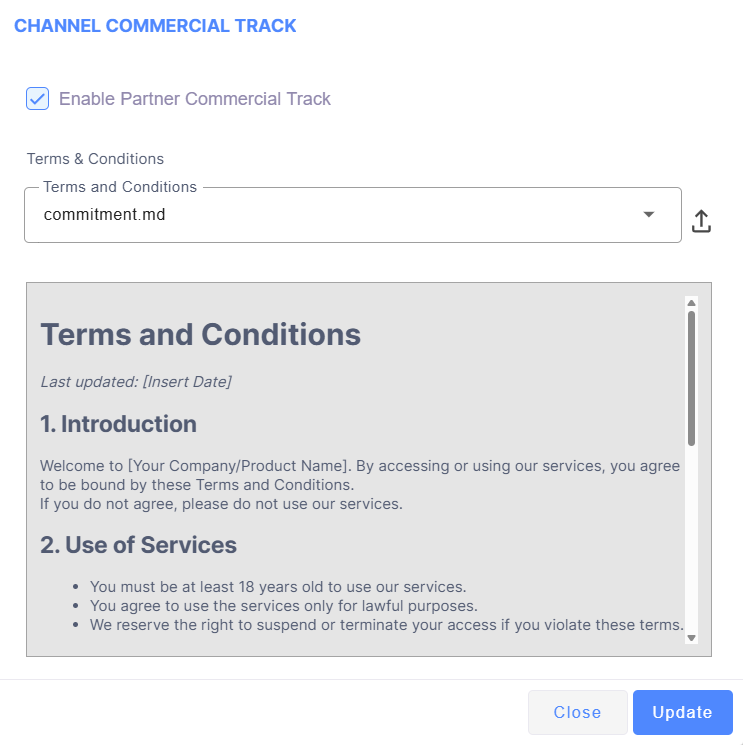
On the toolbar, click the Update Commercial button; the Channel Commercial Track dialog box appears: |
|
5.
|
Select the check box 'Enable Partner Commercial Track'. |
|
6.
|
Click the  icon to upload your T&C file. icon to upload your T&C file. |