Opening Live Panel in Mobile App for Teams
After you join a meeting recording (scheduled through Microsoft Outlook Calendar) through your Meeting Insights app for Teams mobile clients, you can add Meeting Insights Live Panel to the meeting recording.
| ➢ | To access Live Panel from joined meeting: |
| 1. | Join the meeting through your mobile Teams app, by tapping Join: |

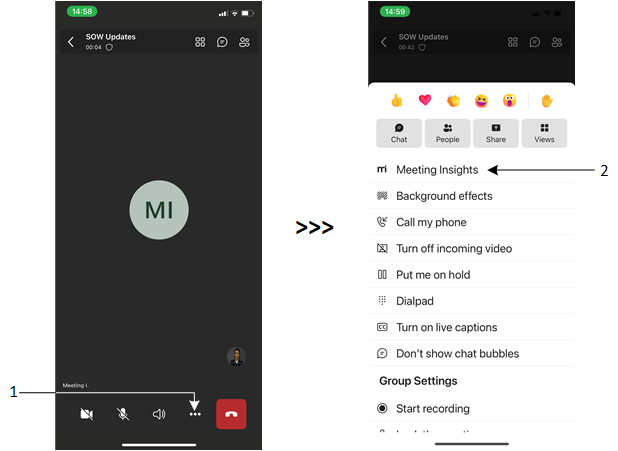
| 2. | Tap the ellipsis button (#1 in figure), and then from the pop-up, tap Meeting Insights (#2 in figure): |
The Meeting Insights Live Panel appears, prompting you to select the language spoken in your meeting:

| 3. | From the 'Select the language ...' drop-down list, select the language of your meeting, and then click Save. |