Change the Cloud Architecture Mode Service Password
This section describes how to change the password for a Cloud Architecture mode user.
| ➢ | To change the password: |
| 1. | Select Option 3 Edit User Password. |
Edit User Password
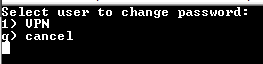
| 2. | Select the user whose password you wish to change and confirm. |
| 3. | Enter the new password and confirm (passwords must be between 2-20 characters). |