Option 2 Connecting Mediant Cloud Edition (CE) Devices to OVOC on Azure using Internal IP Address
This section describes how to establish a secure connection between the OVOC server and Mediant CE devices which are both deployed in the Azure Cloud in the same Virtual network. Communication between OVOC and Mediant CE SBC devices is carried over internal IP addresses (Private IP addresses) on both sides. The figure below illustrates this topology.
The Mediant CE SBC devices must be added manually to OVOC. Refer to Section "Adding AudioCodes Devices Manually " in the OVOC User's Manual.
Internal IP Connection
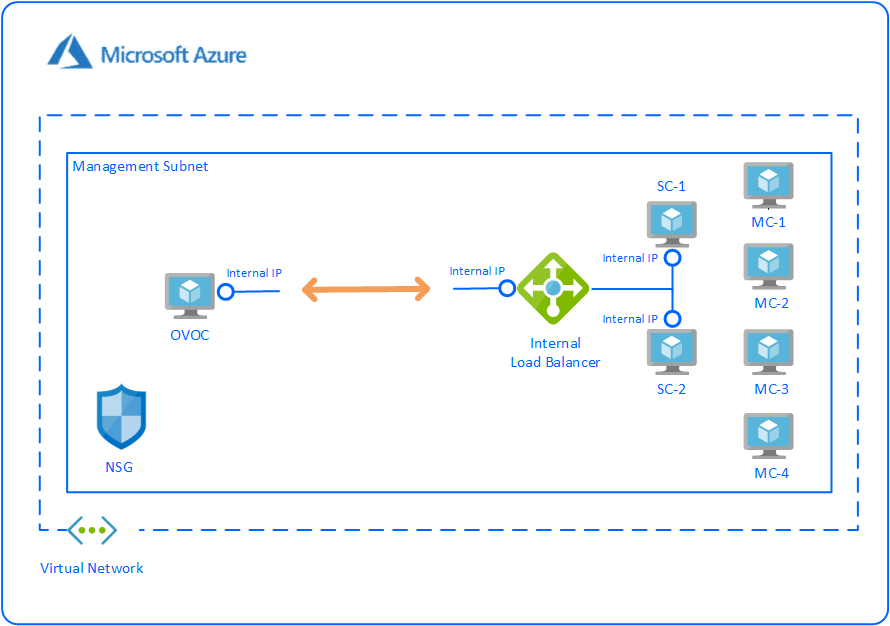
This section includes the following procedures:
| ■ | Configuring the OVOC Server Manager on Azure (Internal IP) |
| ■ | Configuring Mediant Cloud Edition (CE) SBC Devices on Azure (Internal IP) |
The Mediant CE SBC devices must be added to OVOC manually. Refer to Section "Adding AudioCodes Devices Manually" in the OVOC User's Manual.